Table of Contents
- Introduction: The Frustration Behind Matter Device Failures
- What Is mDNS and Why Does Matter Depend on It?
- How mDNS Works in a Local Network
- Why Blocking mDNS Across Subnets Breaks Matter Devices
- Real World Scenario: A Smart Home That Stopped Working
- Technical Deep Dive: mDNS, Multicast, and VLAN Isolation
- Common Network Configurations That Block mDNS
- Step by Step Guide to Fix mDNS Across Subnets
- Safe Solutions to Enable mDNS Without Compromising Security
- Real User Experiences and Lessons Learned
- Tools to Diagnose mDNS Issues on Your Network
- Best Practices for Matter Device Network Design
- FAQ: Matter Devices and mDNS Subnet Issues
- Final Thoughts
Introduction: The Frustration Behind Matter Device Failures
You just spent your weekend setting up your brand new Matter compatible smart home devices. The smart lights, the thermostat, the door locks. Everything paired beautifully. Then you decided to organize your network properly by placing IoT devices on a separate VLAN for security reasons. Suddenly, nothing works. Your Apple Home app cannot find the devices. Google Home shows them as “offline.” And you are left staring at your screen wondering what went wrong.
If this sounds familiar, you are not alone. Having worked with smart home networking for years, I have encountered this exact problem dozens of times. The culprit? mDNS being blocked across your subnets.
When Matter devices fail mDNS blocked subnets become the hidden obstacle that breaks your entire smart home setup. Most users never realize that their network segmentation strategy directly conflicts with how Matter protocol discovers and communicates with devices.
In this article, I will explain exactly why Matter devices fail when mDNS traffic cannot cross subnet boundaries, what is happening under the hood, and most importantly, how you can fix it safely without exposing your network to unnecessary risks.
Let us dive in.
What Is mDNS and Why Does Matter Depend on It?
Understanding mDNS (Multicast DNS)
mDNS stands for Multicast Domain Name System. Think of it as a way for devices on your local network to introduce themselves to each other without needing a central DNS server.
When a Matter device comes online, it essentially shouts out to the network, “Hey, I am a smart light, and you can reach me at this address.” Other devices and controllers listen for these announcements and use them to discover and communicate with the device.
This protocol operates on port 5353 using UDP multicast to the address 224.0.0.251 for IPv4 and ff02::fb for IPv6.
Why Matter Chose mDNS
The Matter protocol, developed by the Connectivity Standards Alliance (CSA), was designed to unify smart home ecosystems. One of its core design decisions was using mDNS based service discovery through a mechanism called DNS-SD (DNS Service Discovery).
Here is why this matters:
- Zero configuration: Devices find each other automatically
- No cloud dependency: Discovery happens locally
- Cross platform: Works with Apple, Google, Amazon, and Samsung ecosystems
- Standards based: Built on proven IETF standards (RFC 6762 and RFC 6763)
Without mDNS, a Matter controller literally cannot discover or maintain a connection with Matter devices on the network.
How mDNS Works in a Local Network
To truly understand the problem, you need to understand how mDNS operates step by step.
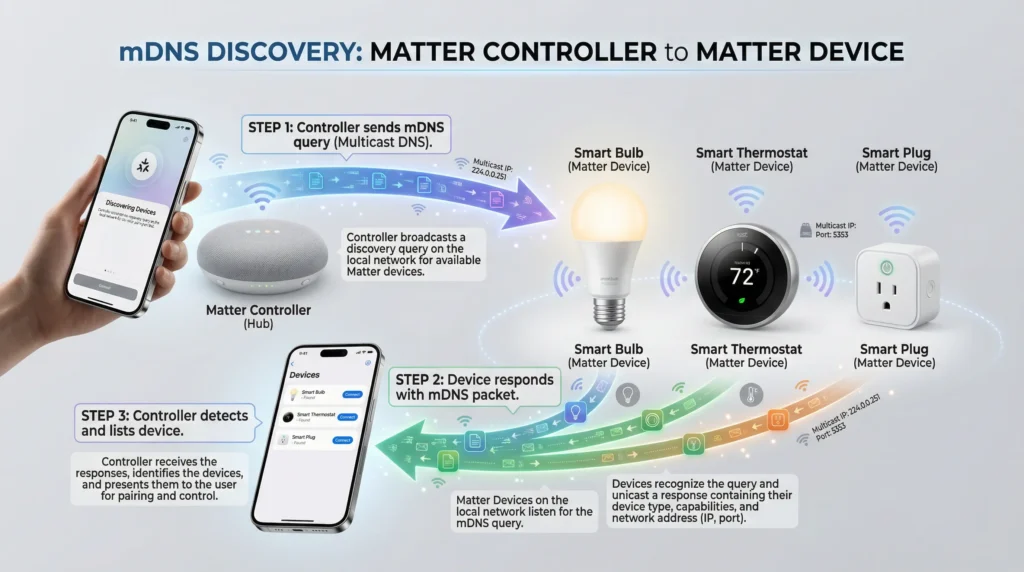
The Discovery Process
- Device boot up: A Matter device powers on and joins the network
- Service announcement: The device sends a multicast mDNS announcement advertising its services
- Controller query: A Matter controller (like Apple HomePod or Google Nest Hub) sends mDNS queries looking for Matter devices
- Response: The device responds with its service type, hostname, IP address, and port
- Connection established: The controller uses this information to establish a direct connection
The Multicast Nature
The key word here is multicast. Unlike unicast traffic (one device talking directly to another), multicast sends packets to a group address. Every device that has joined that multicast group receives the packet.
This works flawlessly on a single flat network or single subnet. The problem begins when you introduce multiple subnets or VLANs.
What Happens at Subnet Boundaries
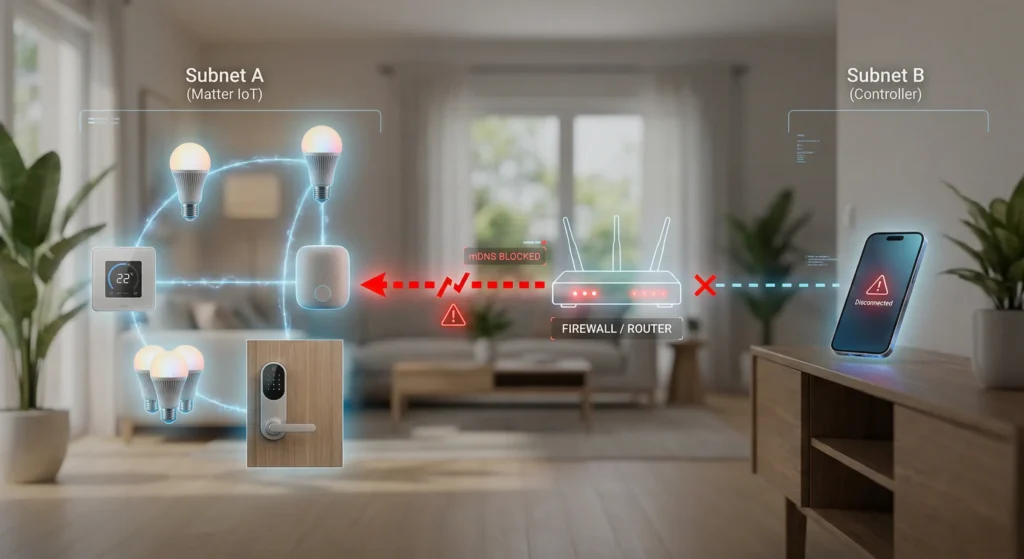
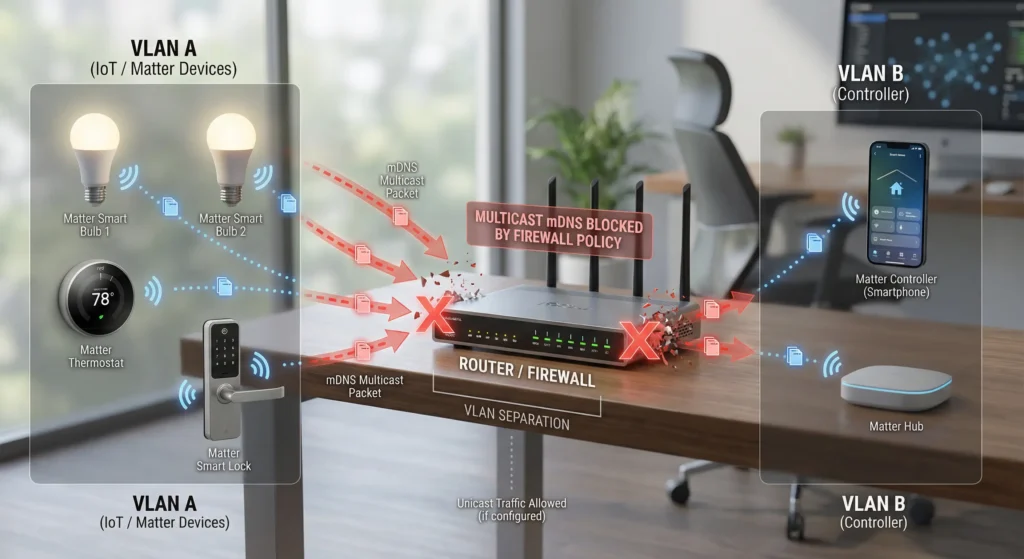
By default, multicast traffic does not cross Layer 3 boundaries. Routers do not forward multicast packets from one subnet to another unless explicitly configured to do so.
This means if your Matter controller sits on VLAN 10 (192.168.1.0/24) and your Matter device sits on VLAN 20 (192.168.2.0/24), the mDNS announcements from the device will never reach the controller.
The controller does not even know the device exists.
Why Blocking mDNS Across Subnets Breaks Matter Devices
Now let us get to the heart of the issue. Here is exactly what goes wrong and why.
1. Discovery Fails Completely
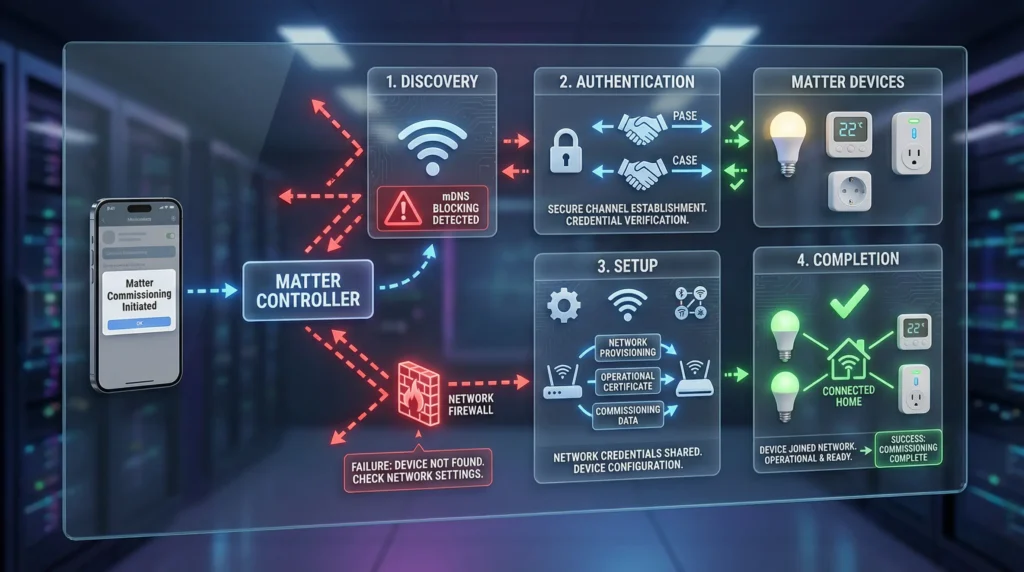
Matter uses DNS-SD over mDNS for initial device discovery. If multicast traffic cannot flow between subnets, the controller will never receive the device service advertisements. The pairing process cannot even begin.
2. Operational Communication Breaks
Even if you somehow managed to pair a device (perhaps when it was temporarily on the same subnet), ongoing communication relies on mDNS for address resolution. If the device IP changes (common with DHCP), the controller uses mDNS to find the new address. Without cross subnet mDNS, the device appears offline.
3. Commissioning Over IP Fails
The Matter commissioning process specifically uses mDNS to discover commissionable devices. The device advertises a service type called _matterc._udp during commissioning. If this advertisement cannot reach the commissioner, pairing is impossible.
4. Fabric Synchronization Issues
Matter uses a concept called “fabrics” for multi-admin scenarios. Devices advertise their fabric information through mDNS service records. Blocking mDNS disrupts fabric based communication between controllers and devices.
5. Thread Border Router Discovery
Many Matter devices use Thread networking. Thread Border Routers advertise their services through mDNS as well. Blocking mDNS can prevent proper Thread mesh network formation and border router discovery.
Real World Scenario: A Smart Home That Stopped Working
Let me share a scenario I encountered recently that perfectly illustrates this problem.
The Setup
A homeowner, let us call him James, had a well organized network:
- VLAN 1 (Management): 10.0.1.0/24 for his router and management interfaces
- VLAN 10 (Trusted): 10.0.10.0/24 for phones, laptops, and smart home controllers
- VLAN 30 (IoT): 10.0.30.0/24 for all smart home devices
- Firewall rules: Strict inter VLAN rules allowing only specific traffic
James had 15 Matter compatible devices including Eve smart plugs, Nanoleaf lights, and an Aqara hub. His controllers were an Apple TV 4K on VLAN 10 and a Google Nest Hub on VLAN 10.
What Went Wrong
Everything worked when all devices were on the same VLAN. The moment James moved IoT devices to VLAN 30, every single Matter device went offline. His Apple Home showed “No Response” and Google Home displayed “Could not communicate.”
The Root Cause
James had default firewall rules that blocked all inter VLAN traffic except for specific TCP/UDP ports he explicitly allowed. He had opened ports for HTTP, HTTPS, and some custom ports.
But he had not accounted for:
- UDP port 5353 for mDNS
- Multicast traffic to 224.0.0.251 and ff02::fb
- The fact that even opening port 5353 between VLANs is not enough because multicast routing needs to be specifically enabled
The Fix
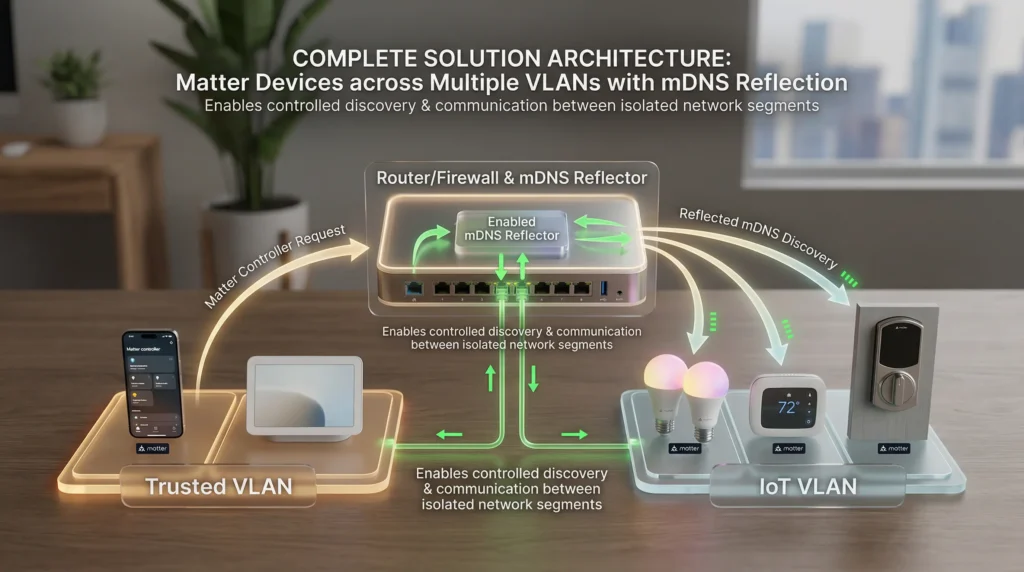
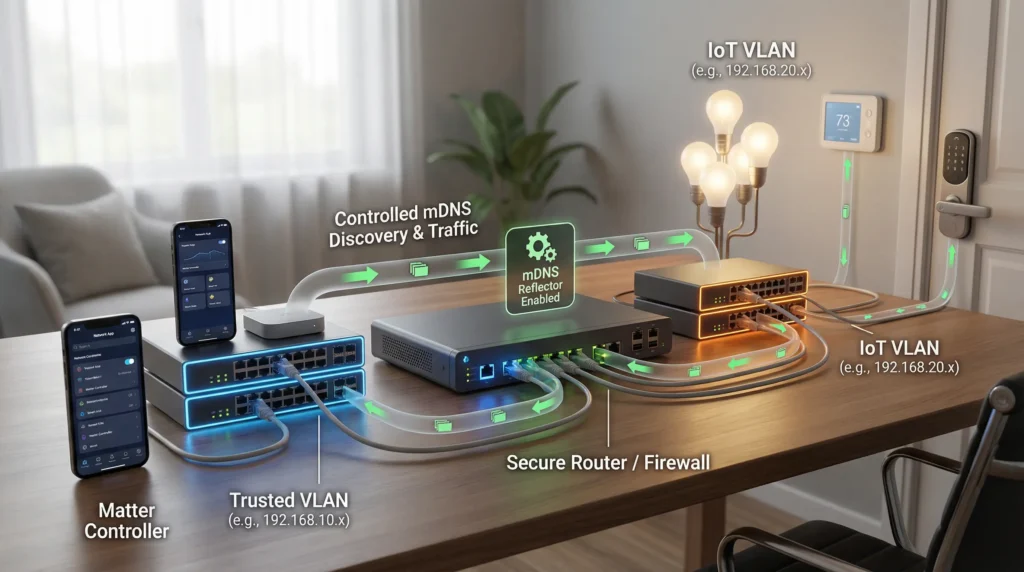
James needed to implement an mDNS reflector (also called mDNS repeater) on his router to relay mDNS traffic between VLAN 10 and VLAN 30. After enabling this feature on his UniFi Dream Machine Pro, all 15 devices came back online within minutes.
Technical Deep Dive: mDNS, Multicast, and VLAN Isolation
Understanding the OSI Model Barrier
mDNS multicast operates at Layer 3 using special multicast IP addresses. VLANs create Layer 2 isolation. When you route between VLANs (Layer 3 routing), standard routing protocols do not handle multicast the same way they handle unicast.
Why Standard Firewall Rules Are Not Enough
A common misconception is that simply allowing UDP port 5353 in your firewall rules between VLANs will fix the problem. Here is why it does not:
- Firewall rules typically handle unicast traffic
- Multicast packets have a destination address of 224.0.0.251, not a specific device IP
- Most firewalls and routers drop multicast by default at Layer 3 boundaries
- Even if the firewall allows the port, the router needs to know where to forward multicast packets
The mDNS Packet Structure
A typical Matter mDNS announcement looks like this:
textSource IP: 10.0.30.15 (Matter device on IoT VLAN)
Destination IP: 224.0.0.251 (mDNS multicast group)
Source Port: 5353
Destination Port: 5353
Protocol: UDP
Payload: DNS record advertising _matter._tcp service
When this packet hits the router interface for VLAN 30, the router sees a multicast destination and by default does not forward it to VLAN 10. The packet dies right there.
IPv6 Considerations
Matter heavily relies on IPv6, and mDNS over IPv6 uses the multicast address ff02::fb. IPv6 link-local multicast is even more restricted by design, as the ff02:: scope means “link-local” and should not be routed. This adds another layer of complexity when dealing with cross subnet Matter communication.
Common Network Configurations That Block mDNS
Here are the most common network setups that inadvertently block mDNS and break Matter devices:
1. VLAN Segregation Without mDNS Relay
This is the most common scenario. Users create VLANs for security (which is good practice) but forget that smart home protocols need mDNS to function.
2. Guest Network Isolation
Many consumer routers offer “guest network” features that isolate devices from the main network. If Matter devices end up on a guest network, they become invisible to controllers on the main network.
3. AP Isolation (Client Isolation)
Some access points have a feature called “client isolation” or “AP isolation” that prevents wireless clients from communicating with each other. This blocks mDNS even within the same subnet.
4. Overly Restrictive Firewall Rules
Enterprise grade firewalls (pfSense, OPNsense, Fortinet) with default deny policies block all inter VLAN traffic including multicast unless explicitly permitted.
5. Managed Switches With IGMP Snooping Misconfiguration
IGMP snooping helps manage multicast traffic on switches. When misconfigured, it can prevent mDNS multicast from reaching certain ports, effectively blocking Matter device discovery even on the same VLAN.
6. Mesh Wi-Fi Systems With Separate Bands
Some mesh systems treat different frequency bands as different network segments internally. This can occasionally cause mDNS issues with Matter devices that connect on different bands.
Step by Step Guide to Fix mDNS Across Subnets
Here is a practical guide to get your Matter devices working across subnets. I will cover the most popular platforms.
For Ubiquiti UniFi (UDM, UDM Pro, USG)
Step 1: Log into your UniFi Network controller
Step 2: Navigate to Settings then Network
Step 3: Click on the IoT VLAN network
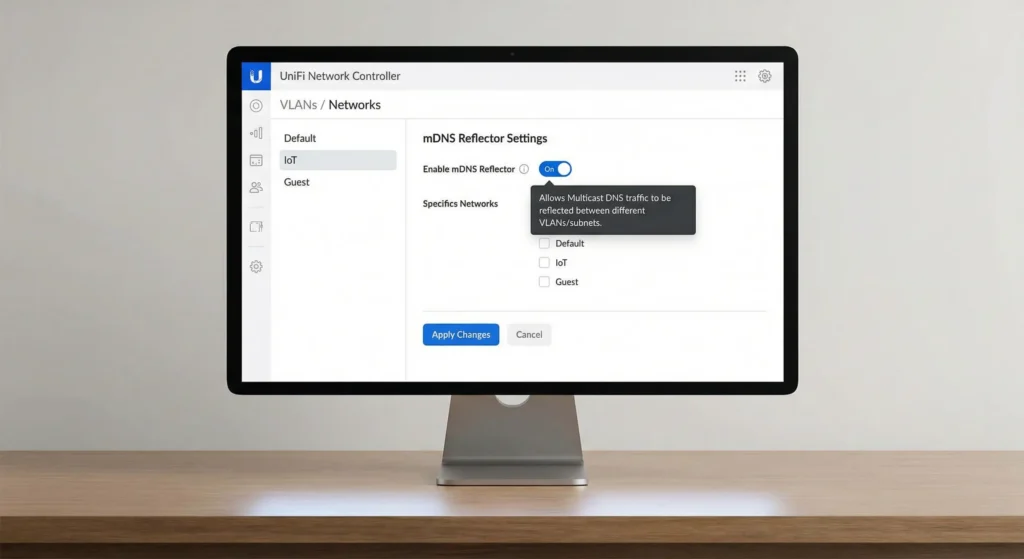
Step 4: Ensure “Multicast DNS” is enabled under Advanced settings
Step 5: Go to Settings then Services
Step 6: Enable “mDNS Reflector” (called “Multicast DNS” in newer firmware)
Step 7: Apply changes and wait for the controller to provision the settings
text# For those using UniFi CLI, you can verify:
# SSH into the UDM
cat /run/mdnsd.conf
For pfSense / OPNsense
Step 1: Install the Avahi package (Services then Package Manager)
Step 2: Navigate to Services then Avahi
Step 3: Enable the Avahi daemon
Step 4: Select the interfaces you want to bridge mDNS between (your trusted VLAN and IoT VLAN)
Step 5: Enable “Reflect” option
Step 6: Save and start the service
Step 7: Create firewall rules on both VLANs allowing UDP port 5353 to destination 224.0.0.251
text# pfSense firewall rule example for IoT VLAN:
Action: Pass
Interface: IOT_VLAN
Protocol: UDP
Source: IOT_VLAN net
Destination: 224.0.0.251
Destination Port: 5353
For MikroTik Routers
Step 1: Open WinBox or the web interface
Step 2: Navigate to IP then Multicast
Step 3: Enable IGMP Proxy if needed
Step 4: Alternatively, use the IP multicast feature with PIM
Step 5: For a simpler approach, use a script based mDNS repeater
routeros# Enable multicast on relevant interfaces
/routing pimsm interface
add interface=vlan10
add interface=vlan30
For Home Assistant Users
If you are running Home Assistant as your Matter controller:
Step 1: Ensure Home Assistant is on a VLAN that can reach IoT devices
Step 2: Enable mDNS reflection on your router (as described above)
Step 3: In Home Assistant, go to Settings then Devices and Services
Step 4: The Matter integration should automatically discover devices via mDNS
Step 5: If devices are still missing, check that your Home Assistant host has IPv6 enabled
Safe Solutions to Enable mDNS Without Compromising Security
Security is the main reason people segment their networks in the first place. Here is how to enable mDNS while maintaining strong network security.
Solution 1: mDNS Reflector with Scoped Firewall Rules (Recommended)
This is the best balance between functionality and security.
- Enable mDNS reflector only between the specific VLANs that need it
- Create firewall rules that allow only the necessary Matter ports between VLANs
- Block all other inter VLAN traffic
Required ports for Matter:
| Port | Protocol | Purpose |
|---|---|---|
| 5353 | UDP | mDNS discovery |
| 5540 | TCP/UDP | Matter operational communication |
| 80 | TCP | Matter device setup (some devices) |
| 443 | TCP | Matter cloud connectivity (optional) |
Solution 2: Avahi Reflector with Filtering
Avahi allows you to reflect mDNS only for specific service types. You can configure it to only reflect Matter related services:
text# /etc/avahi/avahi-daemon.conf
[reflector]
enable-reflector=yes
reflect-filters=_matter._tcp,_matterc._udp,_meshcop._udp
This ensures only Matter related mDNS traffic crosses the subnet boundary, not everything.
Solution 3: mDNS Proxy (Unicast DNS-SD)
Instead of reflecting multicast, you can set up a DNS-SD proxy that converts multicast mDNS records into unicast DNS records. This is more complex but provides better control.
Tools like mdns-repeater or coredns with the mdns plugin can achieve this.
Solution 4: Place the Controller on a Trunk Port
If your Matter controller supports it, you can place it on a trunk port that has access to both VLANs. The controller then directly participates in mDNS on both subnets without needing reflection.
This approach works well with:
- Apple TV 4K (with Ethernet)
- HomePod mini (limited, as it is Wi-Fi only)
- Home Assistant on a VM with multiple VLAN interfaces
Solution 5: Dedicated IoT Controller Subnet
Create a third “controller” VLAN that bridges the trusted and IoT VLANs specifically for smart home controllers. This limits the attack surface while enabling mDNS where it is needed.
Real User Experiences and Lessons Learned
Experience 1: The UniFi Nightmare
A Reddit user shared their experience on r/homeassistant after spending three days troubleshooting Matter devices on a UniFi setup. They had enabled the mDNS reflector but forgot that their firewall rules were still blocking UDP multicast. The fix was adding an explicit allow rule for the 224.0.0.0/4 multicast range on both VLAN interfaces.
Lesson: Enabling the mDNS reflector is only half the battle. Your firewall rules must also permit the traffic.
Experience 2: The pfSense Success Story
A network engineer documented their pfSense setup on the Home Assistant forums. They installed Avahi, configured reflection between three VLANs, and added granular firewall rules. The result was a perfectly functioning Matter setup with 30 plus devices across multiple VLANs.
Lesson: pfSense with Avahi is one of the most reliable solutions for cross subnet mDNS.
Experience 3: The Eero Mesh Limitation
A user discovered that their Eero mesh system did not support mDNS between its “main” and “IoT” networks. Since Eero does not offer advanced VLAN controls, they had to keep all Matter devices on the main network and use MAC address filtering for security instead.
Lesson: Not all consumer routers support the advanced features needed for proper Matter VLAN segregation.
Experience 4: The Thread Border Router Surprise
An Aqara hub user found that even after fixing mDNS for their Wi-Fi Matter devices, Thread based devices still would not connect. The Thread Border Router in the Aqara hub uses mDNS to advertise the _meshcop._udp service. They had to ensure this service type was also reflected across VLANs.
Lesson: Thread devices add an extra layer of mDNS dependency that is easy to overlook.
Tools to Diagnose mDNS Issues on Your Network
1. dns-sd (macOS)
Built into every Mac, this tool lets you browse for mDNS services:
Bash# Discover Matter devices
dns-sd -B _matter._tcp local.

# Discover commissionable Matter devices
dns-sd -B _matterc._udp local.

# Look up a specific service
dns-sd -L "Device Name" _matter._tcp local.
2. avahi-browse (Linux)
The Linux equivalent for mDNS browsing:
Bash# Install avahi-utils
sudo apt install avahi-utils

# Browse all services
avahi-browse -a

# Browse Matter services specifically
avahi-browse _matter._tcp -r
3. Wireshark
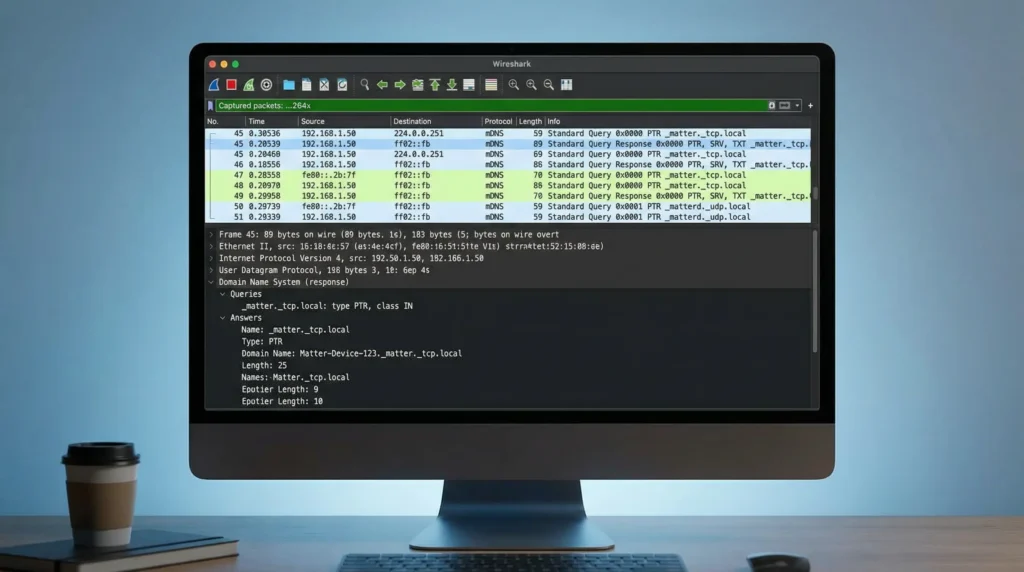
Capture and analyze mDNS packets:
text# Wireshark filter for mDNS traffic
udp.port == 5353

# Filter for Matter specific mDNS
dns.qry.name contains "matter"
4. Discovery (iOS App)
The Discovery app for iOS by Bonhour lets you browse mDNS services directly from your iPhone or iPad. It is useful for quick checks when you are not near a computer.
5. Network Diagnostic Tools
Bash# Verify multicast routing on Linux
ip mroute show

# Check if multicast is reaching an interface
tcpdump -i eth0 -n host 224.0.0.251

# Test mDNS resolution
dig @224.0.0.251 -p 5353 _matter._tcp.local PTR
Best Practices for Matter Device Network Design
Based on years of experience, here are my recommendations for designing a network that works well with Matter:
1. Plan mDNS Before Segmenting
Before creating VLANs, plan your mDNS strategy. Know which VLANs need to see each other and configure mDNS reflection accordingly.
2. Use a Dedicated IoT VLAN
Keep all IoT devices on one VLAN and your controllers on your trusted VLAN. Enable mDNS reflection only between these two VLANs.
3. Keep IPv6 Enabled
Matter prefers IPv6. Many issues arise from disabling IPv6 on VLANs. Ensure IPv6 is enabled and that IPv6 multicast (ff02::fb) is handled by your mDNS reflector.
4. Use Static DHCP Reservations
While mDNS handles dynamic address changes, using DHCP reservations for Matter devices reduces the frequency of mDNS lookups and improves reliability.
5. Monitor mDNS Traffic
Set up monitoring for mDNS traffic between your VLANs. Tools like ntopng or even simple SNMP counters can help you verify that mDNS reflection is working properly.
6. Document Your Setup
Write down your VLAN configuration, firewall rules, and mDNS settings. When something breaks (and eventually, something will), documentation saves hours of troubleshooting.
7. Test After Every Firmware Update
Router firmware updates can reset mDNS settings or change default behaviors. Test your Matter devices after every update.
FAQ: Matter Devices and mDNS Subnet Issues
Q1: Can Matter devices work without mDNS at all?
No. Matter fundamentally relies on mDNS for device discovery and DNS-SD for service resolution. Without mDNS, Matter devices cannot be commissioned or maintained. There is no alternative discovery mechanism in the current Matter specification.
Q2: Will putting all devices on the same subnet fix the problem?
Yes, this is the simplest fix. If all Matter devices and controllers are on the same subnet, mDNS works out of the box. However, this sacrifices network segmentation and security, which is not recommended for larger smart home setups.
Q3: Does mDNS reflection create a security risk?
It creates a minimal risk. mDNS reflection only forwards service discovery packets between VLANs. It does not create a full network bridge. Combined with proper firewall rules that only allow specific Matter ports (5353 and 5540), the security impact is very low.
Q4: Why does my Matter device work with the app but not with voice assistants?
Voice assistants (Alexa, Google Assistant, Siri) rely on local controllers (Echo, Nest Hub, HomePod) to communicate with Matter devices. If the controller is on a different subnet with blocked mDNS, the voice assistant cannot reach the device even though the app (which might be on the same subnet as the device via Wi-Fi) can.
Q5: Does this affect Thread based Matter devices differently?
Yes. Thread devices add additional mDNS dependencies because Thread Border Routers advertise their services via mDNS. You need to ensure both _matter._tcp and _meshcop._udp services are reflected across subnets.
Q6: Can I use a VPN instead of mDNS reflection?
No. VPNs create point to point tunnels and do not support multicast traffic by default. Even if you bridge two subnets via VPN, mDNS multicast will typically not traverse the tunnel.
Q7: How do I know if my router supports mDNS reflection?
Check your router documentation for terms like “mDNS reflector,” “mDNS repeater,” “Bonjour forwarding,” “multicast DNS relay,” or “Avahi.” Most enterprise and prosumer routers (UniFi, pfSense, OPNsense, MikroTik) support it. Many consumer routers do not.
Q8: Does Wi-Fi 6 or Wi-Fi 7 solve this problem?
No. Wi-Fi standards handle Layer 1 and Layer 2 communication. The mDNS subnet issue is a Layer 3 routing problem. No Wi-Fi upgrade will fix it. You need proper multicast handling at the routing level.
Q9: Is there a cloud based workaround?
Some Matter controllers offer cloud relay as a fallback, but this defeats the purpose of Matter being a local protocol. Cloud relays add latency, depend on internet connectivity, and may not support all device features. Local mDNS is always the recommended approach.
Q10: Will future Matter updates fix this issue?
The Matter 1.4 and future specifications are exploring alternative discovery mechanisms including BLE based rediscovery and centralized device registries. However, mDNS will remain the primary discovery method for the foreseeable future.
External Resources
For further reading and technical reference, check out these resources:
- Matter Specification Overview on CSA-IOT
- RFC 6762: Multicast DNS (IETF)
- RFC 6763: DNS-Based Service Discovery (IETF)
- Avahi mDNS Reflector Documentation
- Home Assistant Matter Integration Guide
Final Thoughts
Matter devices failing when mDNS is blocked across subnets is not a bug. It is a fundamental architectural consequence of how Matter was designed. The protocol chose local, zero configuration discovery through mDNS because it provides a reliable, cloud independent experience. But that design decision means your network must allow mDNS multicast to flow between any subnets where Matter devices and controllers reside.
The good news is that fixing this is straightforward once you understand the problem. Whether you use a built in mDNS reflector on your UniFi gear, Avahi on pfSense, or a dedicated mDNS proxy, the solution typically takes less than 30 minutes to implement.
The key takeaway is this: network segmentation and smart home functionality are not mutually exclusive. You just need to build the right bridges for the right traffic. Enable mDNS reflection between your trusted and IoT VLANs, lock down everything else with firewall rules, and your Matter devices will work reliably while your network stays secure.
If you are planning a new smart home setup or migrating to Matter, take the time to design your network with mDNS in mind from day one. Your future self will thank you.