Table of Contents
- Introduction
- What Is Z‑Wave and How Does It Work?
- How a UPS Can Disrupt Z‑Wave Networks
- Real Scenarios: When a UPS Wrecked My Smart Home
- The Science Behind UPS Interference with Z‑Wave Signals
- Step‑by‑Step Guide to Diagnose UPS Related Z‑Wave Issues
- Proven Fixes to Restore Z‑Wave Stability After Adding a UPS
- Best UPS Models That Play Nice with Z‑Wave
- Preventive Tips Before Installing a UPS in a Smart Home
- FAQ
- Final Thoughts
Introduction
You finally did the responsible thing. You bought a UPS to protect your smart home hub from power outages. You plugged it in, felt good about yourself, and then everything fell apart. Your Z‑Wave devices started dropping off the network. Lights stopped responding. Door locks became unreachable. Your automation routines turned into chaos.
If this sounds painfully familiar, you are not alone. Thousands of smart home enthusiasts have experienced this exact frustration. They add a UPS expecting more reliability, only to get less. The irony stings.
I spent three weeks troubleshooting this exact problem in my own home back in 2022. My SmartThings hub sat on a CyberPower UPS, and within 48 hours, half my Z‑Wave mesh disappeared. What I learned during that process changed how I think about power management in smart homes entirely.
This article will explain exactly why adding a ups z-wave-network-stability, what is happening at an electrical level, and most importantly, how you can fix it without sacrificing backup power protection.
What Is Z‑Wave and How Does It Work?
Before we dig into the problem, let us quickly cover how Z‑Wave operates so the interference issue makes practical sense.
Z‑Wave Basics
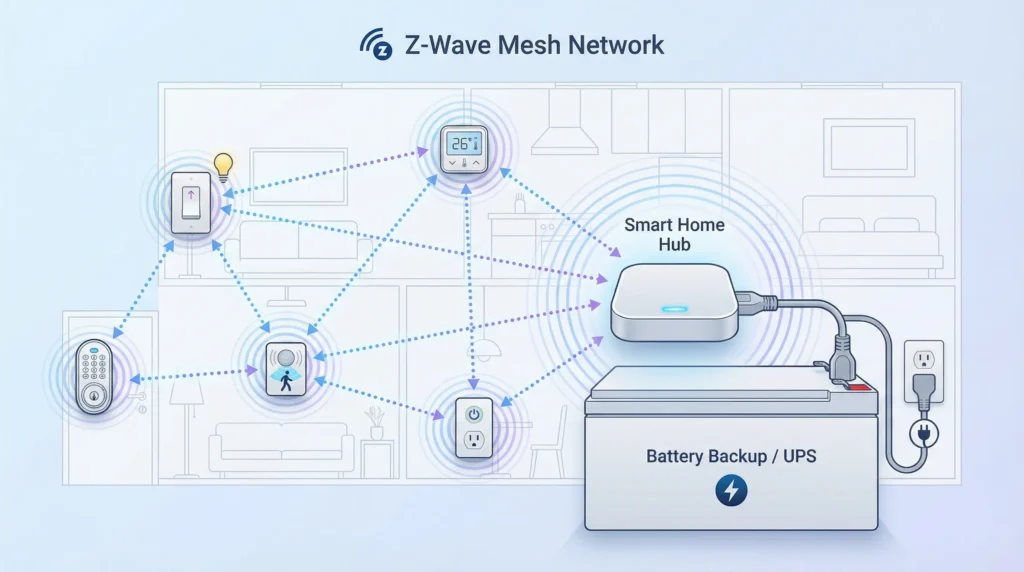
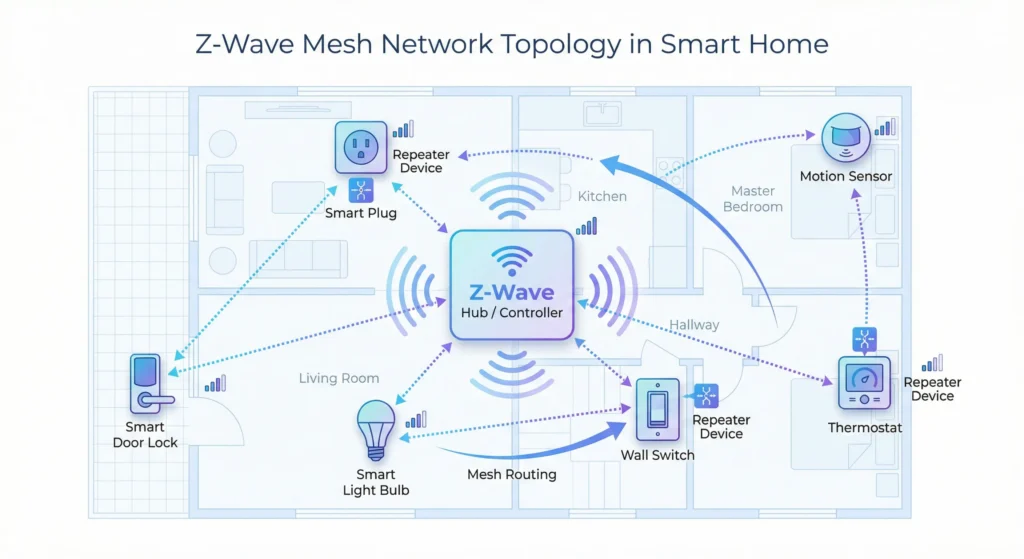
Z‑Wave is a wireless communication protocol designed specifically for smart home devices. It operates on low‑power radio frequencies, typically 908.42 MHz in North America and 868.42 MHz in Europe. Unlike Wi‑Fi, Z‑Wave creates a mesh network where each powered device acts as a repeater, passing signals along to the next device until the command reaches its destination.
Why Z‑Wave Is Sensitive
Z‑Wave radios transmit at very low power levels, usually around 1 mW (0 dBm). This is intentional. Low power means longer battery life for sensors and door locks. But it also means that Z‑Wave signals are extremely susceptible to electromagnetic interference (EMI) and radio frequency interference (RFI).
Even a small amount of electrical noise in the right frequency range can degrade Z‑Wave communication. And that is exactly where the UPS enters the picture.
For more technical details on Z‑Wave specifications, you can visit the Z‑Wave Alliance official documentation.
How a UPS Can Disrupt Z‑Wave Networks
Here is where things get interesting. A UPS is not inherently bad for Z‑Wave. The problem comes from specific types of UPS units and their electrical behavior.
Simulated Sine Wave Output
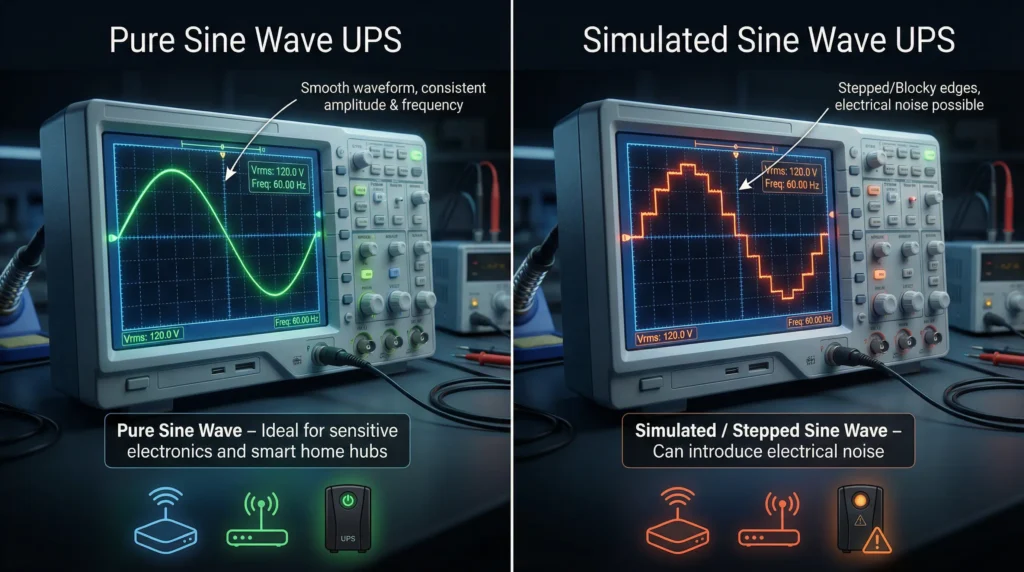
Most affordable consumer UPS units are standby or line‑interactive models. When they switch to battery power, they produce a simulated sine wave (also called a modified sine wave or stepped approximation). This waveform is electrically noisy. It generates harmonics that can spread into the radio frequency spectrum, right into the range where Z‑Wave operates.
Constant EMI Even on Line Power
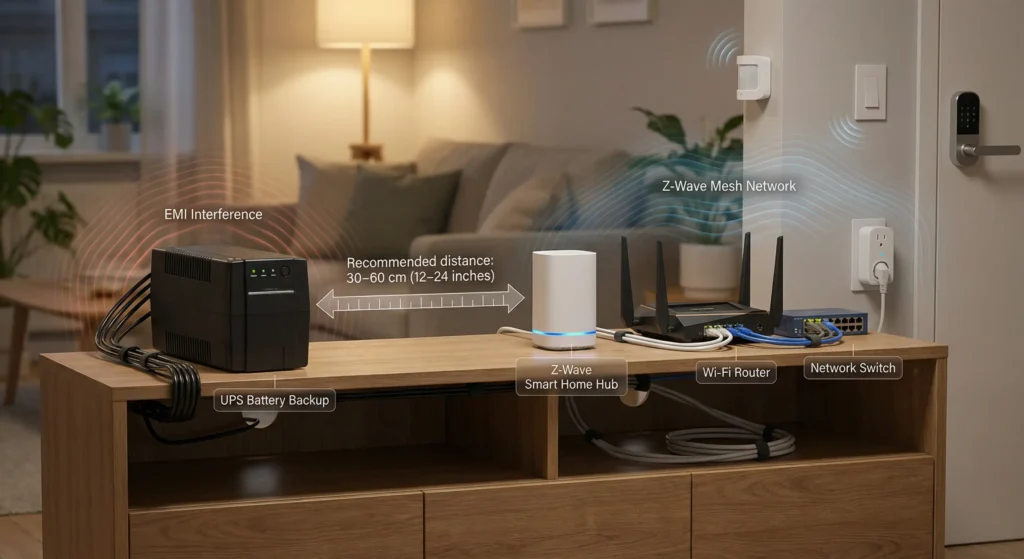
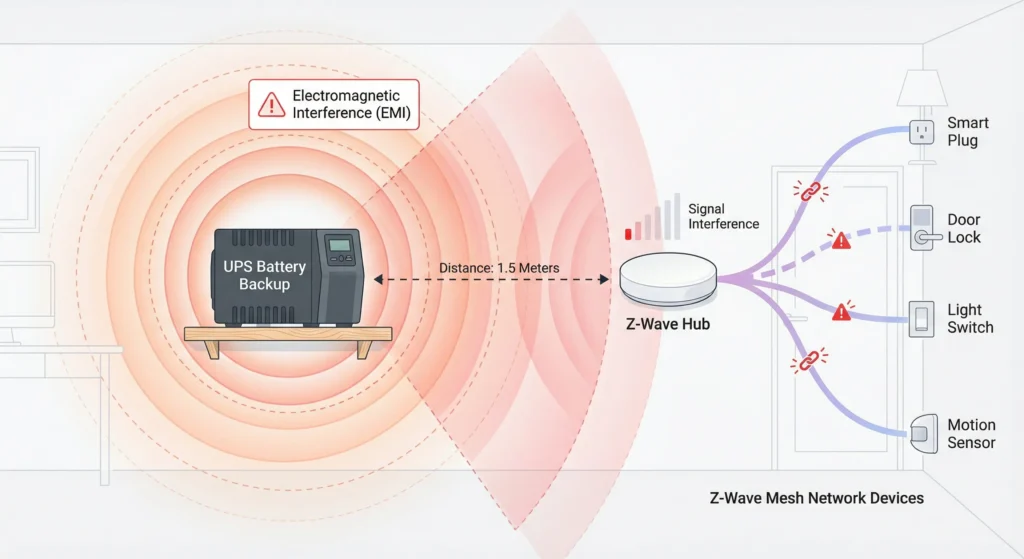
Even when the UPS is running on wall power and not on battery, its internal circuitry generates electromagnetic interference. The charging circuits, voltage regulation components, and switching transistors all produce EMI. If your Z‑Wave hub sits physically close to the UPS, this constant background noise can reduce the effective range and reliability of every Z‑Wave transmission.
Ground Loop Issues
Adding a UPS can create ground loops in your electrical setup. When the hub and nearby Z‑Wave devices reference different ground potentials, the resulting electrical noise rides along power cables and radiates into the surrounding area. Z‑Wave radios pick this up as interference.
Inverter Switching Noise
Line‑interactive UPS models constantly adjust voltage through an autotransformer. Each adjustment creates a small burst of switching noise. These bursts are brief but frequent, and they can cause intermittent Z‑Wave communication failures that are maddening to diagnose because they seem random.
Real Scenarios: When a UPS Wrecked My Smart Home
Scenario 1: The CyberPower Disaster
In late 2022, I plugged my Samsung SmartThings hub into a CyberPower CP1500AVRLCD. Within two days, I noticed that three Z‑Wave light switches on the second floor stopped responding consistently. At first, I blamed the switches. I excluded and re‑included them. I ran Z‑Wave repairs. Nothing helped.
Then I noticed a pattern. The failures were worst in the evening when the UPS was also powering my modem and router. On a hunch, I unplugged the hub from the UPS and connected it directly to the wall outlet. Within an hour, all three switches came back online and stayed stable.
The problem was EMI from the UPS contaminating the Z‑Wave radio inside the hub.
Scenario 2: The Community Report
A user on the Home Assistant community forums reported that after installing an APC Back‑UPS 600, their Aeotec Z‑Stick Gen5 lost communication with 12 out of 30 Z‑Wave devices. After isolating the issue, they discovered that simply moving the Z‑Stick three feet away from the UPS via a USB extension cable restored the network completely.
You can read similar reports on the Home Assistant Community Forum.
Scenario 3: The Hubitat Experience
A Hubitat user shared that their Z‑Wave mesh became unstable every night at the same time. After weeks of investigation, they realized it coincided with their UPS performing a self‑test. The brief switch to battery and the resulting simulated sine wave output caused enough interference to knock several Z‑Wave devices offline temporarily.
The Science Behind UPS Interference with Z‑Wave Signals
Let us get a bit more technical for those who want to understand what is actually happening at the signal level.
Harmonic Frequencies from Modified Sine Waves
A pure sine wave contains energy at a single frequency, in this case 50 Hz or 60 Hz depending on your country. A modified sine wave, the kind most UPS units produce on battery, contains energy at many harmonic frequencies. These harmonics extend well into the megahertz range.
Z‑Wave operates at approximately 908 MHz. While the fundamental frequency of the UPS output is nowhere near this, the broadband noise generated by the switching circuits inside the UPS can produce spurious emissions that overlap with Z‑Wave frequencies.
Near‑Field vs. Far‑Field Interference
When your Z‑Wave hub sits directly on top of or beside a UPS, it is in the near‑field region of the UPS electromagnetic emissions. In this region, the electric and magnetic field components behave differently than they do at a distance. The interference coupling is much stronger and harder to shield against.
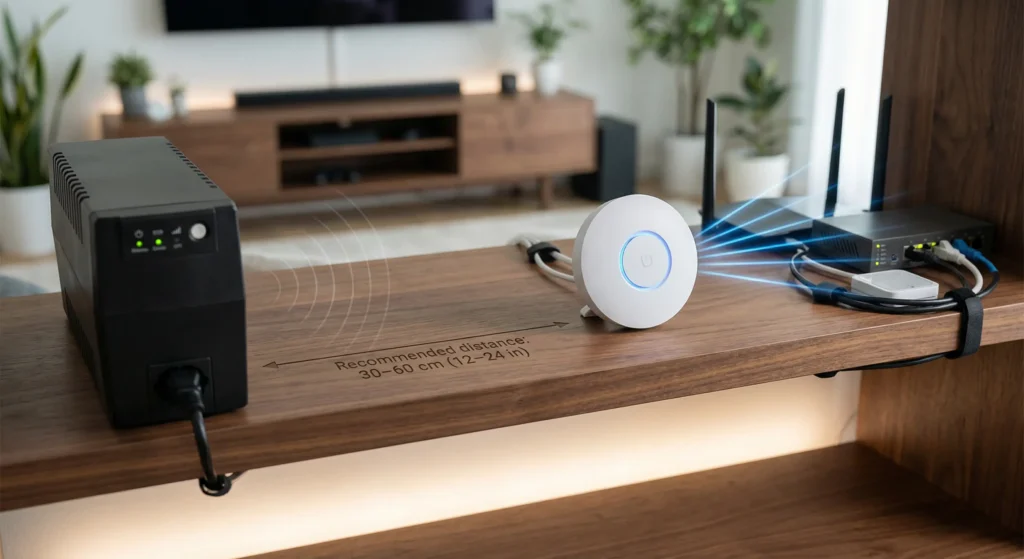
Moving the hub just 2 to 3 feet away from the UPS often moves it out of the near‑field region and dramatically reduces interference.
Conducted vs. Radiated Emissions
UPS interference reaches Z‑Wave radios through two paths. Conducted emissions travel through the power cable from the UPS to the hub. Radiated emissions travel through the air from the UPS case. Both matter, but radiated emissions are usually the bigger problem because Z‑Wave antennas are designed to be sensitive receivers.
For deeper reading on EMI and electronic devices, IEEE has published extensive research on electromagnetic compatibility standards.
Step‑by‑Step Guide to Diagnose UPS Related Z‑Wave Issues
If you suspect your UPS is causing Z‑Wave problems, follow these steps to confirm and isolate the issue.
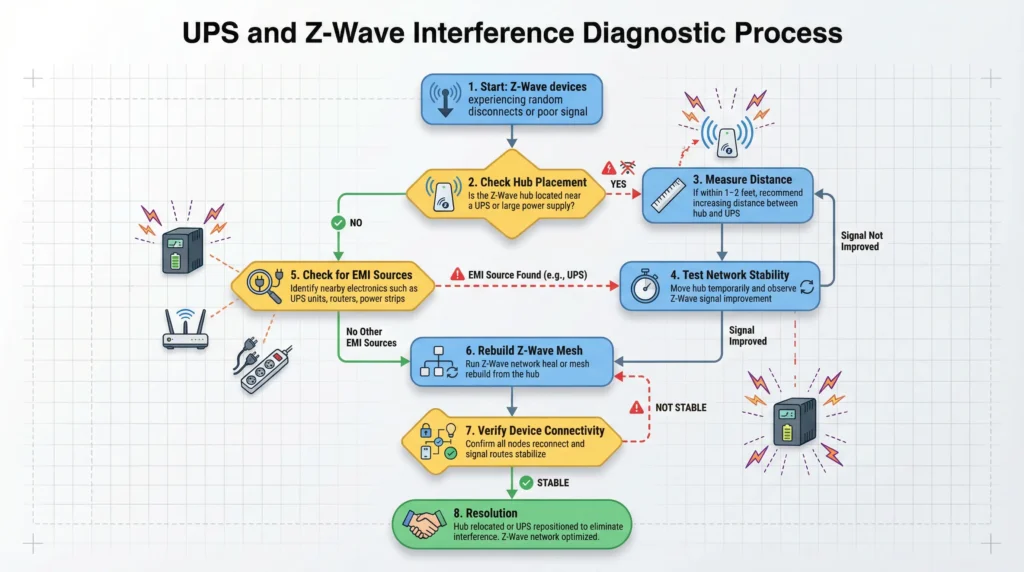
Step 1: Document Your Current Network Health
Before changing anything, open your Z‑Wave controller software and note which devices are responding and which are not. Record any error rates or failed commands. Take screenshots. You need a baseline.
Step 2: Disconnect the Hub from the UPS
Unplug your Z‑Wave hub from the UPS and plug it directly into a wall outlet. Do not change anything else. Give the network at least 4 to 6 hours to stabilize. Z‑Wave mesh networks take time to re‑route and heal.
Step 3: Run a Z‑Wave Network Repair
After the waiting period, initiate a full Z‑Wave network repair from your controller. This forces all devices to rediscover their neighbors and optimize routing paths.
Step 4: Compare Network Health
Check the same metrics you recorded in Step 1. If devices that were previously unreachable are now responding, and error rates have dropped, the UPS is almost certainly the culprit.
Step 5: Test with Physical Separation
If you need the UPS for power protection, try plugging the hub back into the UPS but placing the hub at least 3 feet away using an extension cable or longer Ethernet cable if your hub supports it. Monitor for 24 hours.
Step 6: Test During Battery Switchover
If your UPS has a self‑test function, trigger it manually while monitoring your Z‑Wave network. If devices drop during the test, the simulated sine wave output is likely causing the interference.
Proven Fixes to Restore ups z wave-network-stability
Here are solutions that have worked for real users, ranked from simplest to most involved.
Fix 1: Increase Physical Distance
This is the easiest and most effective fix. Move your Z‑Wave hub at least 3 feet away from the UPS. Use a longer USB cable for USB stick controllers or a longer Ethernet cable for hubs with network connections. Many users report that this single change resolves 80% of interference issues.
Fix 2: Use a Ferrite Choke on the Power Cable
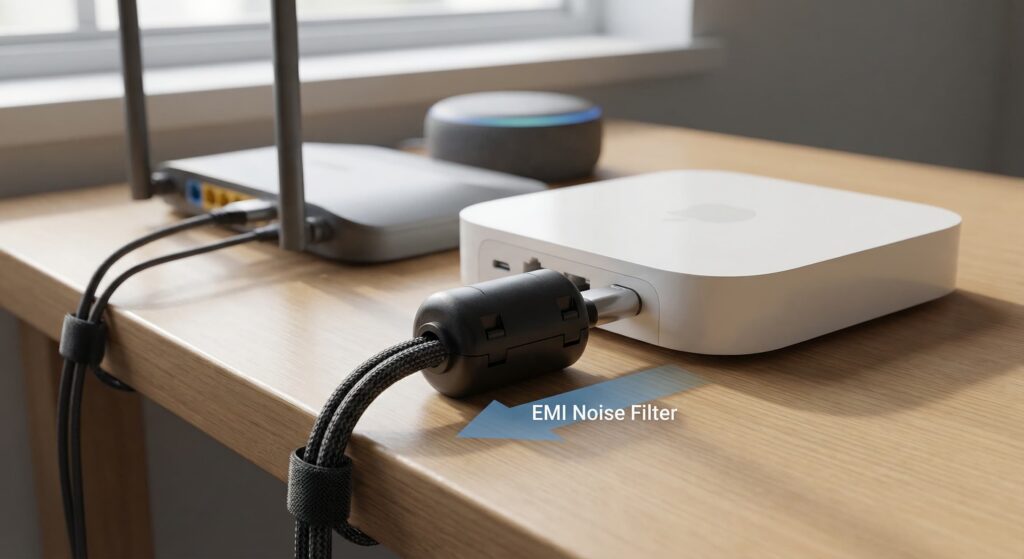
Snap a ferrite choke (also called a ferrite bead) onto the power cable between the UPS and the hub. This filters out high‑frequency conducted emissions. You can buy them for a few dollars at any electronics store. Place the choke as close to the hub end of the cable as possible.
Fix 3: Switch to a Pure Sine Wave UPS
If your budget allows, replace your simulated sine wave UPS with a pure sine wave model. These units produce cleaner power with far less harmonic distortion. The electrical noise output is significantly lower, both conducted and radiated.
Fix 4: Add an EMI Line Filter
Install an EMI line filter between the UPS output and your hub power adapter. These filters are inexpensive and specifically designed to block high‑frequency noise on power lines. Tripp Lite and Schaffner both make quality options.
Fix 5: Use a Separate, Small UPS for the Hub Only
Instead of sharing a large UPS with your modem, router, and NAS, use a small dedicated UPS just for the Z‑Wave hub. Less load on the UPS means less switching activity and less noise. A compact unit like the APC BE425M is often sufficient.
Fix 6: Ground Everything Properly
Ensure your UPS, hub, and nearby electronics all share a common, clean ground. Use a surge protector with proper grounding. Avoid daisy‑chaining power strips with the UPS.
Fix 7: USB Extension Cable for Stick Controllers
If you use a Z‑Wave USB stick (like the Zooz ZST39 or Aeotec Z‑Stick), plug it into a 6‑foot USB extension cable and position it well away from the UPS, the computer, and any other electronics. This is considered a best practice regardless of whether you have a UPS.
Best UPS Models That Play Nice with Z‑Wave
Based on community reports and personal testing, these UPS models cause the fewest issues with Z‑Wave networks.
Pure Sine Wave Options (Recommended)
| Model | Capacity | Sine Wave Type | Average Price |
|---|---|---|---|
| CyberPower CP1500PFCLCD | 1500VA | Pure Sine Wave | $219 |
| APC SMT1500C | 1500VA | Pure Sine Wave | $299 |
| Tripp Lite SMART1500LCDT | 1500VA | Pure Sine Wave | $239 |
| CyberPower CP850PFCLCD | 850VA | Pure Sine Wave | $149 |
Budget Friendly Options (With Mitigation)
If you must use a simulated sine wave UPS, these models have relatively low EMI output when combined with the distance and ferrite choke fixes mentioned above.
| Model | Capacity | Notes |
|---|---|---|
| APC BE600M1 | 600VA | Compact, low EMI in standby |
| APC BE425M | 425VA | Very small, good for hub only |
| CyberPower EC650LCD | 650VA | Eco mode reduces switching noise |
You can find detailed UPS reviews and comparisons on Tom’s Hardware UPS reviews.
Preventive Tips Before Installing a UPS in a Smart Home
If you have not installed your UPS yet, here are tips to avoid Z‑Wave problems from the start.
Tip 1: Plan Your Physical Layout
Before plugging anything in, decide where the UPS will sit. Keep it at least 3 feet from any Z‑Wave hub, Z‑Wave USB stick, or Z‑Wave repeater. Draw a simple layout if it helps.
Tip 2: Buy Pure Sine Wave from the Start
The price difference between a simulated and pure sine wave UPS has shrunk significantly. Spending the extra $50 to $100 upfront saves you hours of troubleshooting later.
Tip 3: Test Before You Commit
After setting up the UPS, monitor your Z‑Wave network for at least 72 hours before considering the installation complete. Check device response rates, automation execution reliability, and overall mesh health.
Tip 4: Keep Firmware Updated
Both your Z‑Wave hub and UPS may have firmware updates that improve compatibility and reduce noise. Check manufacturer websites quarterly.
Tip 5: Document Your Setup
Take photos of your cable routing and UPS placement. If problems arise later, this documentation helps you identify what changed.
Tip 6: Consider Your Z‑Wave Frequency Band
Remember that Z‑Wave operates on different frequencies in different regions. In North America (908.42 MHz), the interference profile differs from Europe (868.42 MHz). Test accordingly.
FAQ
Does every UPS cause Z‑Wave interference?
No. Pure sine wave UPS models produce significantly less electromagnetic interference. The problem is most common with budget simulated sine wave units. Even among those, the severity varies by model and by how close the UPS sits to the Z‑Wave radio.
Can a UPS affect Zigbee or Wi‑Fi devices too?
Yes, but it is less common. Zigbee operates at 2.4 GHz and Wi‑Fi at 2.4 GHz or 5 GHz. These higher frequencies are less susceptible to the type of broadband noise a UPS typically generates. However, in extreme cases, a noisy UPS can affect any wireless protocol.
Will a surge protector between the UPS and hub help?
A standard surge protector will not help with EMI. You need an EMI/RFI line filter specifically designed to block high‑frequency noise. These are different products even though they sometimes look similar.
How far should my Z‑Wave hub be from the UPS?
A minimum of 3 feet (approximately 1 meter) is recommended. In cases of particularly noisy UPS models, 5 to 6 feet may be necessary. Test and adjust based on your specific equipment.
Can I shield the UPS to reduce interference?
Technically yes, but it is impractical for most home users. Commercial EMI shielding enclosures exist, but they are expensive and bulky. Physical distance and pure sine wave UPS selection are far simpler solutions.
Does the UPS wattage or VA rating affect interference levels?
Generally, larger UPS units have larger internal components that can generate more EMI. However, the design quality matters more than the size. A well‑designed 1500VA unit may produce less interference than a poorly designed 600VA unit.
My Z‑Wave network was already unstable. Could the UPS make it worse?
Absolutely. If your Z‑Wave mesh was marginal, with weak signal paths and few repeaters, the additional noise floor from a UPS can push borderline connections over the edge. Fix your mesh topology first, then add the UPS.
Is it safe to run my Z‑Wave hub without a UPS?
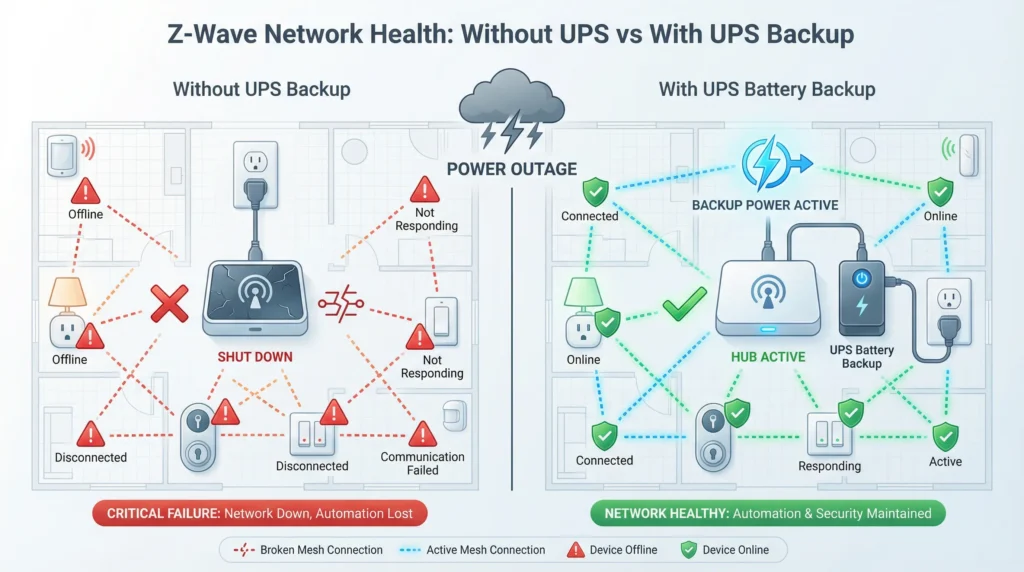
Yes. Most Z‑Wave hubs handle unexpected power loss gracefully. Your Z‑Wave network state is stored in non‑volatile memory, so it survives power outages. A UPS is a nice‑to‑have, not a necessity, for most smart home hubs.
Final Thoughts
Adding a UPS to your smart home setup is a smart decision, but it requires some awareness of how electrical devices interact with wireless protocols. The reason a UPS changes Z‑Wave network stability comes down to electromagnetic interference, both conducted through power cables and radiated through the air.
The good news is that this is a solved problem. You do not have to choose between power protection and a stable Z‑Wave network. With the right UPS model, proper physical spacing, and a few inexpensive filters, you can have both.
Start with the simplest fix. Move your hub away from the UPS. If that does not fully resolve the issue, work your way through the other solutions in this guide. In my experience, the combination of a pure sine wave UPS and a USB extension cable for stick controllers eliminates the problem entirely.
Your smart home should make your life easier, not harder. A little planning on the power management side goes a long way toward keeping your Z‑Wave mesh healthy and your automations running smoothly.
For ongoing discussions and troubleshooting help, the r/homeautomation subreddit and r/zwave subreddit are excellent community resources.