

Table of Contents
- Introduction
- What Is a Reverse Proxy and How Does It Work?
- How Webhooks Work Behind the Scenes
- Why Reverse Proxy Breaks Webhook Automations
- Real Scenario: A Broken Zapier Webhook After Enabling Nginx Reverse Proxy
- Common Symptoms When Webhooks Fail Behind a Reverse Proxy
- Step by Step: How to Fix Webhook Issues Caused by Reverse Proxy
- Nginx Reverse Proxy Configuration for Webhooks
- Apache Reverse Proxy Configuration for Webhooks
- How to Debug Webhook Failures Behind a Reverse Proxy
- Real Experiences from Developers Who Fixed This Issue
- Best Practices to Prevent Reverse Proxy from Breaking Webhooks
- FAQ
- Conclusion
Introduction
You spent hours building the perfect automation workflow. Your webhooks were firing flawlessly, connecting your payment gateway to your CRM, triggering Slack notifications, and updating your database in real time. Then you decided to add a reverse proxy for security, load balancing, or SSL termination. Suddenly, everything stopped working.
No errors in your application logs. No obvious clues. Just silence where there used to be seamless automation.
If this sounds painfully familiar, you are not alone. This is one of the most frustrating issues developers and system administrators face, and it happens far more often than most people realize. The good news is that once you understand exactly why enabling a reverse proxy breaks webhook automations, the fix is usually straightforward.
In this guide, I will walk you through the exact reasons this happens, share real world scenarios I have personally encountered, and give you tested solutions that work with Nginx, Apache, Cloudflare, and reverse proxy break webhook automations.
What Is a Reverse Proxy and How Does It Work?
Before diving into the problem, let us make sure we are on the same page about what a reverse proxy actually does.
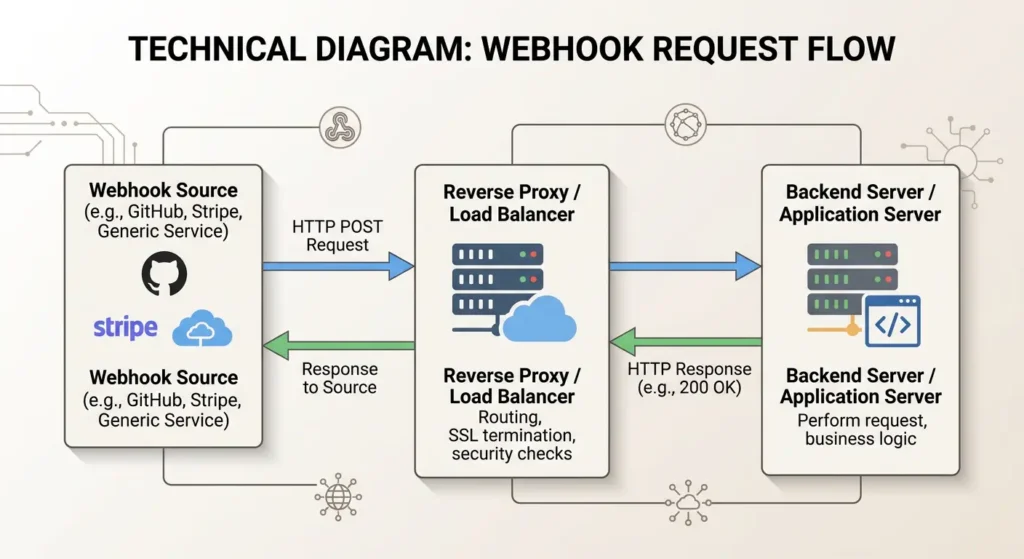
A reverse proxy is a server that sits between external clients and your backend application. Instead of clients communicating directly with your app, they send requests to the reverse proxy, which then forwards those requests to the appropriate backend server.
Why Do People Use Reverse Proxies?
There are several compelling reasons:
SSL Termination: The reverse proxy handles HTTPS encryption, so your backend app only needs to deal with HTTP traffic.
Load Balancing: Distributing incoming traffic across multiple backend servers to prevent overload.
Security: Hiding the identity and characteristics of your backend servers from the outside world.
Caching: Storing copies of responses to serve repeated requests faster.
Compression: Reducing the size of responses before sending them to clients.
Popular reverse proxy solutions include Nginx, Apache HTTP Server, HAProxy, Traefik, and Cloudflare.
How Webhooks Work Behind the Scenes
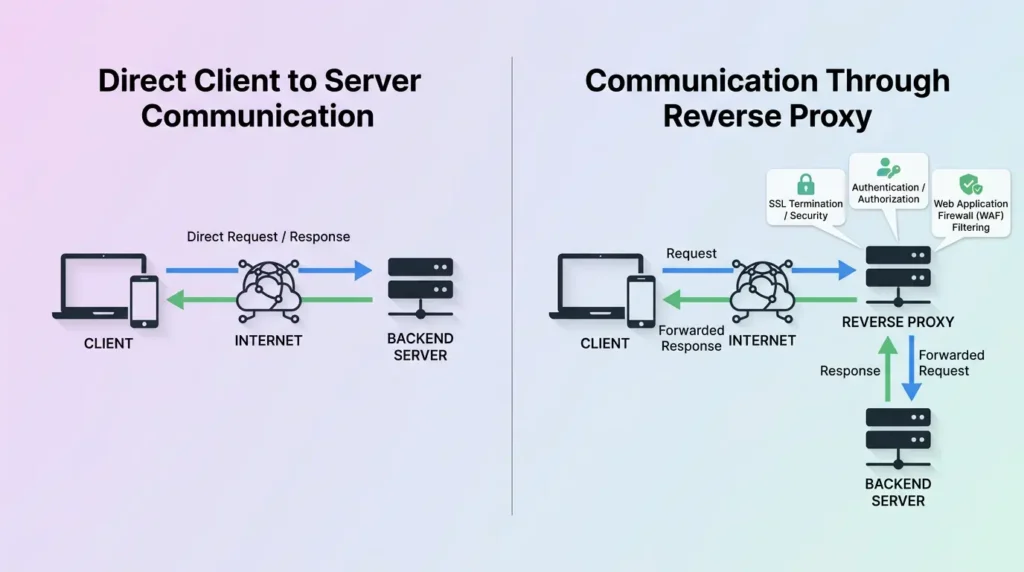
A webhook is essentially an HTTP callback. When a specific event occurs in one system, that system sends an HTTP POST request to a URL you have specified. This URL is your webhook endpoint.
The Typical Webhook Flow
- An event occurs in the source system (for example, a customer completes a payment on Stripe).
- The source system constructs an HTTP POST request containing event data in JSON format.
- The source system sends this request to your webhook URL.
- Your server receives the request, processes the data, and returns an HTTP 200 status code to confirm receipt.
- If the source system does not receive a 200 response within a specific timeout period, it may retry the delivery.
What Makes Webhooks Different from Regular API Calls
Webhooks are initiated by external systems, not by your application. This means your server must be accessible from the outside, must respond quickly, and must handle incoming POST requests at specific endpoints.
This is exactly where the reverse proxy introduces complications.
Why Reverse Proxy Breaks Webhook Automations
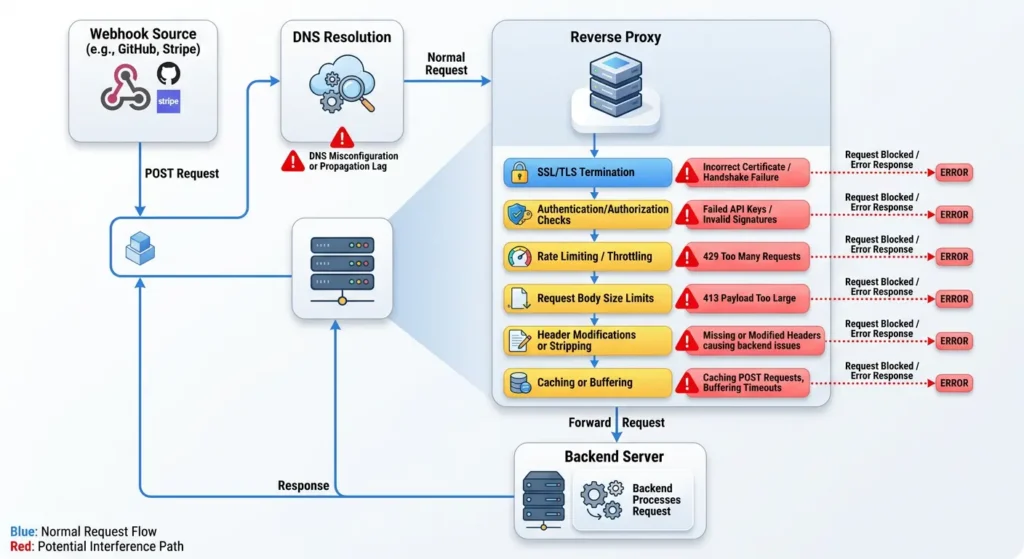
Now we arrive at the core question. There are multiple reasons why enabling a reverse proxy can break your webhook automations, and often it is a combination of several factors.
1. Incorrect Header Forwarding
This is the number one culprit. When a reverse proxy forwards a request to your backend, it often modifies or strips important HTTP headers. Webhook providers frequently use headers for:
Signature verification: Services like Stripe, GitHub, and Shopify include a signature header (such as X-Hub-Signature or Stripe-Signature) that your application uses to verify the request is legitimate. If the reverse proxy modifies the request body even slightly, or if it strips the signature header, verification fails silently.
Host header changes: The reverse proxy might send the request to your backend with the internal hostname instead of the original external hostname. This can confuse applications that generate URLs based on the Host header.
Content type issues: Some reverse proxy configurations strip or modify the Content-Type header, which can cause your application to misparse the webhook payload.
2. SSL/TLS Termination Problems
Many webhook providers require HTTPS endpoints. When your reverse proxy handles SSL termination, the connection between the proxy and your backend is usually plain HTTP. This creates several issues:
Your application might detect that the connection is not HTTPS and reject the request or redirect it, which webhook providers do not follow.
Certificate misconfigurations at the reverse proxy level can cause webhook providers to reject the connection entirely before any data is exchanged.
3. Request Body Modification
Some reverse proxy configurations buffer, re-encode, or modify the request body. This is catastrophic for webhooks because:
Many webhook providers compute a signature hash based on the exact raw request body. Even adding a single whitespace character will cause signature verification to fail.
If the proxy re-encodes JSON data, field ordering might change, which again breaks signature verification.
4. Timeout Issues
Reverse proxies have their own timeout settings. If these are too short, the proxy might close the connection before your backend finishes processing the webhook. The webhook provider then sees a failed delivery and may retry, leading to duplicate processing or eventual deactivation of your webhook endpoint.
5. IP Address and Firewall Conflicts
When you enable a reverse proxy, your backend server no longer sees the real client IP address. Instead, it sees the reverse proxy IP. If your application has IP whitelisting for webhook providers, it will reject legitimate webhook requests.
6. URL Path Rewriting
Reverse proxies often rewrite URL paths. If your webhook endpoint is registered as https://yourdomain.com/api/webhooks/stripe but the reverse proxy rewrites the path before forwarding, your backend might not recognize the route.
7. HTTP Method Restrictions
Some reverse proxy configurations are set to only allow GET requests by default, or they might restrict POST request body sizes. Webhooks rely on POST requests, and their payloads can sometimes be substantial.
Real Scenario: A Broken Zapier Webhook After Enabling Nginx Reverse Proxy
Let me share a real situation that perfectly illustrates this problem.
A SaaS company was running a Node.js application on port 3000. They had Zapier webhooks set up to trigger automations whenever a new user signed up. Everything worked perfectly for months.
Then the team decided to add Nginx as a reverse proxy to handle SSL and serve the app on port 443. They used a basic configuration:
nginxserver {
    listen 443 ssl;
    server_name app.example.com;

    ssl_certificate /etc/ssl/certs/example.crt;
    ssl_certificate_key /etc/ssl/private/example.key;

    location / {
        proxy_pass http://127.0.0.1:3000;
    }
}
Immediately after this change, all Zapier webhook automations stopped working. The team spent two days debugging the application code, checking Zapier configurations, and reviewing firewall rules. The application logs showed no incoming webhook requests at all.
What Went Wrong
The problem had three layers:
First, the basic proxy_pass directive did not forward essential headers like Host, X-Real-IP, and X-Forwarded-For.
Second, there was no X-Forwarded-Proto header, so the application did not know the original request was HTTPS and kept trying to redirect to HTTPS, creating an infinite redirect loop that the webhook provider could not follow.
Third, the default Nginx configuration had a request body size limit of 1MB, which was fine for most webhooks, but some larger payloads were being silently dropped.
The Fix
The corrected Nginx configuration looked like this:
nginxserver {
    listen 443 ssl;
    server_name app.example.com;

    ssl_certificate /etc/ssl/certs/example.crt;
    ssl_certificate_key /etc/ssl/private/example.key;

    location / {
        proxy_pass http://127.0.0.1:3000;
        proxy_set_header Host $host;
        proxy_set_header X-Real-IP $remote_addr;
        proxy_set_header X-Forwarded-For $proxy_add_x_forwarded_for;
        proxy_set_header X-Forwarded-Proto $scheme;
        proxy_buffering off;
        proxy_request_buffering off;
        client_max_body_size 10M;
        proxy_read_timeout 90s;
    }
}
After applying this fix, all webhook automations resumed working within minutes.
Common Symptoms When Webhooks Fail Behind a Reverse Proxy
Knowing the symptoms helps you diagnose the problem faster. Here are the most common signs:
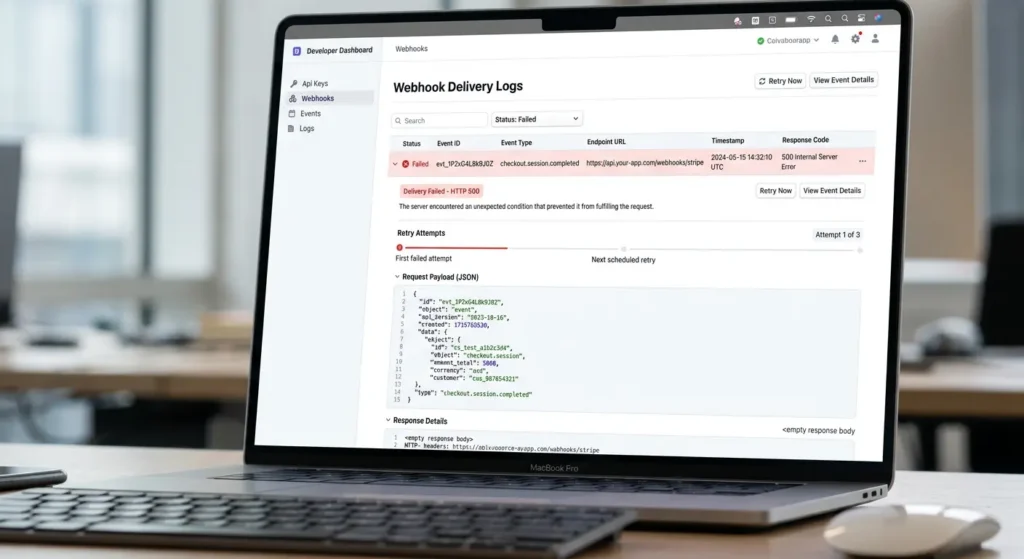
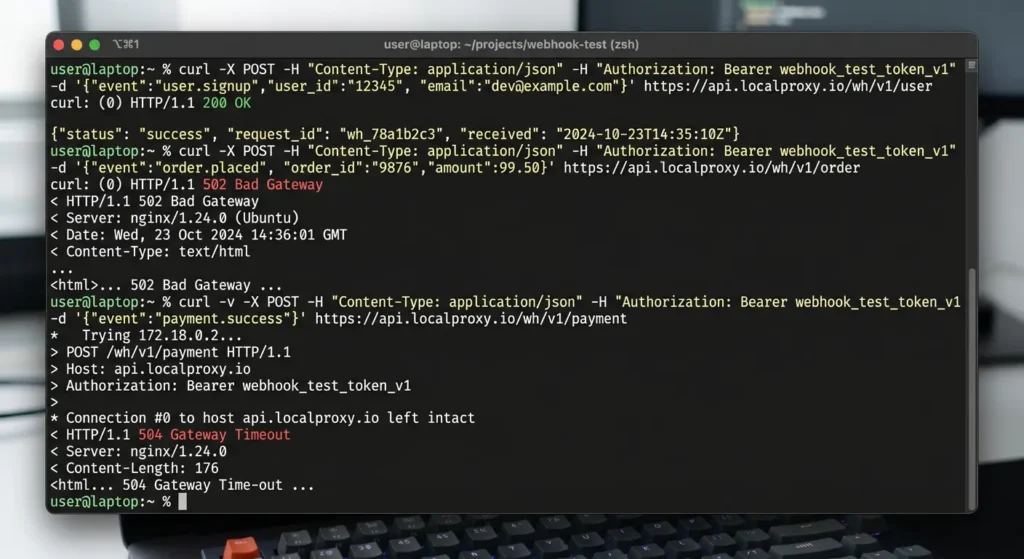
Symptom 1: Webhook Provider Shows Delivery Failures
The webhook provider dashboard shows HTTP 502, 504, or connection timeout errors. This usually points to the reverse proxy not being able to reach your backend or timing out.
Symptom 2: Signature Verification Failures
Your application receives the webhook but rejects it because the signature does not match. This means the request body was modified in transit.
Symptom 3: No Requests Reaching Your Application
Your application logs show zero incoming requests at the webhook endpoint. This suggests the reverse proxy is blocking, redirecting, or silently dropping the requests.
Symptom 4: Intermittent Failures
Webhooks work sometimes but not always. This often indicates timeout issues where processing takes too long on some requests, or load balancer inconsistencies where different backend instances have different configurations.
Symptom 5: 301/302 Redirect Loops
The webhook provider reports too many redirects. This is a classic sign of HTTP to HTTPS redirect loops when SSL termination is not properly configured.
Step by Step: How to Fix Webhook Issues Caused by Reverse Proxy
Here is a systematic approach to diagnosing and fixing webhook failures after enabling a reverse proxy.
Step 1: Verify the Reverse Proxy Is Forwarding Requests
Create a simple test endpoint that logs all incoming request details:
JavaScript// Node.js Express example
app.post('/webhook-test', (req, res) => {
    console.log('Headers:', JSON.stringify(req.headers, null, 2));
    console.log('Body:', JSON.stringify(req.body, null, 2));
    console.log('IP:', req.ip);
    console.log('Protocol:', req.protocol);
    res.status(200).send('OK');
});
Send a test request using curl:
Bashcurl -X POST https://yourdomain.com/webhook-test \
  -H "Content-Type: application/json" \
  -d '{"test": "data"}'
If nothing appears in your logs, the reverse proxy is not forwarding the request.
Step 2: Configure Proper Header Forwarding
Ensure your reverse proxy forwards all necessary headers. The critical headers are:
Host to preserve the original hostname.X-Real-IP to pass the real client IP address.X-Forwarded-For to maintain the chain of IP addresses.X-Forwarded-Proto to indicate the original protocol (HTTP or HTTPS).Content-Type to preserve the content type of the webhook payload.
Step 3: Disable Request Body Buffering
For webhook signature verification to work, the raw request body must arrive at your application unchanged. Disable request buffering in your reverse proxy.
Step 4: Increase Timeout Values
Set appropriate timeout values that give your application enough time to process the webhook:
Connection timeout: 30 seconds minimum.
Read timeout: 90 seconds minimum.
Send timeout: 60 seconds minimum.
Step 5: Handle SSL Termination Properly
Configure your application to trust the X-Forwarded-Proto header from the reverse proxy. In Express.js, this means adding:
JavaScriptapp.set('trust proxy', true);
In Django:
PythonSECURE_PROXY_SSL_HEADER = ('HTTP_X_FORWARDED_PROTO', 'https')
USE_X_FORWARDED_HOST = True
Step 6: Check Firewall and Security Rules
Ensure that your reverse proxy allows POST requests from webhook provider IP ranges. Major providers publish their IP ranges:
Stripe publishes webhook IP addresses in their documentation.
GitHub provides a meta API endpoint listing their IP ranges.
Step 7: Test with the Webhook Provider’s Testing Tools
Most webhook providers offer testing tools. Use them to send test events and verify end to end delivery through your reverse proxy.
Nginx Reverse Proxy Configuration for Webhooks
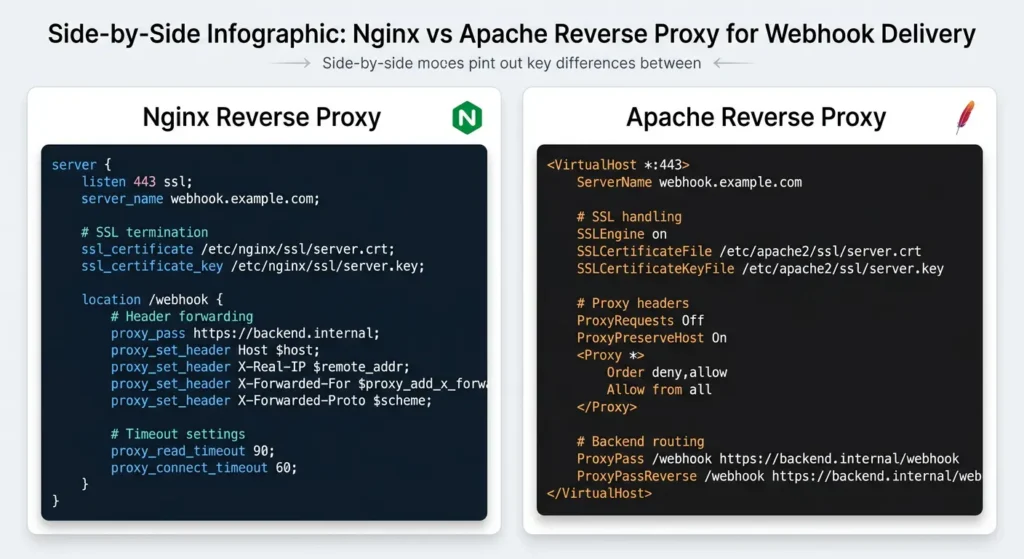
Here is a production ready Nginx configuration optimized for webhook delivery:
nginxupstream backend_app {
    server 127.0.0.1:3000;
    keepalive 32;
}

server {
    listen 80;
    server_name yourdomain.com;
    return 301 https://$server_name$request_uri;
}

server {
    listen 443 ssl http2;
    server_name yourdomain.com;

    ssl_certificate /etc/ssl/certs/yourdomain.crt;
    ssl_certificate_key /etc/ssl/private/yourdomain.key;
    ssl_protocols TLSv1.2 TLSv1.3;

    # Webhook specific location
    location /api/webhooks/ {
        proxy_pass http://backend_app;
        proxy_http_version 1.1;

        # Essential headers
        proxy_set_header Host $host;
        proxy_set_header X-Real-IP $remote_addr;
        proxy_set_header X-Forwarded-For $proxy_add_x_forwarded_for;
        proxy_set_header X-Forwarded-Proto $scheme;
        proxy_set_header X-Forwarded-Host $host;
        proxy_set_header X-Forwarded-Port $server_port;
        proxy_set_header Connection "";

        # Disable buffering for webhooks
        proxy_buffering off;
        proxy_request_buffering off;

        # Generous timeouts
        proxy_connect_timeout 30s;
        proxy_send_timeout 60s;
        proxy_read_timeout 90s;

        # Allow larger payloads
        client_max_body_size 10M;

        # Do not modify the body
        proxy_pass_request_body on;
        proxy_pass_request_headers on;
    }

    # Regular application traffic
    location / {
        proxy_pass http://backend_app;
        proxy_http_version 1.1;
        proxy_set_header Host $host;
        proxy_set_header X-Real-IP $remote_addr;
        proxy_set_header X-Forwarded-For $proxy_add_x_forwarded_for;
        proxy_set_header X-Forwarded-Proto $scheme;
    }
}
Key Points in This Configuration
The webhook endpoint has its own location block with specific settings. Buffering is disabled to ensure the raw body reaches the application untouched. Timeout values are generous enough for webhook processing. The client_max_body_size is set to accommodate larger webhook payloads.
Apache Reverse Proxy Configuration for Webhooks
If you are using Apache instead of Nginx, here is the equivalent configuration:
apache<VirtualHost *:443>
    ServerName yourdomain.com

    SSLEngine on
    SSLCertificateFile /etc/ssl/certs/yourdomain.crt
    SSLCertificateKeyFile /etc/ssl/private/yourdomain.key

    ProxyPreserveHost On
    ProxyRequests Off

    # Forward essential headers
    RequestHeader set X-Forwarded-Proto "https"
    RequestHeader set X-Forwarded-Port "443"

    # Webhook endpoint
    <Location /api/webhooks/>
        ProxyPass http://127.0.0.1:3000/api/webhooks/
        ProxyPassReverse http://127.0.0.1:3000/api/webhooks/

        # Disable response buffering
        SetEnv proxy-sendchunked 1

        # Timeout settings
        ProxyTimeout 90
    </Location>

    # General application
    ProxyPass / http://127.0.0.1:3000/
    ProxyPassReverse / http://127.0.0.1:3000/

    # Increase body size limit
    LimitRequestBody 10485760
</VirtualHost>
Make sure you have the required Apache modules enabled:
Bashsudo a2enmod proxy
sudo a2enmod proxy_http
sudo a2enmod headers
sudo a2enmod ssl
sudo systemctl restart apache2
How to Debug Webhook Failures Behind a Reverse Proxy
When webhooks fail and you need to find the root cause quickly, follow this debugging workflow.
Use Webhook Testing Services
Services like Webhook.site and RequestBin let you inspect incoming webhook requests in detail. You can temporarily point your webhook to these services to see exactly what the provider is sending.
Check Reverse Proxy Access Logs
Your reverse proxy logs contain valuable debugging information:
Bash# Nginx access log with detailed format
log_format webhook_debug '$remote_addr - $remote_user [$time_local] '
                         '"$request" $status $body_bytes_sent '
                         '"$http_referer" "$http_user_agent" '
                         'upstream_response_time=$upstream_response_time '
                         'request_time=$request_time';

access_log /var/log/nginx/webhook_access.log webhook_debug;
Monitor Both Sides Simultaneously
Open two terminal windows. In one, watch the reverse proxy logs:
Bashtail -f /var/log/nginx/access.log
In the other, watch your application logs:
Bashtail -f /var/log/app/application.log
Trigger a test webhook and compare what you see on both sides. If the request appears in the proxy log but not in the application log, the proxy is blocking or misrouting it.
Test with Verbose Curl
Bashcurl -v -X POST https://yourdomain.com/api/webhooks/test \
  -H "Content-Type: application/json" \
  -H "X-Custom-Signature: test123" \
  -d '{"event": "test", "data": {"id": 1}}' \
  2>&1 | tee webhook_test.log
The -v flag shows you the full HTTP conversation, including redirects, SSL handshakes, and response headers.
Real Experiences from Developers Who Fixed This Issue
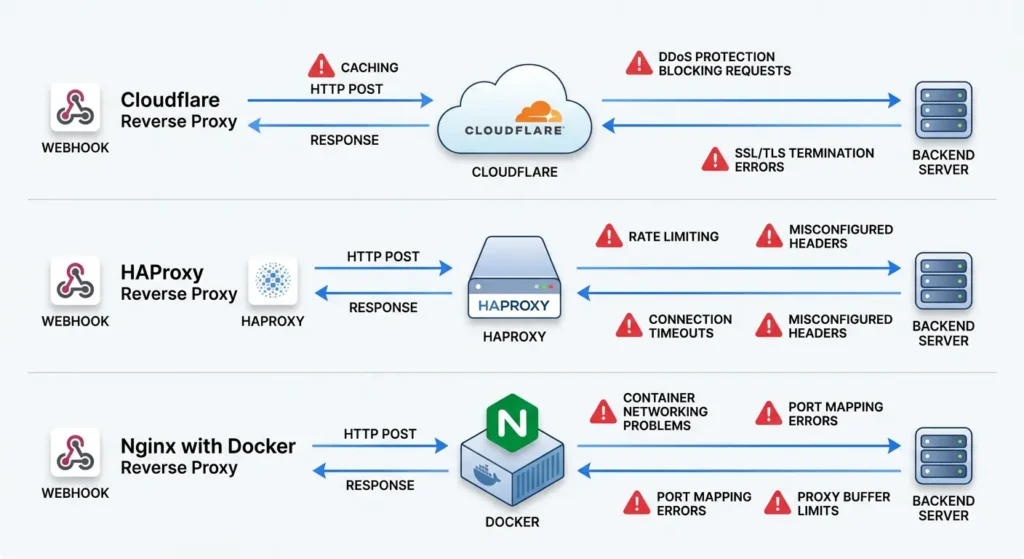
Experience 1: Shopify Webhooks and Cloudflare
A developer running a Shopify app noticed that webhook verification started failing after enabling Cloudflare as a reverse proxy. The issue was that Cloudflare was modifying the response encoding, which changed the raw body content. The fix was to create a page rule in Cloudflare that disabled “Auto Minify” and “Rocket Loader” for the webhook endpoint path.
Experience 2: GitHub Webhooks and HAProxy
A DevOps engineer set up HAProxy in front of a CI/CD server. GitHub webhook deliveries showed as successful on the GitHub side, but the CI/CD server never triggered builds. The problem was that HAProxy was configured with option httpclose, which was closing connections before the full POST body was transferred. Switching to option http-server-close resolved the issue.
Experience 3: Stripe Webhooks and Nginx with Docker
A team running their application in Docker containers behind Nginx experienced intermittent webhook failures. The root cause was Docker DNS resolution. The Nginx proxy_pass directive resolved the container hostname at startup, but when containers were restarted with new IP addresses, Nginx was still sending requests to the old IP. Using a variable in the proxy_pass directive forced Nginx to re-resolve DNS on every request:
nginxlocation /api/webhooks/stripe {
    set $backend http://app-container:3000;
    proxy_pass $backend;
    resolver 127.0.0.11 valid=10s;
    # ... other proxy settings
}
Best Practices to Prevent Reverse Proxy from Breaking Webhooks
Follow these best practices to avoid webhook issues from the start.
1. Always Forward Essential Headers
Make it a rule to include these headers in every reverse proxy configuration:
textHost
X-Real-IP
X-Forwarded-For
X-Forwarded-Proto
X-Forwarded-Host
Content-Type
Content-Length
2. Preserve the Raw Request Body
Never enable middleware or proxy features that modify, compress, or re-encode request bodies on webhook endpoints. This includes disabling gzip decompression of incoming requests at the proxy level.
3. Set Up Health Checks
Configure your reverse proxy to monitor backend health so it can report proper errors instead of silently dropping requests:
nginxlocation /api/webhooks/ {
    proxy_pass http://backend;
    proxy_next_upstream error timeout http_502 http_503;
    proxy_next_upstream_tries 2;
}
4. Use Separate Location Blocks for Webhooks
Do not mix webhook proxy settings with general application settings. Webhooks have unique requirements like disabled buffering and longer timeouts that might not be appropriate for regular traffic.
5. Implement Retry Logic in Your Application
Even with perfect configuration, network issues can cause occasional webhook delivery failures. Your application should be idempotent, meaning processing the same webhook twice should not cause problems.
6. Monitor Webhook Delivery Rates
Set up monitoring to track webhook success rates. A sudden drop in deliveries often indicates a proxy configuration change.
7. Document Your Reverse Proxy Configuration
When you find a working configuration, document it thoroughly. Include why each directive is there, so future team members do not accidentally remove critical settings.
FAQ
Does Cloudflare as a reverse proxy affect webhooks?
Yes, Cloudflare can affect webhooks in several ways. Its Web Application Firewall (WAF) might block legitimate webhook POST requests, its minification features can alter response content, and its challenge pages can prevent automated webhook deliveries. You should create firewall rules to allow webhook provider IP addresses and disable performance optimizations on webhook endpoint paths.
Can a reverse proxy cause duplicate webhook deliveries?
Yes. If the reverse proxy times out before your backend sends a response, but the backend actually processed the request successfully, the webhook provider will consider the delivery failed and retry. This results in duplicate processing. Increasing proxy timeout values and implementing idempotency in your application are the solutions.
Why do my webhooks work with HTTP but fail with HTTPS through the reverse proxy?
This usually happens because of SSL certificate issues. The webhook provider might reject self-signed certificates, expired certificates, or certificates with incorrect domain names. Always use valid SSL certificates from trusted certificate authorities. You can get free certificates from Let’s Encrypt.
How do I know if the reverse proxy is modifying my webhook payload?
Compare the raw payload at two points. First, use a webhook testing service to capture what the provider sends. Then, log the raw body your application receives. If they differ, the reverse proxy is modifying the content. Disabling request buffering and body re-encoding typically resolves this.
Should I whitelist webhook provider IP addresses at the reverse proxy level?
Yes, this is a good security practice. Most major webhook providers publish their IP ranges. Configuring your reverse proxy to only accept webhook requests from these IPs adds an extra layer of security without relying solely on signature verification.
Can load balancing across multiple backends cause webhook issues?
Yes. If your webhook processing is stateful or requires sequential processing, load balancing can cause problems. Use sticky sessions for webhook endpoints, or better yet, design your webhook processing to be stateless and idempotent.
What is the recommended timeout setting for webhook endpoints behind a reverse proxy?
A minimum of 30 seconds for connection timeout and 90 seconds for read timeout is recommended. However, your webhook processing should ideally complete within 5 to 10 seconds. If it takes longer, consider acknowledging the webhook immediately and processing it asynchronously in a background queue.
Conclusion
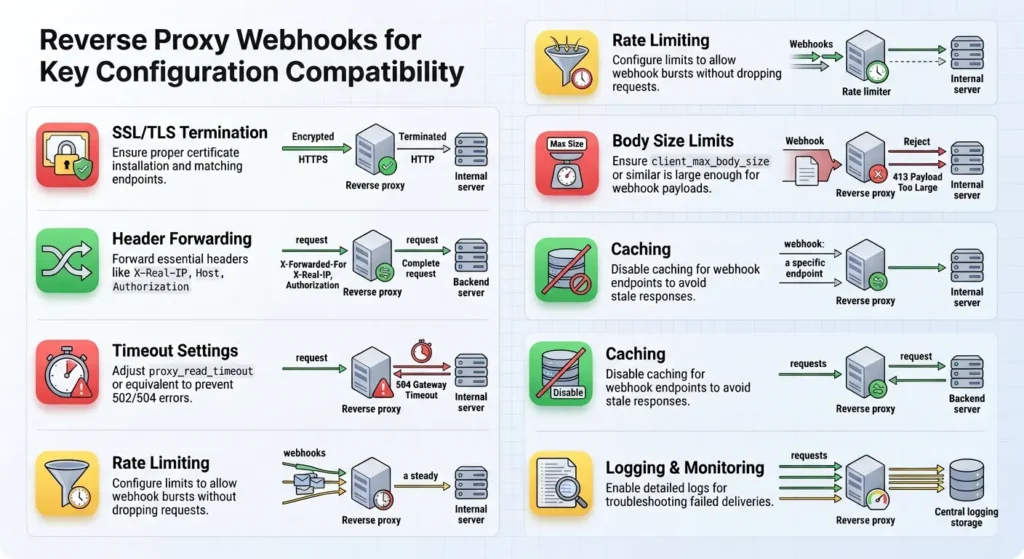
Enabling a reverse proxy does not have to break your webhook automations. The issues arise from misconfiguration, not from any fundamental incompatibility between reverse proxies and webhooks. The most common culprits are missing header forwarding, request body modification, SSL termination problems, and insufficient timeout values.
By following the configurations and best practices outlined in this guide, you can run a reverse proxy and maintain reliable webhook delivery at the same time. The key is to treat webhook endpoints differently from regular application routes, give them their own proxy configuration blocks with appropriate settings for header forwarding, body preservation, and timeout values.
If you are currently experiencing webhook failures after enabling a reverse proxy, start with the debugging steps in this guide. Check your proxy access logs first, verify header forwarding second, and test with curl before making changes to your application code. In most cases, the fix is a few lines of proxy configuration rather than any change to your application.
Remember that reliable webhook delivery is critical for automation workflows. A few minutes spent on proper reverse proxy configuration can save you hours of debugging and prevent missed events that could impact your business operations.