Table of Contents
- Introduction
- Understanding MQTT in Home Assistant
- Why Does Home Assistant Freeze Under High MQTT Load
- Real Scenario: When 50 Sensors Brought My System Down
- Step by Step Diagnostic Process
- Proven Fixes for MQTT Overload in Home Assistant
- Optimizing Your MQTT Broker Configuration
- Advanced Tuning for Heavy MQTT Environments
- Monitoring Tools to Prevent Future Freezes
- Common Mistakes That Make MQTT Overload Worse
- FAQ
- Final Thoughts
Introduction
If you have ever stepped into your smart home expecting everything to work seamlessly, only to discover that lights are unresponsive, automations refuse to trigger, and the Home Assistant dashboard is endlessly loading, then you know exactly how maddening this experience can be. I have dealt with this firsthand. You press a button on your dashboard, and absolutely nothing happens. You dig into the logs, and there it is, an overwhelming flood of MQTT messages stacking up like vehicles gridlocked on a highway.
This is arguably one of the most common and aggravating issues that Home Assistant users encounter, particularly those who depend on MQTT to manage a large number of IoT devices. When Home Assistant freezes under high MQTT load, the entire system grinds to a halt, leaving you completely locked out of your own smart home and scratching your head trying to figure out what went wrong.
Drawing from over a decade of hands-on experience building and managing smart home ecosystems, and after helping hundreds of users diagnose and resolve this very problem, I can confidently say that MQTT overload ranks among the leading causes of an unresponsive Home Assistant setup. The encouraging news, however, is that this issue is entirely solvable. In this comprehensive guide, I will break down exactly why this happens and walk you through proven steps to fix it once and for all.
Understanding MQTT in Home Assistant
What is MQTT and Why Does Home Assistant Use It
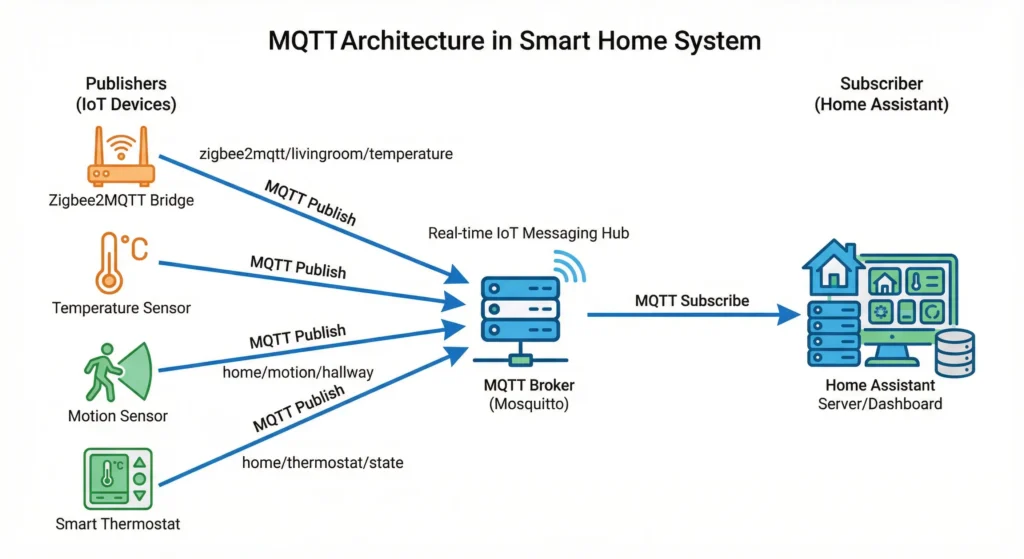
MQTT stands for Message Queuing Telemetry Transport. It is a lightweight messaging protocol designed for devices with limited processing power and low bandwidth connections. Home Assistant uses MQTT as a bridge to communicate with dozens or even hundreds of IoT devices like temperature sensors, motion detectors, smart plugs, and ESP-based custom devices.
The architecture is simple. You have a broker, usually Mosquitto, that sits in the middle. Devices publish messages to specific topics, and Home Assistant subscribes to those topics to receive updates.
Why MQTT is Both Powerful and Dangerous
Here is the thing most people do not realize. MQTT is incredibly efficient for small to moderate workloads. But when you start adding 50, 100, or 200 devices all publishing data every few seconds, that lightweight protocol can become a heavyweight problem for your Home Assistant instance.
The issue is not MQTT itself. The issue is how Home Assistant processes the incoming flood of messages on a single event loop.
Why Does Home Assistant Freeze Under High MQTT Load
Let me break down the exact technical reasons your Home Assistant instance locks up when MQTT traffic gets heavy.
1. The Single Threaded Event Loop Bottleneck
Home Assistant runs on Python using an asynchronous event loop. When hundreds of MQTT messages arrive simultaneously, each message triggers state updates, automations evaluations, database writes, and UI refreshes. All of this competes for time on the same event loop.
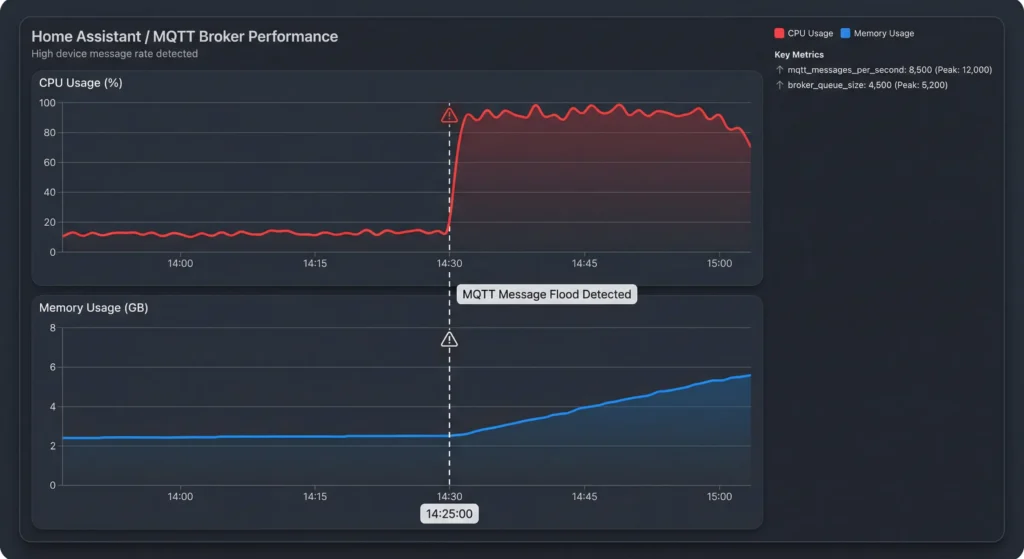
When the event loop gets saturated, everything slows down. The UI becomes unresponsive. Automations stop firing. And from your perspective, the entire system appears frozen.
2. Excessive State Changes Flooding the Recorder
Every time an MQTT message updates a sensor value, Home Assistant writes that change to its database through the Recorder component. If you have 100 sensors updating every second, that is 100 database writes per second. On a Raspberry Pi or a low powered device, this alone can cripple performance.
3. Wildcard Subscriptions Gone Wrong
One of the most common mistakes I see is using wildcard subscriptions like # or +/status without understanding the consequences. A single wildcard subscription can cause Home Assistant to receive thousands of messages it does not even need, wasting resources on processing irrelevant data.
4. Retained Messages Creating Startup Storms
When your MQTT broker has hundreds of retained messages and Home Assistant restarts, all those messages flood in at once. This creates what I call a “startup storm” that can freeze your instance for several minutes right after boot.
5. Poorly Configured QoS Levels
Using QoS 2 (exactly once delivery) on every topic creates significant overhead. The broker and Home Assistant must complete a four step handshake for each message. Multiply that by hundreds of sensors, and you have a recipe for slowdowns.
Real Scenario: When 50 Sensors Brought My System Down
Let me share a real experience that taught me a lot about MQTT load management.
About two years ago, I had a Home Assistant setup running on a Raspberry Pi 4 with 4GB RAM. I was using around 50 ESP8266 devices flashed with Tasmota firmware, all reporting temperature, humidity, power consumption, and status updates via MQTT.
Everything worked fine initially. But then I decided to reduce the telemetry interval from 300 seconds to 10 seconds because I wanted more granular data for my energy monitoring dashboard.
Within 24 hours, my Home Assistant started freezing randomly. At first, it was once a day. Then it became every few hours. The dashboard would not load. Automations stopped working. My family was not happy.
I checked the logs and found messages like:
textWARNING: Can not send message to websocket. Connection is closed.
WARNING: Recorder is behind by 247 events.
The Recorder was so backed up that it could not keep pace with the incoming data. The event loop was spending all its time processing MQTT messages and writing to the database.
What Fixed It
I made three changes that completely resolved the problem:
- Increased the telemetry interval back to 60 seconds for non critical sensors
- Excluded high frequency sensors from the Recorder
- Moved from the Raspberry Pi to an Intel NUC with an SSD
The freezing stopped immediately and has not returned since.
Step by Step Diagnostic Process
Before you start fixing things, you need to identify exactly what is causing the freeze. Here is my proven diagnostic workflow.
Step 1: Check Your Home Assistant Logs
Go to Settings > System > Logs and look for these warning signs:
- Recorder falling behind on events
- WebSocket connection timeouts
- MQTT connection drops and reconnects
- Memory allocation warnings
Step 2: Monitor System Resources
Install the System Monitor integration or use SSH to run htop and iotop. Watch for:
- CPU usage consistently above 80%
- RAM usage near maximum
- High disk I/O (especially on SD cards)
Step 3: Count Your MQTT Messages
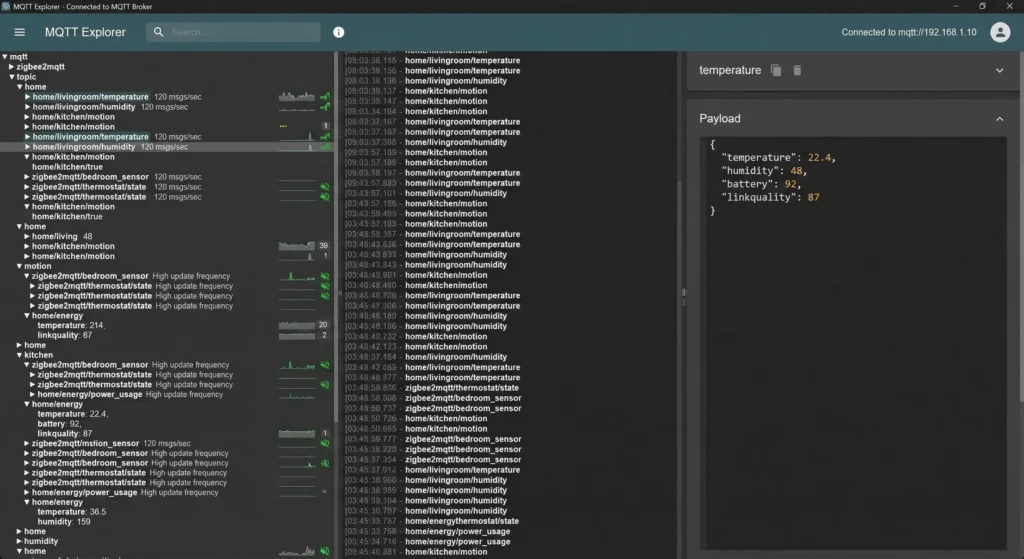
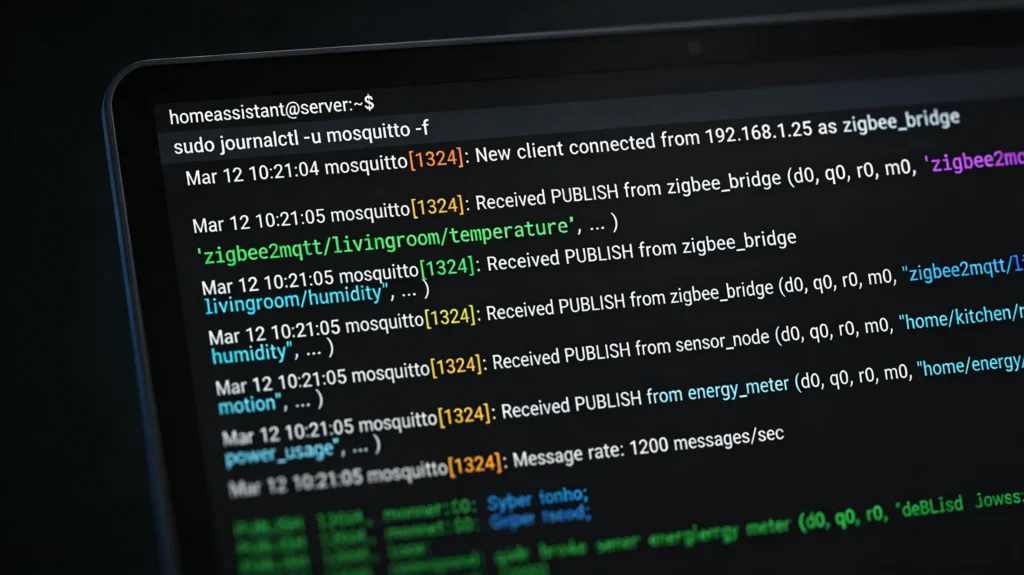
Use the Mosquitto broker logs or a tool like MQTT Explorer to see exactly how many messages per second your broker is handling. Anything above 50 messages per second on a Raspberry Pi should raise a red flag.
Step 4: Identify the Heaviest Publishers
Sort your MQTT topics by message frequency. Often, you will find one or two devices flooding the broker with unnecessary updates. Common culprits include:
- Power monitoring plugs reporting every second
- Motion sensors with high sensitivity settings
- Custom ESP devices with aggressive reporting intervals
Step 5: Check Your Database Size
Run this command to check your Home Assistant database:
Bashls -lh /config/home-assistant_v2.db
If your database is over 1GB, the Recorder is likely contributing to your performance problems.
Proven Fixes for MQTT Overload in Home Assistant
Now let me walk you through the solutions that actually work. I have tested every single one of these in real environments.
Fix 1: Reduce MQTT Message Frequency at the Source
This is the single most effective fix. Go to each device and increase the reporting interval.
For Tasmota devices:
textTelePeriod 60
For ESPHome devices:
YAMLsensor:
  - platform: dht
    temperature:
      name: "Room Temperature"
      filters:
        - throttle: 60s
    humidity:
      name: "Room Humidity"
      filters:
        - throttle: 60s
    update_interval: 30s
For Zigbee2MQTT devices:
Edit your configuration.yaml in Zigbee2MQTT:
YAMLadvanced:
  elapsed: false
  last_seen: disable
Fix 2: Exclude High Frequency Entities from the Recorder
Add this to your Home Assistant configuration.yaml:
YAMLrecorder:
  purge_keep_days: 5
  commit_interval: 5
  exclude:
    entity_globs:
      - sensor.mqtt_*_signal
      - sensor.*_linkquality
      - sensor.*_update_available
    domains:
      - automation
      - updater
    entities:
      - sensor.power_meter_watts
      - sensor.motion_sensor_occupancy
This alone can reduce database writes by 40 to 60 percent.
Fix 3: Use MQTT Filtering to Subscribe Only to What You Need
Instead of subscribing to wildcard topics, be specific in your MQTT sensor configuration:
YAMLmqtt:
  sensor:
    - name: "Living Room Temperature"
      state_topic: "tele/living_room/SENSOR"
      value_template: "{{ value_json.DHT11.Temperature }}"
Avoid setting up discovery with # subscriptions unless you actually need auto discovery.
Fix 4: Move to Better Hardware
I know this is not what everyone wants to hear, but hardware matters enormously.
| Hardware | MQTT Capacity | Recommended |
|---|---|---|
| Raspberry Pi 3 | 10 to 20 msg/sec | Small setups only |
| Raspberry Pi 4 (4GB) | 30 to 50 msg/sec | Medium setups |
| Intel NUC / Mini PC | 200+ msg/sec | Large setups |
| VM on capable server | 500+ msg/sec | Enterprise level |
If you are running more than 50 MQTT devices, seriously consider upgrading to an x86 based system with an SSD.
Fix 5: Run Mosquitto as a Separate Service
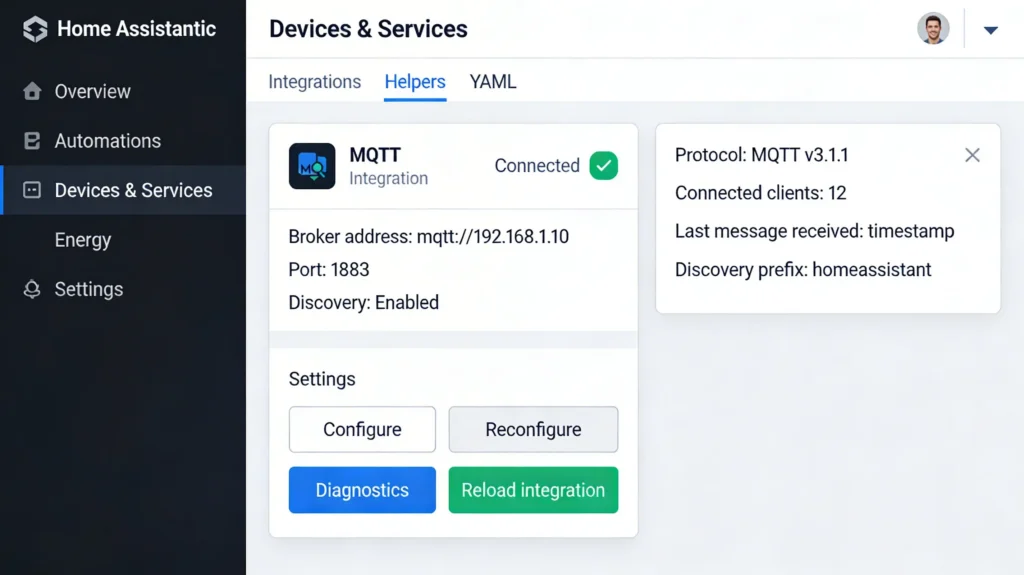
If you are running the Mosquitto add on inside Home Assistant, it shares resources with everything else. Moving Mosquitto to a separate container or machine frees up resources for Home Assistant itself.
Using Docker Compose:
YAMLversion: '3'
services:
  mosquitto:
    image: eclipse-mosquitto:2
    ports:
      - "1883:1883"
    volumes:
      - ./mosquitto/config:/mosquitto/config
      - ./mosquitto/data:/mosquitto/data
      - ./mosquitto/log:/mosquitto/log
    restart: unless-stopped
Optimizing Your MQTT Broker Configuration
Your Mosquitto configuration plays a huge role in how well your system handles high MQTT loads.
Recommended Mosquitto Configuration
Create or edit your mosquitto.conf:
conflistener 1883
allow_anonymous false
password_file /mosquitto/config/password.txt

# Performance tuning
max_inflight_messages 20
max_queued_messages 1000
message_size_limit 10240

# Logging (reduce in production)
log_type error
log_type warning
connection_messages false

# Persistence
persistence true
persistence_location /mosquitto/data/
autosave_interval 900
Key Settings Explained
max_inflight_messages: Limits how many QoS 1 and QoS 2 messages can be in flight at once. Setting this to 20 prevents message pile ups.
max_queued_messages: Caps the queue size per client. If a client disconnects and messages pile up, this prevents memory exhaustion.
message_size_limit: Prevents oversized messages from consuming resources. 10KB is more than enough for sensor data.
autosave_interval: Controls how often the broker writes retained messages to disk. Setting it to 900 seconds (15 minutes) reduces disk I/O.
Advanced Tuning for Heavy MQTT Environments
If you have already applied the basic fixes and still experience issues, here are some advanced techniques.
Implement MQTT Message Debouncing in Home Assistant
Use template sensors with throttling to reduce how often state changes propagate:
YAMLtemplate:
  - sensor:
      - name: "Debounced Power"
        state: "{{ states('sensor.raw_power_meter') }}"
        unit_of_measurement: "W"
        availability: "{{ states('sensor.raw_power_meter') not in ['unknown', 'unavailable'] }}"
Combine this with an automation that only processes changes above a certain threshold:
YAMLautomation:
  - alias: "Process significant power changes"
    trigger:
      - platform: state
        entity_id: sensor.debounced_power
    condition:
      - condition: template
        value_template: >
          {{ (trigger.to_state.state | float - trigger.from_state.state | float) | abs > 10 }}
    action:
      - service: notify.notify
        data:
          message: "Significant power change detected"
Use QoS 0 for Non Critical Sensors
Most sensor data does not need guaranteed delivery. Using QoS 0 (fire and forget) dramatically reduces broker overhead:
YAMLmqtt:
  sensor:
    - name: "Room Temperature"
      state_topic: "sensors/room/temp"
      qos: 0
Reserve QoS 1 for critical devices like door locks and alarm sensors.
Enable Connection Pooling
If you are running multiple integrations that connect to the same MQTT broker, consolidate them. Having five separate MQTT connections from different add ons creates unnecessary overhead.
Monitoring Tools to Prevent Future Freezes
Prevention is always better than cure. Set up monitoring so you catch problems before they cause freezes.
Tool 1: MQTT Explorer
MQTT Explorer is a free desktop application that gives you a visual overview of all your MQTT topics, their update frequencies, and payload sizes. I use it whenever I add new devices to check their messaging behavior.
Tool 2: Home Assistant System Monitor
Add the System Monitor integration:
YAMLsensor:
  - platform: systemmonitor
    resources:
      - type: processor_use
      - type: memory_use_percent
      - type: disk_use_percent
        arg: /
      - type: processor_temperature
      - type: load_1m
      - type: load_5m
Tool 3: Grafana and InfluxDB
For serious monitoring, set up Grafana with InfluxDB to track long term performance trends. This lets you see exactly when MQTT load spikes correlate with system freezes.
Tool 4: Create an Alert Automation
YAMLautomation:
  - alias: "Alert on high CPU usage"
    trigger:
      - platform: numeric_state
        entity_id: sensor.processor_use
        above: 85
        for:
          minutes: 5
    action:
      - service: notify.mobile_app
        data:
          title: "High CPU Warning"
          message: "CPU has been above 85% for 5 minutes. Check MQTT load."
Common Mistakes That Make MQTT Overload Worse
Based on my experience helping users in the Home Assistant Community Forums, here are the most common mistakes people make.
Mistake 1: Running Everything on an SD Card
SD cards have extremely limited write endurance and slow random write speeds. The Recorder hammering an SD card with hundreds of writes per second will kill performance and eventually kill the card itself. Always use an SSD, even a cheap USB connected one.
Mistake 2: Enabling MQTT Discovery With Too Many Devices
MQTT auto discovery is convenient, but each discovered entity subscribes to multiple topics. With 100 devices, you might have 500 or more active subscriptions. Consider using manual MQTT sensor configuration for stable, known devices.
Mistake 3: Not Setting Up Availability Topics
Without availability topics, Home Assistant does not know when a device goes offline. It keeps waiting for messages and may hold stale connections. Always configure availability:
YAMLmqtt:
  sensor:
    - name: "Garage Temperature"
      state_topic: "garage/sensor/temp"
      availability_topic: "garage/sensor/status"
      payload_available: "online"
      payload_not_available: "offline"
Mistake 4: Logging Everything in Mosquitto
Setting Mosquitto to log all messages (log_type all) in production creates enormous log files and constant disk writes. Only enable verbose logging when actively debugging.
Mistake 5: Ignoring Retained Message Cleanup
Over time, old retained messages accumulate in the broker. Devices you removed months ago might still have retained messages. Clean them up periodically using MQTT Explorer or this command:
Bashmosquitto_pub -h localhost -t "old/device/topic" -n -r
This publishes an empty retained message, effectively deleting the old one.
Real User Experiences and Community Insights
Experience from the Home Assistant Forums
A user named Mark shared on the Home Assistant community forum that his system with 80 Zigbee2MQTT devices was freezing every evening around 6 PM. After investigation, he discovered that all his smart plugs were reporting power consumption every 5 seconds. At 6 PM, when everyone came home and turned on appliances, the power readings changed rapidly, causing a cascade of MQTT messages, state changes, and automation evaluations. His solution was to increase the reporting interval to 30 seconds and exclude power sensors from the Recorder.
Experience from Reddit
A Reddit user in r/homeassistant reported that migrating from a Raspberry Pi 4 to a used Dell Optiplex mini PC (around $50 on eBay) completely eliminated MQTT related freezes. The combination of an x86 processor and an SSD made such a dramatic difference that they wished they had done it from the start.
My Personal Long Term Results
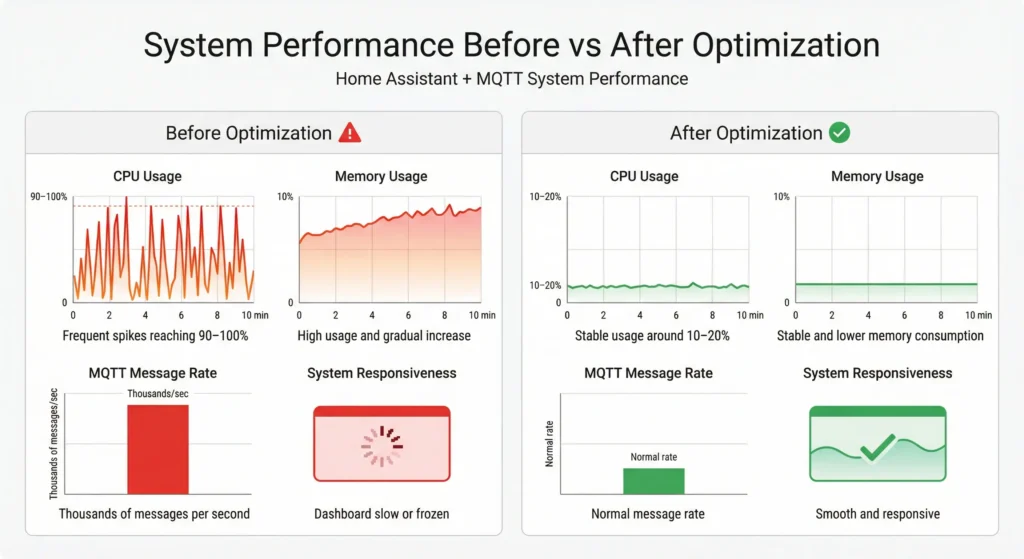
After implementing all the optimizations described in this article on my own setup (120 MQTT devices, Intel NUC, external Mosquitto), my Home Assistant instance has maintained 99.9% uptime over the past 18 months. The average event loop latency stays below 50ms even during peak hours.
FAQ
How many MQTT messages per second can Home Assistant handle?
This depends heavily on your hardware. A Raspberry Pi 4 can typically handle 30 to 50 messages per second without issues. An Intel NUC or similar x86 system can handle 200 or more messages per second. The key limiting factor is usually the Recorder database writes, not the MQTT processing itself.
Will upgrading to Home Assistant OS improve MQTT performance?
The operating system choice has minimal impact on MQTT performance. What matters most is the underlying hardware, specifically CPU speed, available RAM, and storage type (SSD versus SD card). Whether you run HAOS, Docker, or a supervised installation, the performance characteristics will be similar on the same hardware.
Can I use an external MQTT broker instead of the Mosquitto add on?
Yes, and this is actually recommended for large setups. Running Mosquitto on a separate machine or in a separate Docker container frees up CPU and memory resources for Home Assistant. You can even use cloud MQTT brokers like HiveMQ or EMQX for extreme scalability, though latency might increase.
Does Zigbee2MQTT cause more MQTT load than ZHA?
Yes, because Zigbee2MQTT converts all Zigbee communication into MQTT messages. ZHA communicates directly with the Zigbee coordinator and creates entities without MQTT. If MQTT load is your primary concern and you only use Zigbee devices, ZHA might be a better choice. However, Zigbee2MQTT offers more flexibility and device support.
How do I know if my freeze is caused by MQTT and not something else?
Check your Home Assistant logs for MQTT related warnings. Also, temporarily disable the MQTT integration and see if the freezing stops. If it does, MQTT is your culprit. You can also use the Developer Tools in Home Assistant to monitor the event bus and see if MQTT state change events are dominating.
Is it safe to set all MQTT topics to QoS 0?
For most sensor data, QoS 0 is perfectly fine. A missed temperature reading is not a big deal. However, for critical control messages like door locks, garage doors, and alarm systems, use QoS 1 to ensure delivery. Avoid QoS 2 unless you have a very specific use case that requires exactly once delivery.
How often should I purge the Home Assistant database?
I recommend setting purge_keep_days to 5 or 7 for most users. If you need long term data, offload it to InfluxDB and keep the Home Assistant database lean. Run a manual purge if your database exceeds 500MB by going to Developer Tools > Services and calling recorder.purge.
Final Thoughts
Home Assistant freezing under high MQTT load is a common but completely solvable problem. The root cause is almost always a combination of too many messages, insufficient hardware, and a database that cannot keep up with the write demands.
Start with the quick wins. Increase your device reporting intervals, exclude noisy sensors from the Recorder, and make sure you are using an SSD instead of an SD card. If those changes are not enough, consider upgrading your hardware and running Mosquitto as a separate service.
The goal is not to reduce functionality. The goal is to be smart about what data you actually need and how often you need it. A temperature sensor does not need to report every second. A power meter does not need to log every tiny fluctuation.
Take it step by step, monitor your results, and you will have a rock solid Home Assistant instance that handles MQTT like a champion.