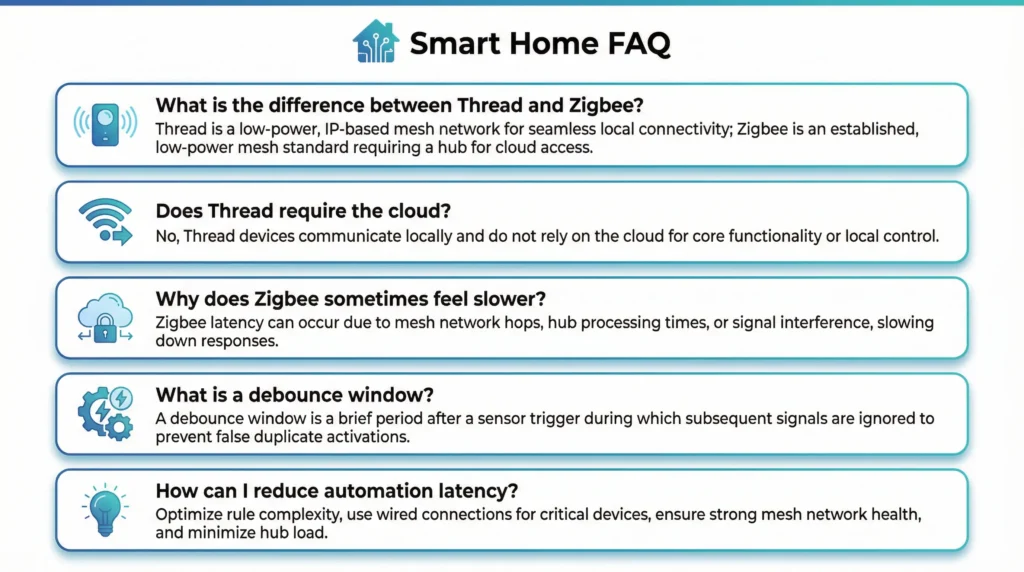
If you’re facing a Google Home routine delay when motion sensors trigger, you’re not alone. Many smart home users notice that Thread devices respond instantly while Zigbee devices take several seconds. In this guide, we break down exactly why this happens and how to fix it.
You set up a Google Home routine expecting your lights to snap on the instant you walk into a room. The motion sensor detects you. The routine fires. But instead of an instant response, you get an awkward pause sometimes two seconds, sometimes six.
The frustration doubles when you realize the delay only shows up when both your Thread-based sensor and your Zigbee-based sensor detect motion at the same time.
You are not dealing with a defective sensor or a broken routine. What you are experiencing is a predictable consequence of how Google Home’s automation engine processes events from two fundamentally different wireless protocols arriving within milliseconds of each other.
This guide breaks down the exact technical reasons behind that delay and gives you actionable steps to minimize or eliminate it entirely.
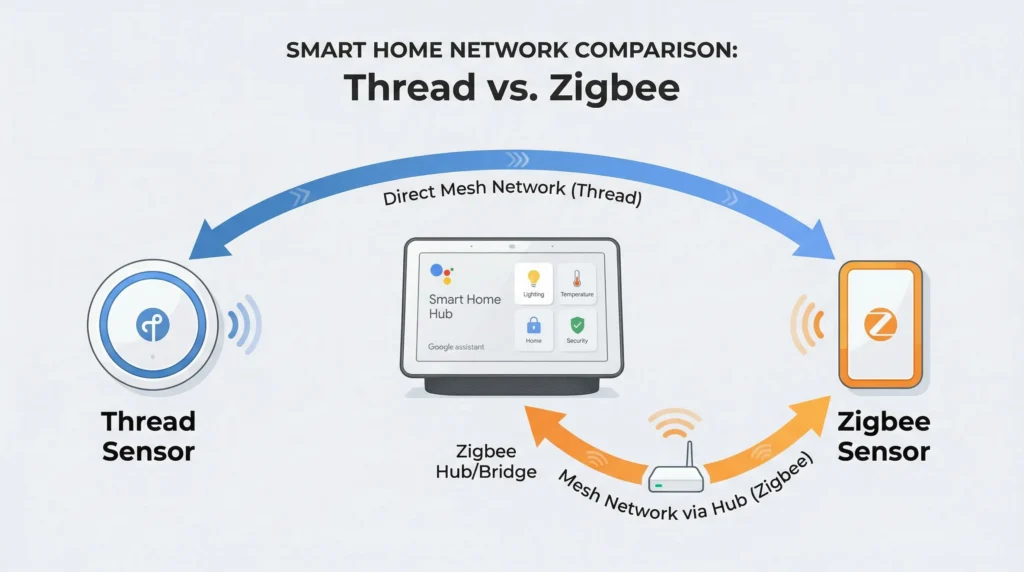
Understanding the Causes of a Google Home Routine Delay
Before you can fix the delay, you need to understand what happens behind the scenes from the moment you move until your lights actually turn on.
Every motion event follows a specific path through your network, and that path varies dramatically depending on whether the sensor communicates via Thread or Zigbee.
How a Thread Motion Sensor Communicates With Google Home
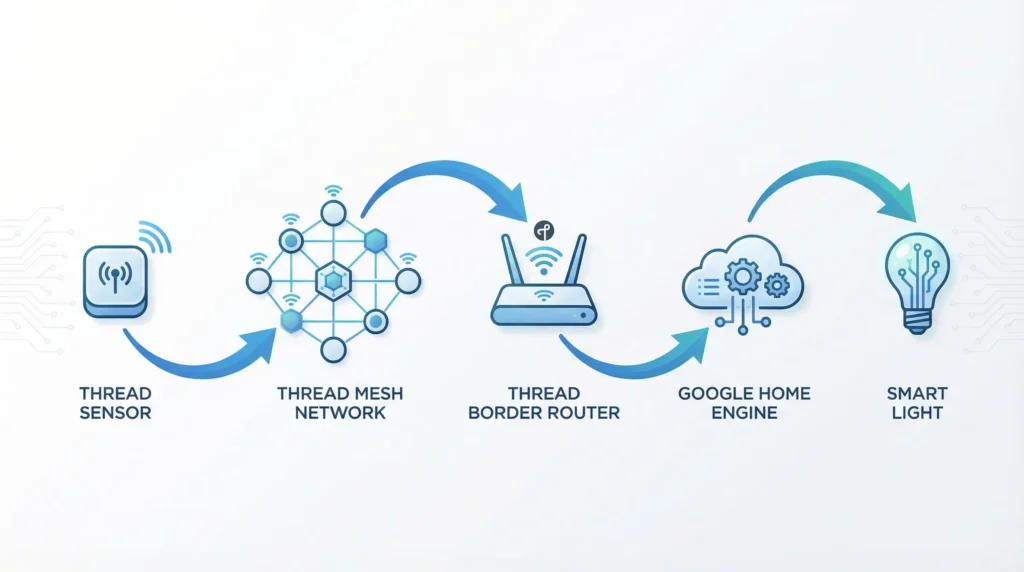
Thread is a low-power mesh networking protocol designed specifically for smart home devices. When a Thread-based motion sensor detects movement, the signal follows this path:
- The sensor detects motion and generates an event.
- The event travels across the Thread mesh network to the nearest Thread Border Router typically a Google Nest Hub (2nd Gen), Nest Wifi Pro, or a compatible Nest router.
- The border router forwards the event to Google Home’s automation engine, which in many configurations happens locally without leaving your home network.
- The automation engine evaluates your routine and sends the appropriate command to your lights, plugs, or other devices.
This entire chain is designed for speed. Because Thread leverages local processing and avoids unnecessary cloud hops, the response often feels nearly instantaneous.
How a Zigbee Motion Sensor Communicates With Google Home
Zigbee sensors take a very different route. Google’s Nest Hubs do not natively support Zigbee, so these sensors require a dedicated third-party hub to function:
- Philips Hue Bridge
- Samsung SmartThings Hub
- Aqara Hub
- Other Zigbee-compatible gateways
Here is the typical signal path:
- The Zigbee sensor detects motion and generates an event.
- The event travels over the Zigbee network to the vendor’s hub.
- The hub processes the event and then forwards it but not directly to Google Home. Instead, it goes to the vendor’s cloud platform (Hue Cloud, SmartThings Cloud, Aqara Cloud, etc.).
- The vendor’s cloud communicates with Google’s cloud through a cloud-to-cloud API integration.
- Google Home’s automation engine finally receives the event, evaluates your routine, and sends commands back to your devices.
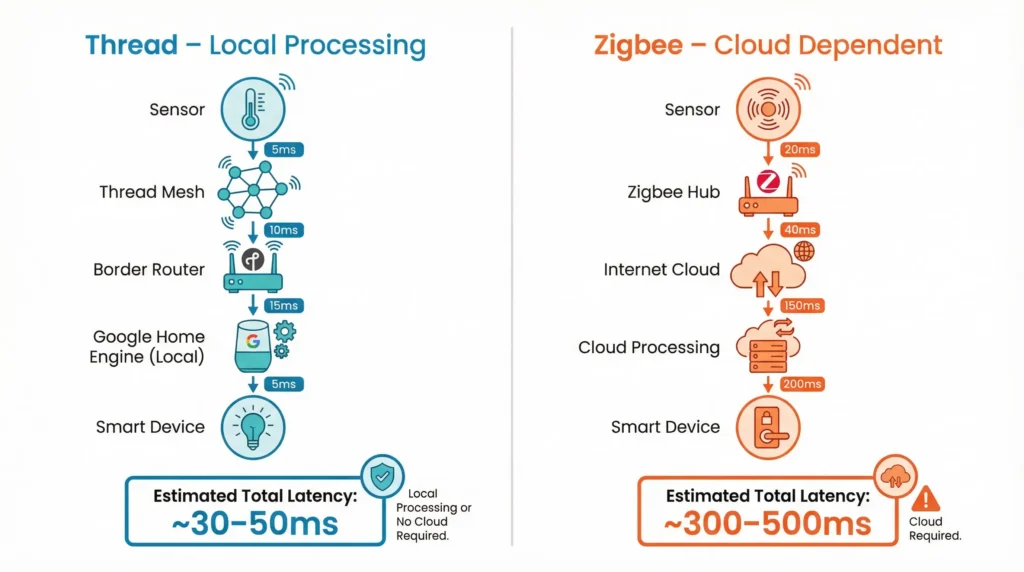
This path introduces multiple points of latency:
| Latency Source | Typical Delay |
| Zigbee to hub communication | 50–200 ms |
| Hub to vendor cloud upload | 200–800 ms |
| Vendor cloud to Google cloud | 300–1500 ms |
| Google routine processing | 200–500 ms |
| Command delivery to target device | 200–1000 ms |
The cumulative result is a noticeably slower response compared to Thread, and the delay fluctuates because it depends on internet speed, server load, and API throttling.
Where Google Home Routines Actually Execute
A common misconception is that Google Home routines run entirely on your local network. The reality is more nuanced:
- Historically, nearly all Google Home routines executed in Google’s cloud servers.
- Recently, Google has started rolling out local execution capabilities, especially through the revamped Google Home app and the Script Editor feature.
- However, in most real-world setups today, the routine logic is partially or fully cloud-dependent, particularly when the routine involves devices from multiple ecosystems.
This means that even a “simple” motion-triggered routine can involve three or more network hops between different clouds before a single light turns on.
What Exactly Happens When Both Sensors Fire Simultaneously
Now that you understand the two signal paths, here is what occurs inside Google Home when your Thread sensor and Zigbee sensor both detect motion at the same time and why it creates a delay that does not exist when only one sensor triggers.
Debounce and Deduplication Logic
Google Home’s automation engine includes built-in safeguards to prevent:
- Duplicate routine execution running the same routine twice because two sensors in the same room both detected the same motion event.
- Automation loops one routine’s output triggering another routine in rapid succession, creating an infinite chain.
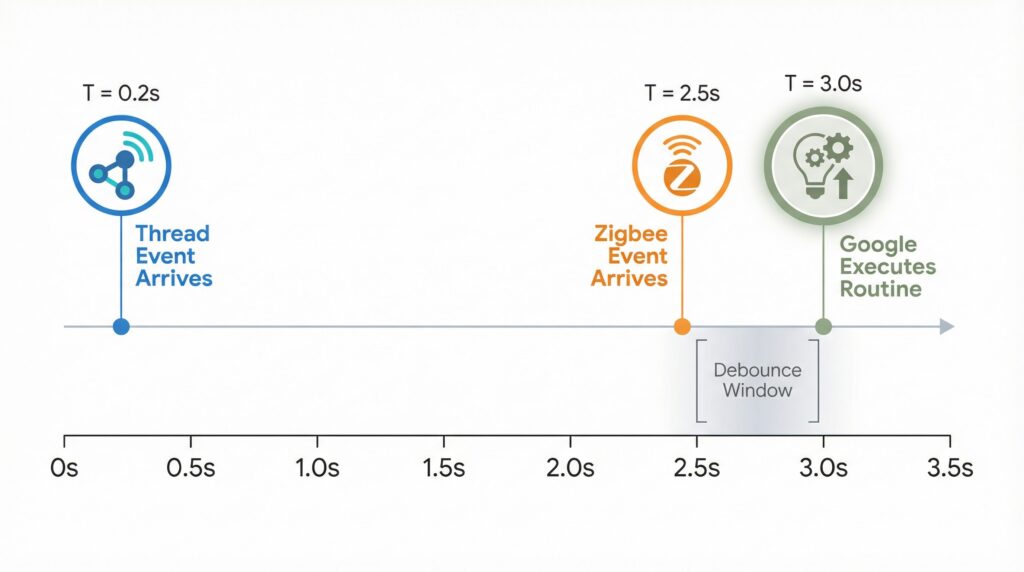
To accomplish this, Google applies a debounce window a short period during which the system collects all incoming triggers before deciding how to respond.
Here is what that looks like in practice:
- Your Thread sensor fires and the event reaches Google Home almost instantly (within 100–300 ms).
- Your Zigbee sensor fires at the same physical moment, but the event arrives at Google Home 1–3 seconds later due to the cloud-to-cloud relay.
- Google Home’s engine detects that two triggers for the same routine arrived within a short window.
- Instead of executing the routine immediately when the first trigger arrives, the engine waits to see if additional triggers are incoming, groups them together, and then executes the routine once.
That waiting period the debounce window is the primary source of the delay you are noticing.
Event Queueing and Cross-Cloud Synchronization
When triggers arrive from different protocols and different clouds, Google’s backend does not process them in a simple first-come-first-served manner. Instead:
- Events are placed into processing queues.
- Worker services evaluate conditions, check for conflicts, and normalize data from different device formats.
- The system may hold execution until it has reconciled all relevant device states especially if your routine includes conditions like “only if this other device is off” or “only between sunset and sunrise.”
This queuing and reconciliation process can add 1 to 4 seconds of additional delay, particularly during peak usage hours when Google’s servers handle millions of automation requests globally.
The “Slowest Link” Problem
Even after your routine is triggered, the execution speed is limited by the slowest device or cloud in the chain.
Consider these scenarios:
| Scenario | Bottleneck | Perceived Delay |
| Thread sensor triggers → Matter/Thread light responds | Fully local | Under 1 second |
| Thread sensor triggers → Hue light responds via cloud | Hue cloud round-trip | 2–4 seconds |
| Zigbee sensor triggers → WiFi smart bulb responds | Multiple cloud hops | 3–6 seconds |
| Both sensors trigger → Mixed protocol lights respond | Debounce + slowest cloud | 4–7 seconds |
The key insight: your routine is only as fast as its slowest component, regardless of how fast the trigger itself arrives.
Additional Factors That Amplify the Delay
Beyond the core multi-sensor issue, several other variables can stack on top and make the problem worse.
Sensor Hardware Cooldown Periods
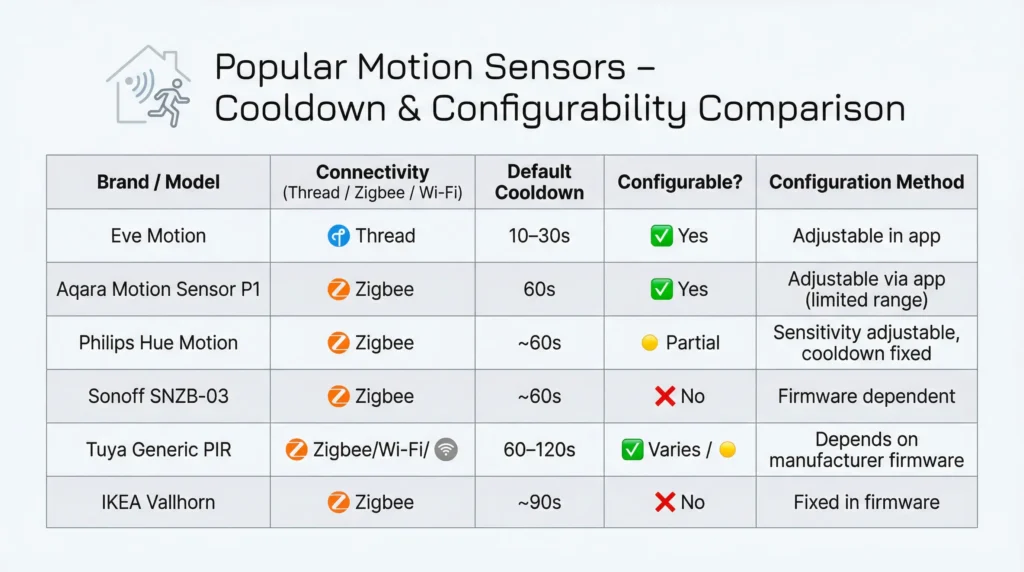
Many motion sensors include a built-in cooldown timer to conserve battery life. After detecting motion, the sensor will not report again for a set period typically 10 to 120 seconds depending on the manufacturer.
If your Thread and Zigbee sensors have different cooldown intervals, their events become staggered in unpredictable ways, further confusing Google Home’s deduplication logic.
Common cooldown defaults:
- Eve Motion (Thread): ~10 seconds (configurable)
- Hue Motion Sensor (Zigbee): ~10 seconds (configurable in Hue app)
- Aqara Motion Sensor (Zigbee): ~60 seconds (not easily configurable)
- SmartThings Motion Sensor: ~30 seconds
Third-Party Hub and Integration Delays
Each vendor hub introduces its own processing time:
- Philips Hue: Extremely fast for Hue-to-Hue automations (local), but adds 1–3 seconds when routed through Google Home.
- SmartThings: Cloud-dependent for most Google Home integrations, adding variable latency.
- Aqara: Some hubs support local HomeKit automations but rely on cloud for Google Home.
- Tuya-based devices: Often use polling-based integrations rather than real-time event push, causing inconsistent and sometimes significant delays.
Network Congestion and WiFi Interference
Even if your Thread mesh is rock-solid, the WiFi network that connects your hubs, border routers, and cloud services can introduce bottlenecks:
- Router overload from too many connected devices
- WiFi channel congestion in dense apartment buildings
- ISP latency spikes during peak hours
- DNS resolution delays affecting cloud API calls
These issues compound with every cloud hop in your automation chain.Proven Strategies to Reduce or Eliminate Routine Delays
While you cannot modify Google Home’s internal automation engine, you can design your smart home setup to avoid the conditions that trigger debounce delays and cross-cloud bottlenecks.
1. Assign One Protocol Per Room for Critical Automations
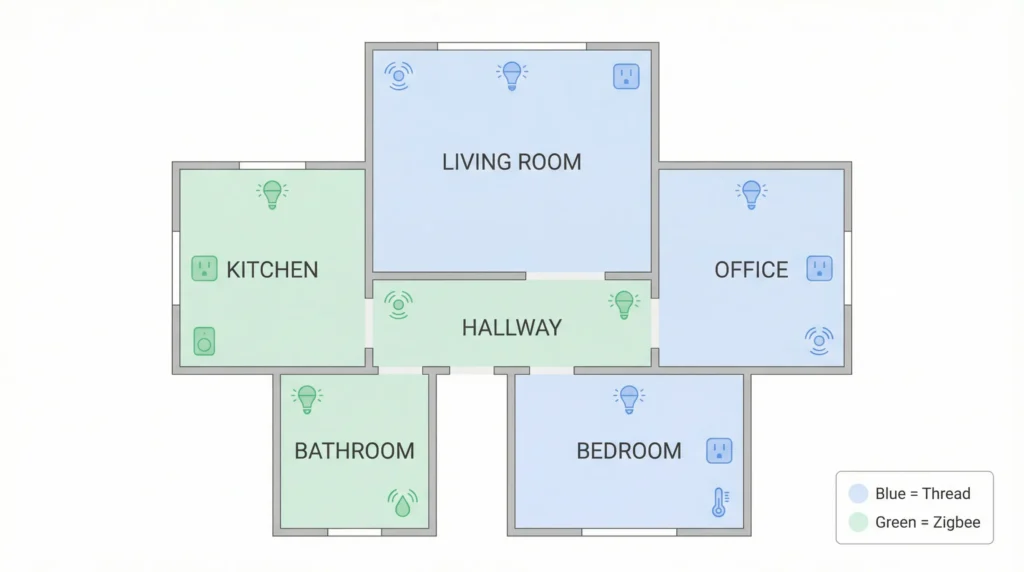
The simplest and most effective strategy: do not mix Thread and Zigbee motion triggers in the same Google Home routine.
Choose one protocol per room for time-sensitive automations:
- Living room: Thread motion sensor → Thread/Matter lights → Google Home routine
- Kitchen: Zigbee motion sensor → Zigbee lights → Handled inside the Hue or SmartThings app
Reserve the second sensor for non-critical tasks like temperature logging, occupancy tracking, or backup detection.
2. Run Time-Critical Automations on the Local Hub
If your Zigbee devices connect through a hub that supports local automations, use that capability instead of routing through Google Home:
- Philips Hue: Create motion automations directly in the Hue app. Motion → Hue Bridge → Hue lights. No cloud. No Google. Response time under 500 ms.
- SmartThings: Use SmartThings Routines for Zigbee-to-Zigbee automations with Edge drivers for local execution.
- Aqara: Use Aqara Home automations for sensor-to-device rules within the Aqara ecosystem.
Use Google Home only for:
- Voice commands (“Hey Google, turn off the bedroom lights”)
- Cross-ecosystem scenes
- Non-time-critical automations (scheduled events, reminders, announcements)
3. Prioritize Matter-Over-Thread Devices for New Purchases
When expanding your smart home, prioritize devices that support Matter over Thread:
- They communicate directly with your Nest Hub or Thread Border Router.
- They are increasingly eligible for local routine execution as Google expands this feature.
- They eliminate the need for third-party hubs and cloud integrations entirely.
The ideal fully-local automation path:
Thread Motion Sensor → Thread Border Router (Nest Hub) → Local Google Routine → Matter/Thread Light
This path can achieve response times under one second consistently.
Recommended Matter/Thread devices to consider:
- Eve Motion (Thread)
- Eve Light Switch (Thread)
- Nanoleaf Essentials bulbs (Thread)
- Wiz bulbs with Matter update (Thread/WiFi)
4. Simplify Your Routine Trigger Logic
If you must include multiple motion sensors in one Google Home routine:
- Use the “Any of these devices detect motion” trigger rather than requiring all devices.
- Avoid chaining routines that can re-trigger each other.
- Test incrementally: Start with one sensor, confirm fast response, then add the second sensor and measure the difference.
By reducing trigger complexity, you minimize the debounce window and give Google’s engine less reason to pause and reconcile.
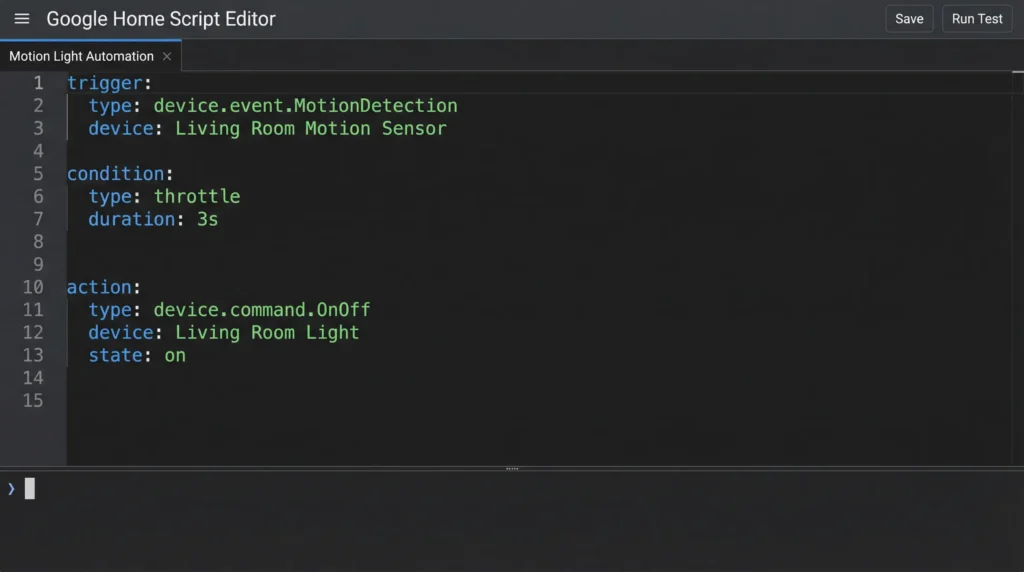
5. Leverage the Google Home Script Editor
For users with access to the Google Home Script Editor (rolling out in supported regions):
- Define explicit throttling rules for example, “ignore subsequent motion events within 15 seconds of the first trigger.”
- Separate Thread and Zigbee automations into distinct scripts with clear conditions.
- Use conditional logic to prevent conflicting triggers from creating delays.
A well-structured script removes the ambiguity that forces Google’s engine to guess how to handle simultaneous events.
What Counts as a “Normal” Delay
Even with a perfectly optimized setup, some delay is unavoidable:
| Setup Type | Expected Delay |
| Full Thread/Matter local path | 0.3 – 1 second |
| Single Zigbee sensor via hub + cloud | 1 – 3 seconds |
| Mixed Thread + Zigbee, same routine | 2 – 5 seconds |
| Multiple clouds involved (Hue + Google + WiFi bulb) | 3 – 7 seconds |
If your delay falls within 1–2 seconds in a single-protocol setup, that is normal and expected for cloud-based routine execution.
If your delay is 3–6 seconds and only appears when both sensors trigger together, you are almost certainly experiencing the debounce/deduplication behavior described above, compounded by the latency difference between the two signal paths.
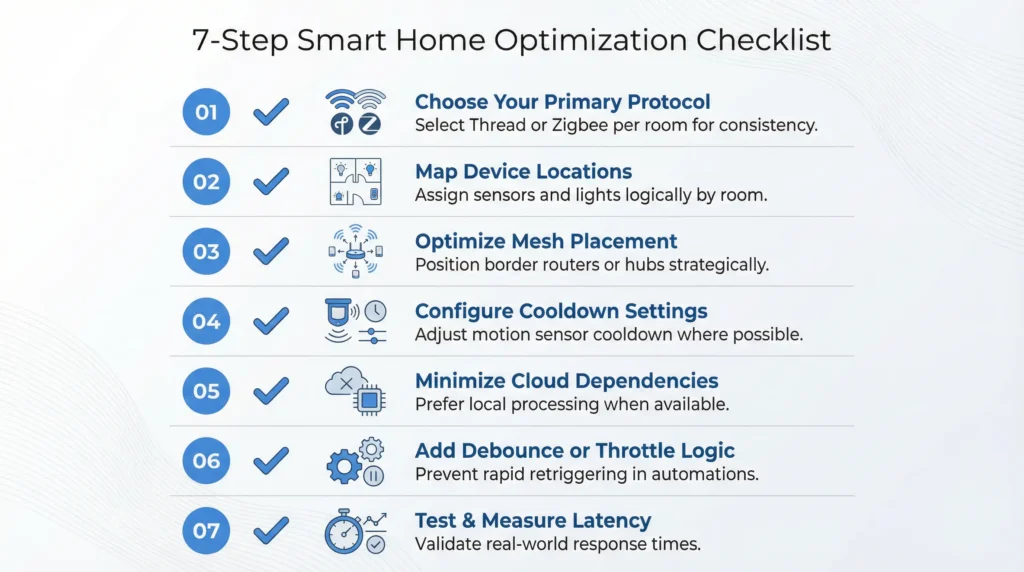
Quick Summary: Action Steps to Fix Your Delayed Routines
- ✅ Use one protocol per room for motion-triggered automations.
- ✅ Run time-critical logic on local hubs (Hue, SmartThings, Aqara) instead of Google Home.
- ✅ Buy Matter/Thread devices going forward to maximize local execution.
- ✅ Simplify routine triggers use “any sensor” logic, avoid chaining.
- ✅ Use the Script Editor for precise control over trigger handling.
- ✅ Check sensor cooldown settings and align them across devices.
- ✅ Optimize your WiFi network to reduce cloud communication delays.
Thread vs Zigbee: Latency Comparison
| Factor | Thread | Zigbee |
|---|---|---|
| Local Execution | Yes | No (via Google) |
| Cloud Dependency | Minimal | High |
| Average Trigger Delay | <1 sec | 2–4 sec |
| Hub Required | No | Yes |
Frequently Asked Questions (FAQs)
Why is my Google Home routine slow only when two motion sensors trigger at the same time?
Google Home uses a debounce window to prevent duplicate routine execution. When two sensors report motion within a short time frame, the automation engine waits to collect and reconcile both events before running the routine once. This intentional grouping behavior adds a noticeable delay that does not occur when only one sensor triggers.
Can I use both Thread and Zigbee motion sensors in the same room?
Yes, you can, but for best performance, assign only one of them as the trigger in your Google Home routine. Use the other sensor for secondary purposes like temperature monitoring, occupancy logging, or automations handled within its own hub’s app.
Is Thread always faster than Zigbee for Google Home automations?
In most Google Home setups, yes. Thread sensors communicate with the Nest Hub’s border router locally, while Zigbee sensors typically require a cloud round-trip through a third-party hub. However, Zigbee can be equally fast when automations are handled locally within the Zigbee hub (for example, Hue motion sensor controlling Hue lights directly).
How do I check if my Google Home routine runs locally or in the cloud?
Currently, Google does not provide a clear indicator in the app for whether a specific routine runs locally or in the cloud. However, routines involving only Matter/Thread devices connected to a Nest Hub are more likely to execute locally. Routines involving cloud-to-cloud integrations (Hue, SmartThings, etc.) always require cloud processing.
Will Google fix this delay in future updates?
Google is actively expanding local automation execution through the Google Home platform and Matter integration. As more devices adopt Matter over Thread and Google extends local routine processing, the reliance on cloud hops and the associated delays should decrease significantly over time.
What is the best motion sensor for fast Google Home routines?
For the fastest response in Google Home routines, choose a Matter-certified Thread motion sensor such as the Eve Motion. These sensors communicate locally with your Thread Border Router, avoiding the cloud delays associated with Zigbee-based sensors routed through third-party hubs.
Does resetting my Google Nest Hub fix motion routine delays?
Resetting your Nest Hub may temporarily improve performance if cached data or software glitches are contributing to the delay. However, it will not resolve delays caused by the fundamental architecture differences between Thread and Zigbee signal paths. The strategies outlined in this guide address the root causes more effectively.