

Introduction: When Your Smart Lights Have a Mind of Their Own
Let me paint you a picture. It’s 2 AM. You’re sound asleep. Suddenly, your living room lights blaze on at full brightness. Your partner jolts awake and asks, “Did you set that automation?” You didn’t. Nobody did. Your smart home just decided it was time for a light show.
If you’re running a mixed Zigbee and Matter lighting setup, this scenario probably sounds painfully familiar. I’ve been there — staring at my phone at 3 AM, scrolling through automation logs, trying to figure out why my kitchen lights triggered when the motion sensor in the garage detected my cat.
The truth is, mixing Zigbee and Matter devices in a single smart home ecosystem is increasingly common. Matter is the new kid on the block, promising universal compatibility. Zigbee has been the backbone of smart lighting for over a decade. But when you combine them? Things can get messy — fast.
In this article, I’m going to walk you through exactly why this happens, what’s going on under the hood, and most importantly, how to fix it so your automations run reliably every single time. No fluff. No generic advice. Just real solutions from someone who’s spent way too many nights debugging smart home setups.
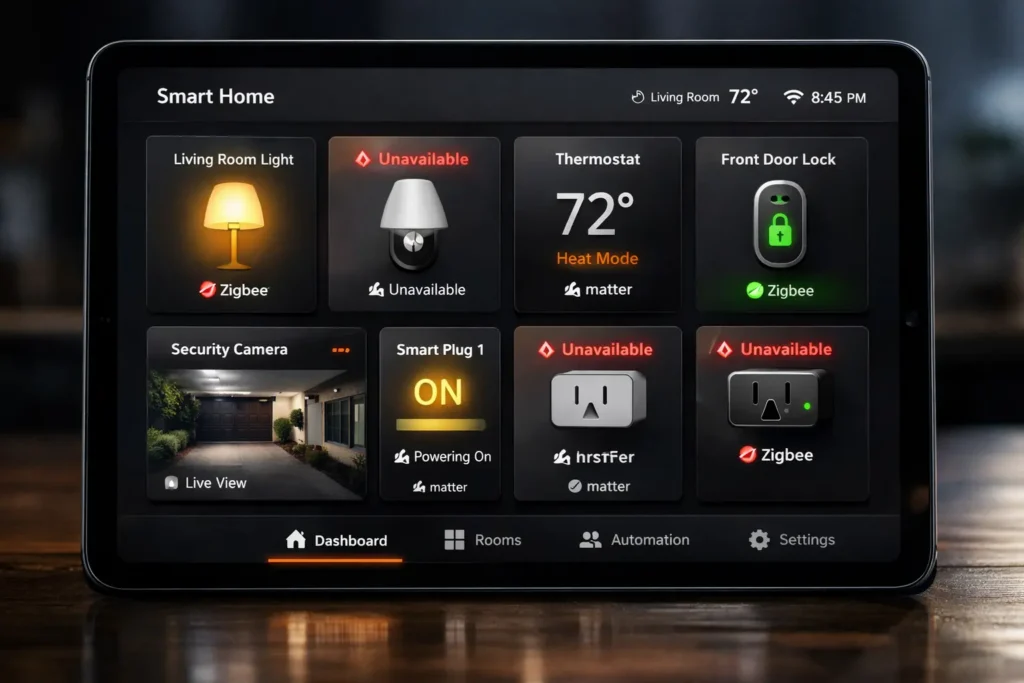
[📷 Image Placeholder 1]
Suggested Image: A smart home dashboard showing mixed Zigbee and Matter devices with some showing “unavailable” status
Alt Text: “Smart home dashboard displaying mixed Zigbee and Matter lighting devices with intermittent connectivity issues”
Understanding the Core Problem: Why Zigbee and Matter Don’t Always Play Nice
The Protocol Translation Bottleneck
Here’s the thing most people don’t realize: Zigbee and Matter speak fundamentally different languages at the network level.
Zigbee operates on IEEE 802.15.4 radio protocol at 2.4 GHz, using a mesh network topology where devices relay messages to each other. It has its own addressing scheme, its own cluster library (ZCL), and its own way of defining device capabilities.
Matter, on the other hand, runs over Thread (which also uses 802.15.4 but with IPv6 addressing) or Wi-Fi. Matter uses a completely different data model, different commissioning process, and different device interaction patterns.
When you create an automation that involves both protocols — say, a Zigbee motion sensor triggering a Matter light bulb — your smart home hub has to:
- Receive the Zigbee signal from the sensor
- Interpret the Zigbee cluster command
- Translate it into a Matter-compatible instruction
- Route it to the Matter fabric
- Deliver it to the Matter device
Each of these steps is a potential failure point. And when any one of them hiccups, your automation either doesn’t fire, fires late, or fires at the wrong time.
The Mesh Network Conflict
This is where things get really interesting — and really frustrating.
Both Zigbee and Thread (Matter’s primary radio protocol) operate on the 2.4 GHz band using IEEE 802.15.4. They share the same radio spectrum but use different network layers. This means they can actually interfere with each other at the radio level.
Imagine two people trying to have separate phone conversations in the same small room. They can technically do it, but there will be moments when they talk over each other, miss words, or have to repeat themselves. That’s essentially what’s happening with your Zigbee and Thread devices.
This radio-level interference manifests as:
- Delayed message delivery (automations trigger 2-30 seconds late)
- Dropped messages (automations don’t trigger at all)
- Duplicate messages (automations trigger multiple times)
- Ghost triggers (automations fire without any apparent cause)
[📷 Image Placeholder 2]
Suggested Image: Diagram showing Zigbee and Thread/Matter networks operating on overlapping 2.4 GHz channels
Alt Text: “Network diagram illustrating how Zigbee and Thread Matter protocols overlap on the 2.4 GHz radio spectrum causing interference”
Real-World Scenarios: What Intermittent Triggers Actually Look Like
Scenario 1: The Phantom Motion Detection
Setup: Zigbee motion sensor (Aqara P1) → Automation → Matter light bulb (Nanoleaf Essentials via Thread)
What happens: The lights turn on randomly, even when no motion is detected. Checking the automation log shows the motion sensor reported “motion detected” — but no one was in the room.
Root cause: The Zigbee motion sensor’s “clear” message (motion no longer detected) was dropped due to radio congestion. The hub still thought motion was active from a previous legitimate detection, so when it re-polled the sensor state, it interpreted the stale “active” state as a new trigger.
Scenario 2: The Delayed Sunset Scene
Setup: Time-based trigger → Automation → Mixed Zigbee bulbs (IKEA TRÅDFRI) + Matter bulbs (Eve Light Strip via Thread)
What happens: At sunset, the Zigbee bulbs turn on immediately, but the Matter bulbs either turn on 10-45 seconds later or don’t turn on at all.
Root cause: The hub processes the Zigbee commands first through its native Zigbee coordinator, then has to separately issue Matter commands through the Matter controller. Under load, the Matter fabric takes longer to respond, especially if the Thread border router is also handling other traffic.
Scenario 3: The Double-Tap Ghost
Setup: Matter smart switch (Eve) → Automation → Zigbee light group (Philips Hue via Zigbee)
What happens: Pressing the switch once occasionally triggers the automation twice, turning the lights on and then immediately off (or vice versa).
Root cause: The Matter switch sends a command, the hub acknowledges it, but the acknowledgment is lost on the return path. The switch retransmits the command (as per Matter’s reliability protocol), and the hub treats it as a second, separate press.
[📷 Image Placeholder 3]
Suggested Image: Screenshot of an automation log showing duplicate trigger entries with timestamps seconds apart
Alt Text: “Home Assistant automation log showing duplicate trigger events from a mixed Zigbee Matter lighting setup”
Diagnosing the Problem: A Step-by-Step Approach
Before you start changing settings randomly (we’ve all been there), let’s diagnose systematically. Here’s exactly how I approach this:
Step 1: Map Your Current Network Architecture
Before fixing anything, you need to understand what you’re working with.
Create a simple spreadsheet with these columns:
- Device Name
- Protocol (Zigbee / Matter-Thread / Matter-Wi-Fi)
- Hub/Bridge it connects to
- Zigbee Channel (if applicable)
- Thread Channel (if applicable)
- Physical location
- Role in automations
This mapping exercise alone often reveals the problem. I once helped a friend debug his setup and discovered he had his Zigbee coordinator and Thread border router sitting literally 6 inches apart on the same shelf — both operating on overlapping channels.
Step 2: Check for Channel Conflicts
This is the single most common cause of intermittent issues in mixed setups.
Zigbee uses channels 11-26 on the 2.4 GHz band.
Thread uses channels 11-26 on the same band.
If your Zigbee network is on channel 15 and your Thread network is on channel 15 (or an adjacent channel), you will have interference. Period.
How to check:
For Zigbee (in Home Assistant):
- Go to Settings → Devices & Services → Zigbee Home Automation (ZHA) → Configure → Network Settings
- Note your current channel
For Thread (in Home Assistant):
- Go to Settings → Devices & Services → Thread → Configure
- Check the active Thread dataset for the channel
For Philips Hue Bridge:
- Open Hue app → Settings → Hue Bridges → Your Bridge → Zigbee Channel
Recommended channel separation:
| Zigbee Channel | Thread Channel | Wi-Fi Channel | Status |
|---|---|---|---|
| 15 | 25 | 1 | ✅ Good |
| 20 | 25 | 6 | ✅ Good |
| 11 | 15 | 11 | ❌ Conflict |
| 25 | 25 | 11 | ❌ Direct Conflict |
| 15 | 20 | 1 | ✅ Good |
The golden rule: Keep at least 5 channels between your Zigbee and Thread networks, and make sure neither conflicts with your Wi-Fi channels.
Step 3: Evaluate Your Hub’s Processing Capacity
Not all hubs handle multi-protocol automations equally.
Hubs that handle mixed setups well:
- Home Assistant Yellow (with dedicated Zigbee and Thread radios)
- Home Assistant Green + SkyConnect (with multiprotocol firmware — though with caveats)
- Apple HomePod Mini (for Thread) + separate Zigbee bridge
Hubs that struggle:
- Single-radio solutions running multiprotocol firmware (Zigbee + Thread on one chip)
- Older SmartThings hubs with Matter support bolted on
- Amazon Echo devices trying to bridge both protocols
If you’re running a multiprotocol setup on a single radio (like the SkyConnect with multi-PAN firmware), this is very likely your problem. The radio has to time-share between Zigbee and Thread, and under load, it drops packets.
Step 4: Audit Your Automations for Race Conditions
A race condition occurs when an automation’s outcome depends on the timing of events that aren’t guaranteed to happen in a specific order.
Example of a race condition:
YAMLautomation:
  trigger:
    - platform: state
      entity_id: binary_sensor.zigbee_motion_sensor
      to: "on"
  action:
    - service: light.turn_on
      target:
        entity_id:
          - light.matter_ceiling    # Matter device
          - light.zigbee_lamp       # Zigbee device
      data:
        brightness: 255
        color_temp: 350
In this automation, both lights receive the command simultaneously. But the Zigbee lamp responds in ~50ms while the Matter light takes ~200-500ms. If you have a condition that checks the state of these lights downstream, you’ll get inconsistent results.
[📷 Image Placeholder 4]
Suggested Image: Flowchart showing the message path from a Zigbee sensor through a hub to a Matter light with potential failure points highlighted
Alt Text: “Flowchart diagram showing automation message path between Zigbee sensor and Matter light bulb with failure points marked”
Fixing the Problem: Practical Solutions That Actually Work
Solution 1: Separate Your Radio Hardware
This is the #1 fix. If you’re currently running multiprotocol firmware on a single radio, stop. Get dedicated hardware for each protocol.
What you need:
- A dedicated Zigbee coordinator (e.g., SONOFF Zigbee 3.0 USB Dongle Plus, ConBee II, or Tube’s Zigbee Gateway)
- A dedicated Thread border router (e.g., Apple HomePod Mini, Apple TV 4K, Google Nest Hub 2nd Gen, or a dedicated Thread radio)
Why this works: With dedicated hardware, each protocol gets its own radio, its own antenna, and its own processing pipeline. There’s no time-sharing, no packet dropping, and no radio-level interference between Zigbee and Thread within your hub.
How to migrate from multiprotocol to dedicated radios (Home Assistant):
- Back up everything — Settings → System → Backups → Create Backup
- Install a dedicated Zigbee coordinator USB dongle
- Flash it with the latest Zigbee coordinator firmware from Koenkk’s Z-Stack firmware repository
- In Home Assistant, go to Settings → Devices & Services
- Migrate your ZHA integration to the new coordinator
- Flash your SkyConnect back to Thread-only firmware
- Set up a dedicated Thread border router
- Re-commission your Matter devices
Yes, this is a pain. But it’s a one-time fix that eliminates an entire category of problems.
Solution 2: Optimize Your Zigbee and Thread Channel Assignment
If you can’t (or don’t want to) separate your hardware, at minimum fix your channel assignments.
Step-by-step process:
- Scan your Wi-Fi environment using a tool like WiFi Analyzer (Android) or built-in diagnostics on your router
- Identify which Wi-Fi channels are in use (1, 6, or 11 for 2.4 GHz)
- Choose Zigbee and Thread channels that avoid Wi-Fi overlap:
| Wi-Fi Channel | Recommended Zigbee Channel | Recommended Thread Channel |
|---|---|---|
| 1 | 20 or 25 | 15 |
| 6 | 25 | 15 |
| 11 | 15 | 20 |
- Change your Zigbee channel (note: this will require all Zigbee devices to re-join the network)
- Change your Thread channel through the Thread border router settings or by creating a new Thread network dataset
⚠️ Important Warning: Changing Zigbee channels means all your Zigbee devices will temporarily go offline and need to re-join. Do this during a time when you won’t need your smart home (if such a time exists). Some devices re-join automatically; others need manual re-pairing.
Solution 3: Add Deliberate Delays in Cross-Protocol Automations
This isn’t a hack — it’s a best practice. When your automation involves devices on different protocols, add a small delay between commands.
Before (problematic):
YAMLaction:
  - service: light.turn_on
    target:
      entity_id:
        - light.zigbee_bulb_1
        - light.matter_bulb_1
        - light.zigbee_bulb_2
        - light.matter_bulb_2
After (reliable):
YAMLaction:
  - service: light.turn_on
    target:
      entity_id:
        - light.zigbee_bulb_1
        - light.zigbee_bulb_2
  - delay:
      milliseconds: 500
  - service: light.turn_on
    target:
      entity_id:
        - light.matter_bulb_1
        - light.matter_bulb_2
Why this works: By grouping commands by protocol and adding a small delay, you prevent the hub from trying to process Zigbee and Matter commands simultaneously. The 500ms delay is usually enough for the Zigbee commands to complete before the Matter commands begin.
Solution 4: Strengthen Your Mesh Networks
Weak mesh networks cause unreliable message delivery, which causes intermittent automation triggers.
For Zigbee:
- Add more Zigbee router devices (any mains-powered Zigbee device acts as a router). Smart plugs are excellent for this.
- Aim for no more than 10 meters between any two Zigbee routers
- Ensure you have at least 1 router for every 6-8 end devices (battery-powered sensors)
- After adding routers, wait 24-48 hours for the mesh to optimize itself
For Thread:
- Ensure you have at least 2 Thread border routers for redundancy (e.g., two HomePod Minis)
- Thread router devices (mains-powered Thread devices) should be distributed throughout your home
- Check Thread network diagnostics in Home Assistant: Settings → Devices & Services → Thread
[📷 Image Placeholder 5]
Suggested Image: A floor plan showing optimal placement of Zigbee routers and Thread border routers for full mesh coverage
Alt Text: “Smart home floor plan showing optimal placement of Zigbee routers and Thread border routers to prevent intermittent automation issues”
Solution 5: Use Bridge-Based Integration Instead of Direct Pairing
This is a strategy shift that has made a massive difference in my own setup.
Instead of pairing all devices directly to your Home Assistant hub, use dedicated bridges:
- Philips Hue Bridge for Hue Zigbee bulbs (connects via API, not radio)
- IKEA DIRIGERA Hub for IKEA devices
- Nanoleaf controller for Nanoleaf devices
Why bridges help:
- The bridge handles all Zigbee communication locally with its own dedicated radio
- Your hub communicates with the bridge over your LAN (Ethernet/Wi-Fi) — a much more reliable connection
- No radio congestion on your hub’s Zigbee coordinator
- The bridge can expose devices to Matter, giving you a clean, single-protocol interface to your hub
Example architecture:
textZigbee Bulbs → Hue Bridge → (LAN) → Home Assistant
Thread Bulbs → Thread Border Router → Home Assistant
Matter Devices → Matter Controller → Home Assistant
This way, Home Assistant never has to deal with raw Zigbee radio traffic for those bulbs — it just sends API calls to the Hue Bridge, which is rock-solid reliable.
Solution 6: Update Everything (Seriously, Everything)
I know this sounds basic, but outdated firmware is responsible for a staggering number of mixed-protocol issues.
Your update checklist:
- Home Assistant Core (latest stable)
- Home Assistant Operating System
- ZHA or Zigbee2MQTT (latest version)
- Zigbee coordinator firmware
- Thread border router firmware
- Matter Server add-on
- Individual device firmware (Hue bulbs, IKEA devices, Nanoleaf, Eve, etc.)
- Router firmware (yes, your Wi-Fi router)
- Bridge firmware (Hue Bridge, DIRIGERA, etc.)
Matter is still a relatively young protocol, and manufacturers are actively fixing bugs. I’ve seen firmware updates resolve ghost trigger issues completely — particularly updates from Nanoleaf and Eve.
[📷 Image Placeholder 6]
Suggested Image: Screenshots of firmware update screens for various smart home devices and hubs
Alt Text: “Firmware update screens showing how to update Zigbee coordinator Thread border router and Matter device firmware”
Advanced Troubleshooting: When Basic Fixes Don’t Work
Analyzing Zigbee Traffic with Wireshark
If you’ve tried everything above and still have intermittent issues, it’s time to look at the actual radio traffic.
What you need:
- A spare Zigbee USB stick (CC2531 or similar)
- Wireshark with Zigbee dissector
- zigpy-znp or similar sniffer firmware
What to look for:
- Retransmissions — If you see the same message being sent multiple times, your mesh has delivery issues
- Route discoveries — Frequent route discoveries indicate an unstable mesh topology
- Channel noise — High noise floor readings indicate radio interference
Checking Matter Logs
In Home Assistant, you can enable debug logging for the Matter integration:
YAMLlogger:
  logs:
    matter_server: debug
    custom_components.matter: debug
Look for:
- Subscription drops — “Subscription for [device] lost” indicates connectivity issues
- CASE session failures — These indicate authentication problems in the Matter fabric
- Timeout errors — Commands sent but never acknowledged
Testing with Isolated Automations
Create test automations that isolate each protocol:
Test 1: Zigbee-only automation
- Zigbee sensor → Zigbee light
- Run for 48 hours, check for intermittent triggers
Test 2: Matter-only automation
- Matter sensor → Matter light
- Run for 48 hours, check for intermittent triggers
Test 3: Cross-protocol automation
- Zigbee sensor → Matter light
- Run for 48 hours, check for intermittent triggers
If Tests 1 and 2 work perfectly but Test 3 fails, your problem is definitively in the protocol translation layer. If Test 1 or 2 also fails, you have a protocol-specific issue that needs to be addressed independently.
My Personal Experience: What Finally Fixed My Setup
I want to share what my journey looked like, because I think it’ll help you avoid some of my mistakes.
My original setup (the broken one):
- Home Assistant on a Raspberry Pi 4
- SkyConnect running multiprotocol firmware (Zigbee + Thread)
- 23 Zigbee devices (Aqara sensors, IKEA bulbs, Sonoff plugs)
- 8 Matter devices (4 Nanoleaf bulbs over Thread, 2 Eve plugs, 2 Eve motion sensors)
- Both networks on the same radio chip
The symptoms:
- Automations worked perfectly for 2-3 days, then started misfiring
- Lights would turn on at random times
- Some automations would trigger twice
- Occasionally, all Matter devices would go “unavailable” for 5-10 minutes
What I tried (in order):
- ❌ Restarting Home Assistant — temporary fix, problems returned within hours
- ❌ Moving the SkyConnect to a USB extension cable — slight improvement, but didn’t fix it
- ❌ Reducing the number of automations — no improvement
- ✅ Changing Zigbee channel from 11 to 20 — reduced issues by ~50%
- ✅ Adding a dedicated Zigbee coordinator (SONOFF dongle) — massive improvement
- ✅ Flashing SkyConnect to Thread-only firmware — eliminated remaining issues
- ✅ Adding a second HomePod Mini as Thread border router — improved Matter response times
My current setup (rock solid for 4+ months):
- Home Assistant on a mini PC (upgraded from Pi 4)
- SONOFF Zigbee 3.0 Plus dongle for Zigbee (channel 20)
- Two Apple HomePod Minis as Thread border routers (channel 25)
- Wi-Fi on channel 1 (no overlap with either protocol)
- All automations include protocol-grouped commands with 500ms delays
- Zero phantom triggers since the migration
The total cost of fixing the problem was about $35 (SONOFF dongle + USB extension cable). That’s it. Best $35 I ever spent on my smart home.
[📷 Image Placeholder 7]
Suggested Image: Before and after comparison of a smart home network diagram showing the migration from single-radio to dedicated-radio setup
Alt Text: “Before and after smart home network architecture showing migration from single multiprotocol radio to dedicated Zigbee and Thread hardware”
Prevention: Building a Mixed Setup That Works from Day One
If you’re just starting out with a mixed Zigbee/Matter setup, or if you’re rebuilding after troubleshooting, here’s the architecture I recommend:
The Ideal Mixed-Protocol Architecture
textLayer 1: Devices
├── Zigbee Sensors & Lights
├── Thread/Matter Sensors & Lights
└── Wi-Fi Devices

Layer 2: Protocol Controllers (SEPARATE HARDWARE)
├── Dedicated Zigbee Coordinator (USB dongle)
├── Dedicated Thread Border Router(s) (HomePod/Nest Hub)
└── Wi-Fi Router

Layer 3: Integration Hub
└── Home Assistant (or equivalent)

Layer 4: Automations
└── Protocol-aware automation design
Rules for Reliable Mixed-Protocol Automations
- Never mix protocols in a single “call service” action — group by protocol
- Always add delays between cross-protocol commands — 300-500ms minimum
- Use “wait for trigger” instead of assuming state changes — verify the device actually responded before proceeding
- Set appropriate timeouts — don’t let automations hang indefinitely waiting for a response
- Implement fallback actions — if a Matter light doesn’t respond within 5 seconds, try again
- Monitor your automation success rate — use Home Assistant’s logbook and create alerts for failed automations
Frequently Asked Questions (FAQ)
Can Zigbee and Matter devices coexist without issues?
Yes, absolutely — but only with proper network planning. The key is dedicated hardware for each protocol, proper channel separation (at least 5 channels apart), and protocol-aware automation design. Many users run mixed setups with zero issues once these fundamentals are in place.
Should I convert all my Zigbee devices to Matter?
Not necessarily. Zigbee is a mature, proven protocol with a massive device ecosystem. Matter is still evolving, and many Matter devices actually use Zigbee bridges under the hood (like Hue). Keep your Zigbee devices if they work well, and add Matter devices as needed. There’s no benefit to converting for conversion’s sake.
Does the SkyConnect multiprotocol firmware work reliably?
In my experience and based on extensive community feedback, multiprotocol firmware on a single radio is the #1 cause of intermittent issues in mixed setups. Silicon Labs has improved the firmware significantly, but physics is physics — time-sharing a single radio between two protocols will always have limitations. For the best reliability, use dedicated hardware.
Why do my Matter devices show as “unavailable” periodically?
This is usually caused by Thread network instability. Common causes include: only having one Thread border router (add a second for redundancy), Thread and Zigbee channel conflicts, or the Thread border router losing its connection to your network. Check your Thread network topology in Home Assistant’s Thread integration page.
Will Matter eventually replace Zigbee?
Matter is designed to be a unifying application layer, not a replacement for radio protocols. In fact, Zigbee Alliance (now CSA — Connectivity Standards Alliance) created Matter. Thread (the radio layer Matter prefers) and Zigbee share the same physical radio standard (IEEE 802.15.4). Long-term, we may see more Thread/Matter devices and fewer new Zigbee devices, but Zigbee will be supported for many years to come.
How many Thread border routers do I need?
At minimum two, for redundancy. If one goes offline (power outage, firmware update, etc.), the other maintains the Thread network. For larger homes (2000+ sq ft), consider three or more. Each Apple HomePod Mini, Apple TV 4K (2022+), Google Nest Hub (2nd gen), and Google Nest Hub Max can serve as a Thread border router.
Can I use Zigbee2MQTT with Matter devices?
Zigbee2MQTT handles only Zigbee devices. For Matter devices, you need a separate Matter controller (like the Matter integration in Home Assistant). However, both can coexist on the same Home Assistant instance — Zigbee2MQTT manages your Zigbee devices while the Matter Server add-on manages your Matter devices.
Do smart plugs help with Zigbee mesh reliability?
Yes, significantly. Every mains-powered Zigbee device (smart plugs, in-wall switches, wired light bulbs) acts as a Zigbee router, relaying messages throughout your mesh. Strategically placed smart plugs between your Zigbee coordinator and distant end devices can dramatically improve reliability. The SONOFF ZBMINI and IKEA TRÅDFRI Signal Repeater are popular choices.
[📷 Image Placeholder 8]
Suggested Image: Infographic summarizing the key fixes for mixed Zigbee/Matter lighting automation issues
Alt Text: “Infographic summarizing six key solutions for fixing intermittent automation triggers in mixed Zigbee and Matter smart home lighting setups”
Useful External Resources
Here are some authoritative resources that dive deeper into the topics covered in this article:
- Home Assistant Matter Integration Documentation
- Connectivity Standards Alliance (CSA) — Matter Protocol Overview
- Zigbee Alliance — Zigbee 3.0 Specification
- Thread Group — Thread Protocol Technical Overview
- Home Assistant Community Forum — Multi-Protocol Discussion
- Zigbee2MQTT Documentation
- Silicon Labs Multiprotocol (Multi-PAN) Architecture Guide
Final Thoughts: Your Smart Home Should Work for You, Not Against You
Mixed Zigbee and Matter setups aren’t inherently broken. They just require intentional design. The devices themselves are fine. The protocols are fine. The problem almost always comes down to how they’re deployed together — shared radios, conflicting channels, and automations that don’t account for the realities of multi-protocol communication.
If you take away just three things from this article, let them be these:
- Separate your radio hardware. Don’t time-share a single chip between Zigbee and Thread.
- Separate your radio channels. Keep at least 5 channels between Zigbee and Thread, and avoid Wi-Fi overlap.
- Design your automations for the real world. Add delays between cross-protocol commands, verify state changes, and build in fallbacks.
Do those three things, and I promise — your 2 AM phantom light shows will be a thing of the past.
Got questions about your specific setup? The Home Assistant Community Forum is an incredibly helpful resource, and so is the r/homeassistant subreddit. Don’t struggle alone — the smart home community has probably seen your exact issue before.
[📷 Image Placeholder 9]
Suggested Image: A peaceful, well-lit smart home living room with multiple smart lighting devices working harmoniously
Alt Text: “Modern smart home living room with mixed Zigbee and Matter smart lighting working reliably together”