

Table of Contents
- Introduction
- Understanding WPA3 and How It Differs from WPA2
- How Older Zigbee Hubs Connect to Your Network
- 5 Key Reasons WPA3 Breaks Older Zigbee Hub Connectivity
- Real World Scenarios and User Experiences
- 7 Proven Fixes to Restore Zigbee Hub Connectivity After Enabling WPA3
- Which Zigbee Hubs Are Most Affected by WPA3?
- Should You Sacrifice Security for Smart Home Compatibility?
- Future Proofing Your Smart Home Network
- FAQ
- Final Thoughts
Introduction
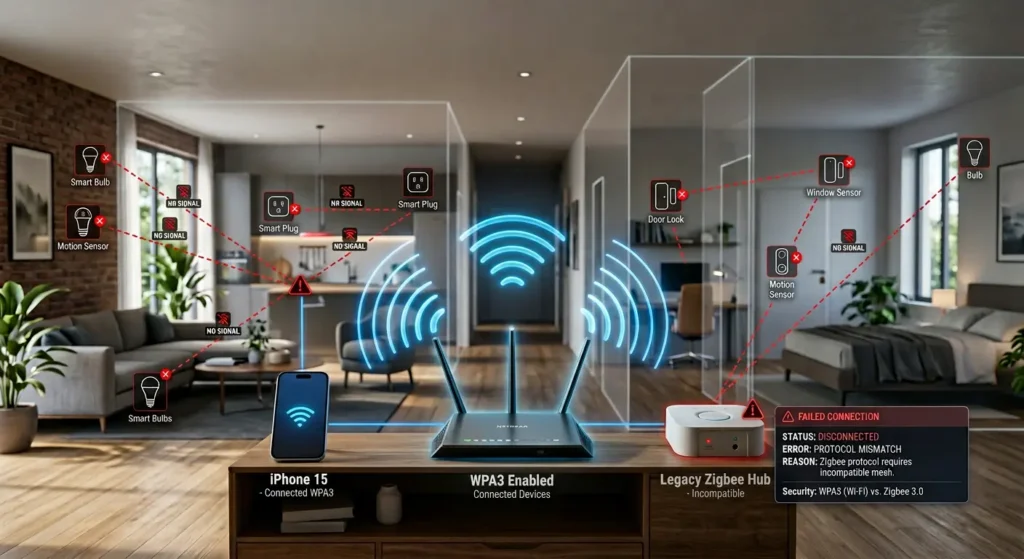
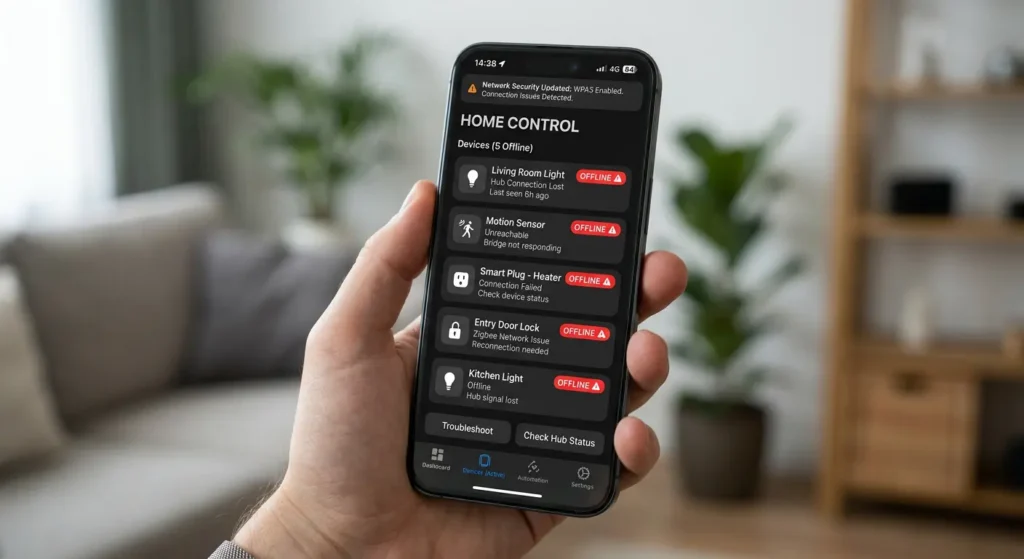
You just upgraded your router security to WPA3, feeling good about protecting your home network. Then suddenly, your smart lights stop responding, your Zigbee sensors go offline, and your entire smart home setup falls apart. You check everything, restart the hub twice, and nothing works. Sound familiar?
I have been there myself. A few months ago, I enabled WPA3 on my Asus router and within minutes, my second generation SmartThings hub completely lost its connection. My Zigbee motion sensors, door locks, and smart plugs all went dark. It took me nearly two hours of troubleshooting before I realized the culprit was the WPA3 setting I had just changed.
This is not a rare problem. Thousands of smart home users face this exact issue every day, especially those running older Zigbee hubs that were designed years before WPA3 even existed. In this article, I will explain exactly how WPA3 breaks Zigbee hub connectivity, which hubs are most affected, and give you practical solutions that keep both your security and your smart home intact.
Understanding WPA3 and How It Differs from WPA2
Before diving into the connectivity problem, let us first understand what WPA3 actually brings to the table and why it handles authentication differently than its predecessor.
What Is WPA3?
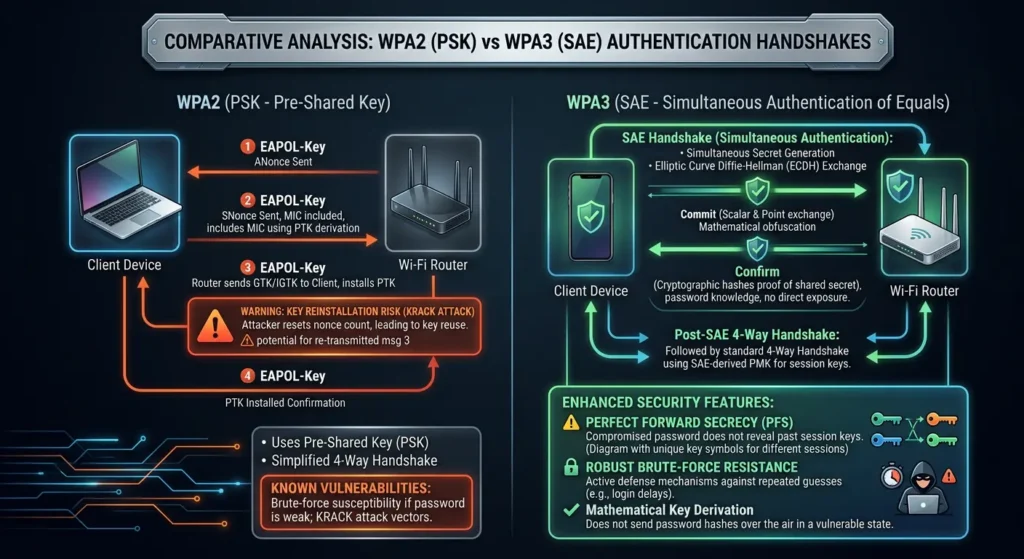
WPA3 (Wi-Fi Protected Access 3) is the latest Wi-Fi security protocol introduced by the Wi-Fi Alliance in 2018. It replaced WPA2, which had been the standard since 2004. WPA3 was designed to address several vulnerabilities discovered in WPA2, most notably the KRACK (Key Reinstallation Attack) exploit.
Key Technical Differences Between WPA2 and WPA3
| Feature | WPA2 | WPA3 |
|---|---|---|
| Authentication Method | PSK (Pre-Shared Key) | SAE (Simultaneous Authentication of Equals) |
| Protected Management Frames (PMF) | Optional | Mandatory |
| Forward Secrecy | Not supported | Supported |
| Brute Force Protection | Vulnerable | Protected |
| Encryption Strength | 128-bit | 192-bit (WPA3-Enterprise) |
| Device Compatibility | Nearly universal | Limited to newer devices |
The most critical difference for our discussion is the shift from PSK to SAE and the mandatory requirement for Protected Management Frames (PMF). These two changes are the primary reasons older Zigbee hubs lose connectivity.
For more technical details on WPA3, you can refer to the Wi-Fi Alliance’s official WPA3 specification page.
How Older Zigbee Hubs Connect to Your Network
Here is where many people get confused. Zigbee and Wi-Fi are two completely different wireless protocols, so why would a Wi-Fi security change affect a Zigbee device?
The Dual Radio Architecture
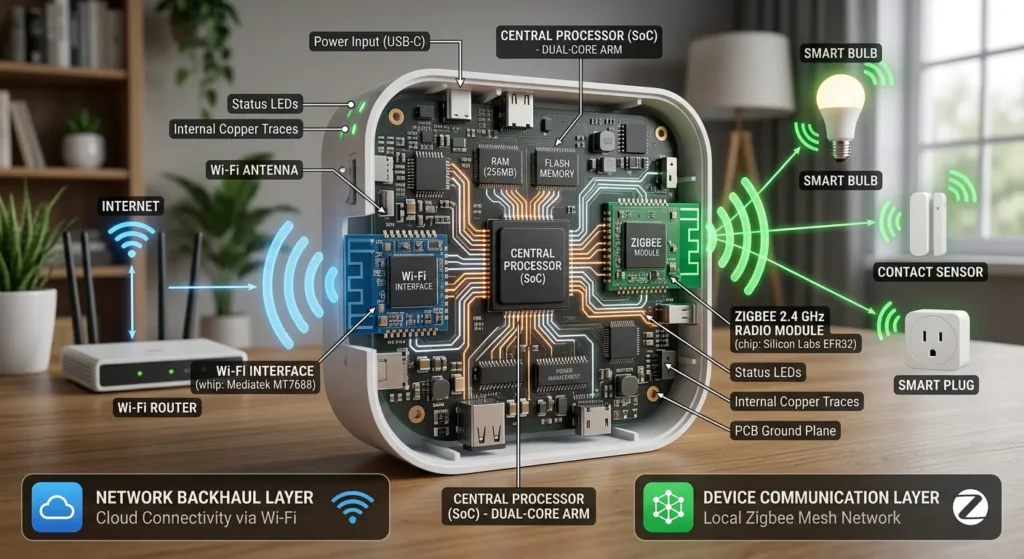
Most Zigbee hubs contain two separate radios inside them:
- A Zigbee radio (IEEE 802.15.4) that communicates with Zigbee devices like sensors, bulbs, and locks
- A Wi-Fi radio or Ethernet port that connects the hub to your home router and the cloud
The Zigbee radio handles local device communication. But the hub itself needs internet connectivity to receive commands from your phone app, sync with cloud services, process automations, and receive firmware updates.
Where the Problem Lives
When an older Zigbee hub uses Wi-Fi (not Ethernet) to connect to your home router, it must authenticate with whatever security protocol your router is broadcasting. If your router is set to WPA3-only mode, the hub’s Wi-Fi chip must support WPA3 to complete the authentication handshake.
Here is the catch: most Zigbee hubs manufactured before 2020 have Wi-Fi chips that only understand WPA2 or even WPA/WPA2 mixed mode. They literally do not have the firmware or hardware capability to perform a WPA3 SAE handshake.
Think of it this way. Your Zigbee hub is like an employee who speaks English trying to check into a hotel where the receptionist only speaks Japanese. The Zigbee devices (the employee’s tools) work perfectly fine, but the employee cannot even get through the hotel door.
5 Key Reasons WPA3 Breaks Older Zigbee Hub Connectivity
Now let us get into the specific technical reasons why enabling WPA3 causes problems for older Zigbee hubs.
Reason 1: Incompatible SAE Authentication Handshake
The biggest reason is the authentication method change. WPA2 uses a four-way handshake based on Pre-Shared Key (PSK). WPA3 replaces this with Simultaneous Authentication of Equals (SAE), which is based on the Dragonfly key exchange protocol.
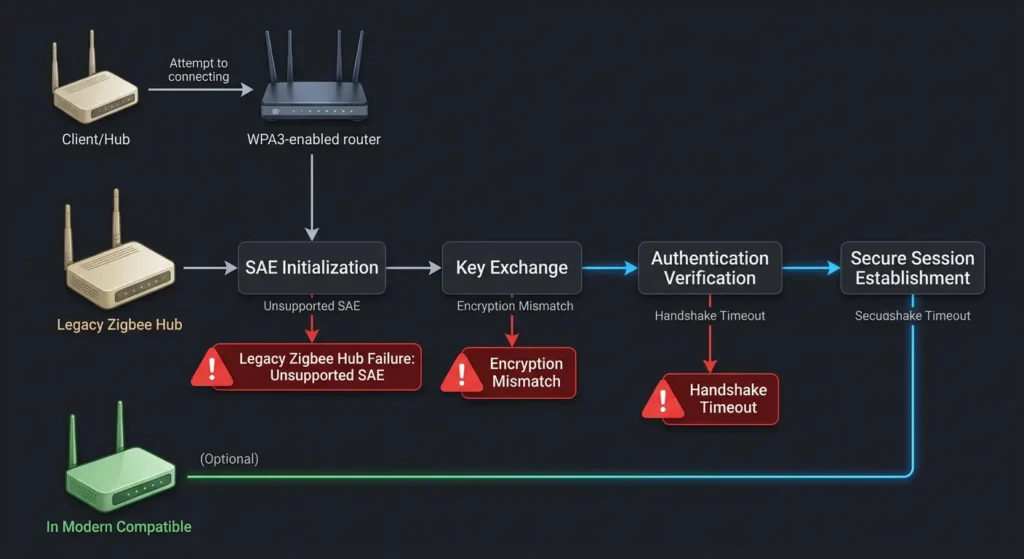
Older Zigbee hub Wi-Fi chips were programmed to perform PSK handshakes only. Their firmware does not contain the SAE algorithm. When your router broadcasts WPA3 and the hub tries to connect, the authentication simply fails because both sides are speaking different security languages.
This is not a software update issue in most cases. The Wi-Fi chips in these older hubs often lack the processing power or memory to run SAE even if a firmware update were available.
Reason 2: Mandatory Protected Management Frames (PMF)
WPA3 makes Protected Management Frames (PMF, also known as IEEE 802.11w) mandatory. PMF protects management frames like deauthentication and disassociation frames from being spoofed.
While PMF was optional in WPA2, many older devices never implemented it. When your router enforces WPA3 with mandatory PMF, devices that cannot handle protected management frames get rejected during the association process.
This is actually the sneaky one. Even some hubs that seem like they should work with WPA3 transition mode fail because of PMF enforcement rather than the SAE handshake itself.
Reason 3: WPA3 Transition Mode Inconsistencies
Many routers offer a WPA2/WPA3 transition mode (also called WPA3-Personal Transition) that is supposed to allow both WPA2 and WPA3 devices to connect simultaneously. In theory, this should solve the problem.
In practice, it often does not work perfectly. Here is why:
- Some router implementations of transition mode still require PMF capability from all devices
- Certain older Wi-Fi chips misinterpret the transition mode beacon frames
- The Information Elements (IEs) in the beacon that advertise both WPA2 and WPA3 can confuse older Wi-Fi stacks
- Some hubs fail to select the correct authentication method when both are available
I have personally seen this happen with my Wink Hub 2. Even in WPA2/WPA3 mixed mode on my Netgear Nighthawk, the hub would connect and disconnect repeatedly every few minutes.
Reason 4: 2.4 GHz Band Handling Changes
This reason is less obvious but equally important. When routers update their firmware to support WPA3, they sometimes also change how they handle the 2.4 GHz band. These changes can include:
- Modified beacon intervals
- Changed DTIM periods
- Altered channel width settings
- Updated power saving mechanisms
Since both Zigbee (IEEE 802.15.4) and Wi-Fi operate in the 2.4 GHz spectrum, any changes to how the router manages this band can create additional interference or timing issues for the Zigbee hub’s Wi-Fi connection.
Reason 5: Firmware and Driver Limitations on Hub Wi-Fi Chips
Most older Zigbee hubs use budget Wi-Fi chipsets. Manufacturers like Qualcomm Atheros, Realtek, and MediaTek produced millions of these chips for IoT devices with WPA2 support only.
These chips often run on minimal firmware with no path to WPA3 support because:
- The hardware lacks the cryptographic accelerators needed for SAE
- Available RAM is insufficient for the larger WPA3 security stack
- The manufacturer has end-of-lifed the chipset with no further driver updates
- The Zigbee hub manufacturer has stopped releasing firmware updates for the product
This means for many older hubs, there is literally no fix that can make them natively support WPA3. The hardware simply cannot do it.
Real World Scenarios and User Experiences
Let me share some real scenarios that illustrate this problem in everyday smart home setups.
Scenario 1: The SmartThings Hub V2 Disaster
Mark, a smart home enthusiast from Texas, upgraded his router to a Wi-Fi 6E mesh system in early 2023. The new router defaulted to WPA3-only mode. Within hours, his SmartThings Hub V2 went offline. All 47 of his Zigbee devices, including door sensors, water leak detectors, and smart switches, stopped working.
“I spent an entire Saturday troubleshooting,” Mark shared on the SmartThings community forum. “I thought the hub had died. I was about to buy a new one before someone suggested checking my Wi-Fi security settings.”
Switching to WPA2/WPA3 transition mode partially fixed the issue, but Mark still experienced random disconnections every few days. He ultimately switched his hub to an Ethernet connection, which completely bypassed the Wi-Fi authentication problem.
Scenario 2: The Wink Hub 2 and Mesh Router Conflict
Sarah in California had been running a Wink Hub 2 with about 20 Zigbee devices for years without issues. When she replaced her old router with a Google Nest Wi-Fi Pro, the system defaulted to WPA3. Her Wink Hub 2 could not connect at all.
Since the Wink Hub 2 only supports Wi-Fi (no Ethernet port for network connectivity), Sarah had limited options. She ended up creating a separate 2.4 GHz guest network with WPA2 security specifically for her Wink Hub.
Scenario 3: The Corporate Office Automation Failure
A small business in Chicago used a Zigbee-based lighting automation system controlled through an older Zigbee gateway. When their IT department upgraded all access points to WPA3-Enterprise, the entire lighting automation system went offline during business hours. It took the IT team three days to identify the cause because they did not initially consider that the Zigbee gateway’s Wi-Fi connection would be affected by the security upgrade.
7 Proven Fixes to Restore Zigbee Hub Connectivity After Enabling WPA3
Here are practical, tested solutions ranked from easiest to most involved.
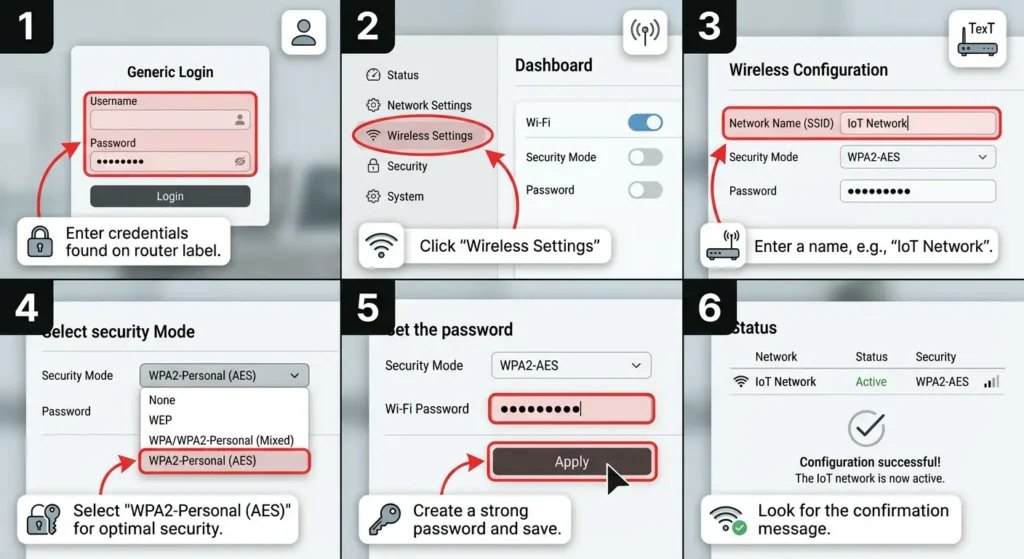
Fix 1: Switch to WPA2/WPA3 Transition Mode
This is the quickest fix and works for many situations.
Steps:
- Log into your router’s admin panel (usually 192.168.1.1 or 192.168.0.1)
- Navigate to Wireless Settings or Wi-Fi Security
- Change the security mode from “WPA3-Personal” to “WPA2/WPA3-Personal” or “WPA3 Transition”
- Save and reboot the router
- Wait 2 to 3 minutes for the hub to reconnect
- Check the hub’s status in your smart home app
Success Rate: About 60 to 70 percent of older hubs will reconnect with this method.
Fix 2: Connect Your Zigbee Hub via Ethernet
If your Zigbee hub has an Ethernet port, this completely eliminates the Wi-Fi authentication issue.
Steps:
- Power off your Zigbee hub
- Connect an Ethernet cable from the hub to your router or a network switch
- If the hub has a Wi-Fi/Ethernet toggle in its settings, switch to Ethernet mode
- Power the hub back on
- Wait for it to reconnect (may take up to 5 minutes)
Why this works: Ethernet connections do not use WPA authentication at all. Your Zigbee hub gets network access directly through the wired connection, completely bypassing WPA3.
Hubs with Ethernet ports include:
- SmartThings Hub V2 and V3
- Hubitat Elevation
- Home Assistant Yellow
- Philips Hue Bridge
Fix 3: Create a Dedicated IoT Network with WPA2
Many modern routers allow you to create separate SSIDs with different security settings.
Steps:
- Access your router’s admin panel
- Create a new SSID (for example, “HomeIoT”)
- Set this network to WPA2-Personal only
- Set it to 2.4 GHz only
- Connect your Zigbee hub to this new network
- Keep your main network on WPA3 for phones, laptops, and tablets
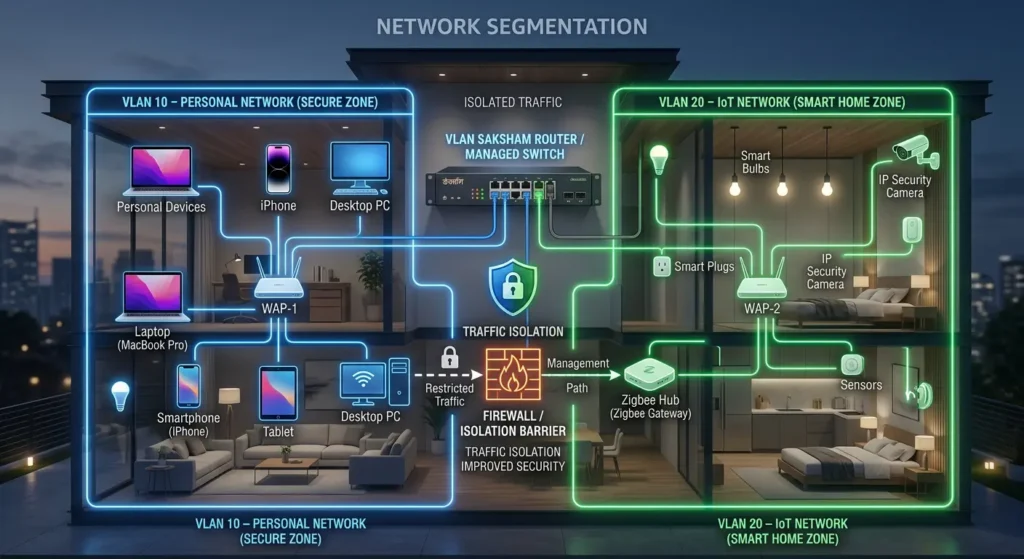
Security tip: Isolate this IoT network using VLAN or AP isolation if your router supports it. This way, even though the IoT network uses WPA2, compromised IoT devices cannot access your main network.
For guidance on network segmentation for IoT devices, check out this NIST IoT security guide.
Fix 4: Disable Protected Management Frames (PMF)
If your router allows it, try disabling PMF while keeping WPA3 or transition mode enabled.
Steps:
- Go to your router’s advanced wireless settings
- Look for “Protected Management Frames” or “802.11w” or “PMF”
- Change it from “Required” to “Capable” or “Disabled”
- Save and reboot
Note: Not all routers expose this setting. Asus, Netgear, and TP-Link routers often have this option in advanced settings. Mesh systems like Google Nest or Eero typically do not expose it.
Fix 5: Update Your Zigbee Hub Firmware
Before giving up on WPA3 compatibility, check if your hub manufacturer has released a firmware update that adds WPA3 support.
Steps:
- Connect your hub temporarily via Ethernet or on a WPA2 network
- Open the hub’s companion app
- Check for firmware updates
- Install any available updates
- After updating, try connecting to your WPA3 network again
Hubs that have received WPA3 support through updates:
- SmartThings Hub V3 (partial support added in 2022)
- Some Aqara hubs (M2 and later models)
Fix 6: Use a Wi-Fi Bridge or Range Extender
If your hub only supports Wi-Fi and cannot connect to WPA3, you can use an older Wi-Fi bridge or range extender as a translator.
Steps:
- Get a Wi-Fi range extender that supports both WPA3 and has an Ethernet port
- Connect the extender to your WPA3 network wirelessly
- Connect your Zigbee hub to the extender’s Ethernet port
- The extender handles the WPA3 authentication while giving your hub a wired connection
This is essentially using the extender as a wireless-to-wired bridge. Products like the TP-Link RE305 or Netgear EX6120 work well for this purpose.
Fix 7: Upgrade to a Newer Zigbee Hub
If none of the above solutions work well for your situation, it may be time to upgrade your hub.
Modern Zigbee hubs with WPA3 support:
- SmartThings Station (2023)
- Aqara Hub M3 (2024)
- Home Assistant Green with SkyConnect (uses Ethernet)
- Hubitat Elevation C-8 (uses Ethernet)
Before upgrading, consider:
- Will your existing Zigbee devices pair with the new hub?
- Do you need to rebuild all your automations?
- Does the new hub support the same Zigbee profiles your devices use?
Which Zigbee Hubs Are Most Affected by WPA3?
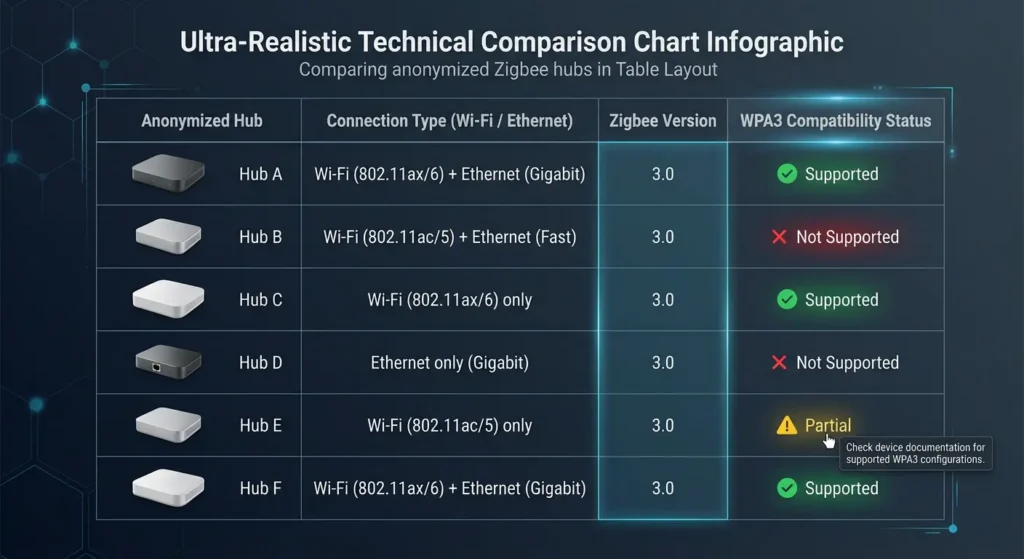
Not all hubs are equally affected. Here is a breakdown based on real user reports and testing.
Highly Affected (Wi-Fi Only, No WPA3 Support)
| Hub | Year Released | Connection Type | WPA3 Compatible |
|---|---|---|---|
| Wink Hub 2 | 2016 | Wi-Fi only | No |
| SmartThings Hub V2 | 2015 | Wi-Fi and Ethernet | No (Wi-Fi radio) |
| Xiaomi Mi Smart Home Hub | 2018 | Wi-Fi only | No |
| Orvibo ZigBee Mini Hub | 2019 | Wi-Fi only | No |
| Tuya Zigbee Gateway (V1) | 2019 | Wi-Fi only | No |
Partially Affected (Have Workarounds)
| Hub | Year Released | Connection Type | Notes |
|---|---|---|---|
| SmartThings Hub V3 | 2018 | Wi-Fi and Ethernet | Use Ethernet to bypass |
| Aqara Hub M1S | 2020 | Wi-Fi only | Some firmware updates help |
| IKEA DIRIGERA | 2022 | Ethernet only | Not affected |
Not Affected (Ethernet or WPA3 Supported)
| Hub | Year Released | Connection Type | Notes |
|---|---|---|---|
| Philips Hue Bridge | 2015+ | Ethernet only | Never uses Wi-Fi |
| Hubitat Elevation | 2018+ | Ethernet only | Never uses Wi-Fi |
| Home Assistant Yellow | 2022 | Ethernet only | Never uses Wi-Fi |
| SmartThings Station | 2023 | Wi-Fi with WPA3 | Full WPA3 support |
Should You Sacrifice Security for Smart Home Compatibility?
This is the question every smart home owner faces when they hit this problem. Let me give you a balanced perspective.
The Case for Keeping WPA3
WPA3 provides genuinely important security improvements:
- Protection against offline dictionary attacks through SAE
- Forward secrecy so that captured traffic cannot be decrypted later even if the password is compromised
- Stronger encryption for sensitive data
- Protection against deauthentication attacks through mandatory PMF
If you handle sensitive work from home, do online banking, or have security cameras on your network, WPA3 provides meaningful protection.
The Balanced Approach
You do not have to choose one or the other. The best approach for most people is:
- Keep your main network on WPA3 for computers, phones, and tablets
- Create a separate IoT VLAN or SSID on WPA2 for legacy devices
- Use network isolation to prevent IoT devices from accessing your main network
- Use Ethernet for any Zigbee hub that supports it
This gives you the security benefits of WPA3 where it matters most while maintaining compatibility with older devices.
What Security Experts Recommend
The general consensus among network security professionals is that a properly segmented network with WPA2 on an isolated IoT VLAN is more secure than a single WPA3 network with no segmentation. Network architecture matters more than the encryption protocol alone.
You can learn more about IoT network security best practices from the OWASP IoT Security Project.
Future Proofing Your Smart Home Network
To avoid running into this problem again as security standards continue to evolve, consider these strategies.
Choose Ethernet Connected Hubs When Possible
Zigbee hubs that connect via Ethernet will never be affected by Wi-Fi security protocol changes. The Philips Hue Bridge has used Ethernet since its first generation, and it has never had a Wi-Fi compatibility issue.
Look for Matter Compatible Devices
The Matter smart home standard, developed by the Connectivity Standards Alliance, is designed with modern security requirements built in. Matter devices support current and future security protocols from day one.
Keep Firmware Updated
Manufacturers occasionally release updates that add WPA3 support to existing products. Enable automatic updates on your hubs when possible, and check for updates regularly on hubs that require manual updating.
Plan for Network Segmentation
Even if you do not need it today, set up your network to support VLANs and multiple SSIDs. Routers from Ubiquiti, TP-Link Omada, and MikroTik make this relatively easy. When the next security protocol change comes, you will be ready.
FAQ
Does WPA3 directly interfere with the Zigbee wireless protocol?
No, WPA3 does not interfere with the Zigbee protocol itself. Zigbee uses IEEE 802.15.4, which is a completely separate protocol from Wi-Fi. The issue is that the Zigbee hub’s Wi-Fi radio cannot authenticate with a WPA3-enabled router. The Zigbee communication between the hub and Zigbee devices remains unaffected.
Will WPA2/WPA3 transition mode always fix the problem?
Not always. While transition mode works for many devices, some older hubs still have issues due to PMF requirements or inconsistent implementation of transition mode across different router brands. You may need to try additional fixes like Ethernet or a dedicated IoT network.
Can I update my old Zigbee hub to support WPA3?
In most cases, no. WPA3 support requires specific hardware capabilities in the Wi-Fi chipset. Most older hubs lack the necessary hardware, so no software update can add WPA3 support. Check with your hub manufacturer for specific information about your model.
Is it safe to keep using WPA2 for my IoT devices?
WPA2 is still considered reasonably secure when used with a strong password and proper network segmentation. The key vulnerabilities in WPA2 require the attacker to be within physical range of your Wi-Fi network. For IoT devices on an isolated network segment, WPA2 remains an acceptable solution.
Does this problem affect Zigbee devices themselves or just the hub?
Only the hub is affected, specifically its Wi-Fi connection to the router. Individual Zigbee devices like sensors, bulbs, and switches communicate with the hub using the Zigbee protocol, which has nothing to do with WPA3. However, if the hub loses its network connection, Zigbee devices lose cloud connectivity and remote control capabilities.
Why does my Philips Hue Bridge work fine with WPA3?
The Philips Hue Bridge connects to your router via Ethernet cable only. It does not have a Wi-Fi radio. Since Ethernet connections do not use WPA authentication, the Hue Bridge is completely unaffected by any Wi-Fi security changes.
Will disabling WPA3 slow down my Wi-Fi?
No. WPA3 is a security protocol, not a speed protocol. Your Wi-Fi speed is determined by the Wi-Fi standard (Wi-Fi 5, Wi-Fi 6, Wi-Fi 6E, Wi-Fi 7) and not by the security protocol. Switching between WPA2 and WPA3 has no measurable impact on throughput or latency.
Can I use a Wi-Fi extender to solve this problem?
Yes. You can use a Wi-Fi extender or bridge that supports WPA3 on its wireless side and has an Ethernet port. Connect the extender to your WPA3 network, then plug your Zigbee hub into the extender’s Ethernet port. The extender handles the WPA3 authentication on behalf of the hub.
Final Thoughts
The WPA3 and older Zigbee hub incompatibility problem is one of those frustrating growing pains of smart home technology. You want better security on your network, but you also want your smart home to keep working. The good news is that you do not have to choose one over the other.
For most people, the best immediate solution is to use a combination of WPA3 on your main network and either Ethernet connectivity or a dedicated WPA2 IoT network for older hubs. Long term, consider upgrading to Ethernet-based hubs or newer models that support WPA3 natively.
The smart home industry is gradually catching up with modern security standards. Matter-compatible devices, newer Zigbee hubs, and Thread-based products are all being designed with current security requirements in mind. Until your entire setup is upgraded, the workarounds described in this article will keep everything running smoothly without compromising your network security.
If you found this article helpful, I recommend bookmarking it and checking back for updates as manufacturers release new firmware and products. The compatibility landscape changes frequently, and what does not work today might work after the next firmware update.
External Resources: