

Table of Contents
- Introduction: The Frustrating Post-DST Morning
- What Actually Happens to Zigbee Sensors During DST Changes
- Root Causes Behind Zigbee Sensor Failures After Daylight Saving Time
- Real-World Scenarios: How DST Breaks Your Smart Home
- Step-by-Step Guide to Fix Zigbee Sensors After DST
- How to Prevent Zigbee Sensor Failures Before the Next DST Change
- Which Zigbee Hubs Handle DST Better Than Others
- Battery Drain: The Hidden DST Problem Nobody Talks About
- Real User Experiences and Community Solutions
- FAQ: Zigbee Sensors and Daylight Saving Time Issues
- Final Thoughts
Introduction: The Frustrating Post-DST Morning
You wake up on a Sunday morning after the clocks have sprung forward or fallen back. Your coffee routine feels slightly off, but that turns out to be the least of your worries. The Zigbee motion sensor in your hallway no longer triggers the lights. The temperature sensor in the nursery quietly stopped reporting to your hub three hours ago. Your door contact sensor reads “last seen: 7 hours ago,” even though you just walked through the front door moments earlier.
If any of this sounds painfully familiar, you are far from alone. Twice a year, thousands of smart home users rush to forums like Reddit, the Home Assistant Community, and the SmartThings Community asking the very same question: why do battery-powered Zigbee sensors fail after DST changes?
Having worked with smart home systems for over a decade, I can confirm that this problem is far more widespread and far more layered than most people assume. It is not simply a matter of a clock being wrong. It touches on how Zigbee mesh networks interpret timing, how coordinators manage polling intervals, and how battery-powered end devices follow sleep-and-wake schedules that suddenly fall out of sync with everything else on the network.
In this guide, I will break down exactly why this happens, walk you through proven solutions, and show you how to safeguard your smart home so a time change never disrupts it again.
What Actually Happens to Zigbee Sensors During DST Changes
To understand the failure, you need to understand how battery-powered Zigbee devices communicate differently from their mains-powered counterparts.
How Zigbee End Devices Communicate
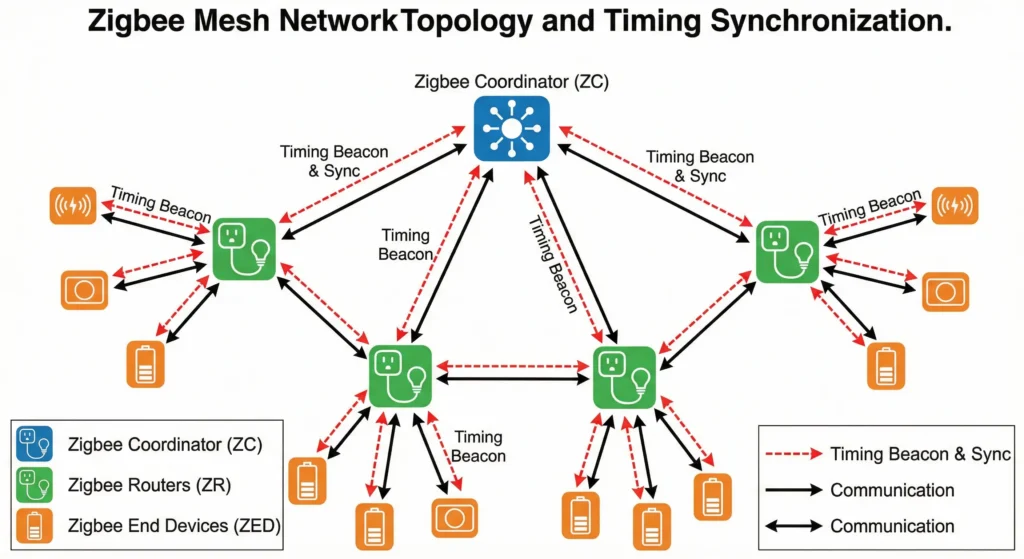
Battery-powered Zigbee sensors are classified as Zigbee End Devices (ZEDs). Unlike routers and coordinators that stay awake constantly, ZEDs spend most of their time in deep sleep to conserve battery. They wake up at predetermined intervals to:
- Check in with their parent router or coordinator
- Report sensor data (temperature, motion, humidity, contact state)
- Listen for any pending commands or configuration updates
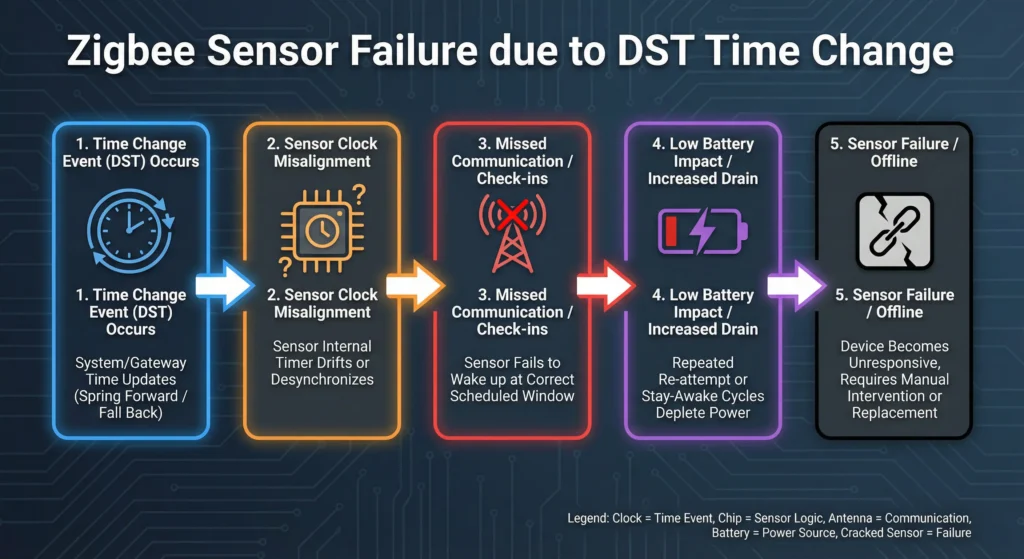
This sleep-wake cycle is governed by a poll interval that is synchronized with the parent device. When DST changes occur, the coordinator or hub updates its internal clock, but the sleeping end device has no idea this happened.
The Timing Mismatch Problem
Here is where things break down. The hub shifts its clock by one hour. Automations tied to specific times recalculate. Scheduled polling windows shift. But the battery sensor, deep in sleep mode, continues operating on the old schedule. When it wakes up and tries to check in, the timing window may no longer align with what the coordinator expects.
In most cases, the device eventually reconnects. But in many setups, especially larger Zigbee meshes with multiple routers, the sensor either:
- Gets marked as “unavailable” or “offline”
- Fails to rejoin its parent router
- Starts consuming excessive battery as it repeatedly attempts to reconnect
- Loses its routing path entirely
Root Causes Behind Zigbee Sensor Failures After Daylight Saving Time
After years of troubleshooting and analyzing community reports, I have identified five primary root causes for this issue.
1. Hub Firmware Clock Handling
Many Zigbee hubs, including some versions of SmartThings, Hubitat, and even certain Zigbee2MQTT configurations, handle the DST transition at the software level rather than the network level. The hub updates its clock, recalculates automation schedules, and in some cases restarts its Zigbee coordinator service. This restart, even if brief, can orphan sleeping end devices.
2. Parent Router Reassignment Failures
When the coordinator restarts or recalculates its network tables, some battery devices lose their parent router assignment. Since ZEDs cannot initiate a network scan on their own (they rely on their last known parent), they enter a loop of failed check-ins until the parent responds or the device is manually reset.
3. Automation Schedule Conflicts
This is not a Zigbee protocol issue per se, but it amplifies the perceived failure. If you have an automation that says “turn on lights when motion is detected between 6:00 PM and 11:00 PM,” and DST shifts your sensor reports by one hour, the automation may stop triggering even though the sensor itself is working fine. Users often interpret this as a sensor failure when it is actually an automation timing conflict.
4. Reporting Interval Desynchronization
Some Zigbee sensors, particularly temperature and humidity sensors from brands like Aqara and Sonoff, use configurable reporting intervals. These intervals are set in seconds relative to the device clock. When the hub clock shifts, the expected report time and the actual report time diverge, causing the hub to mark the device as “not responding.”
5. NTP Sync Cascading Effects
If your hub relies on Network Time Protocol (NTP) to sync its clock, the DST transition can trigger an NTP resync that briefly disrupts the Zigbee coordinator process. On platforms like Home Assistant running on Raspberry Pi, this NTP correction has been documented to cause brief Zigbee coordinator dropouts, which are enough to lose some battery end devices.
Real-World Scenarios: How DST Breaks Your Smart Home
Scenario 1: The Nursery Temperature Sensor
Mark, a Home Assistant user from Ohio, shared his experience on the Home Assistant Community forum. He uses an Aqara temperature and humidity sensor in his baby’s nursery, paired with a ZHA integration. Every spring when clocks move forward, the sensor stops reporting for roughly 4 to 6 hours. During that time, his climate automation (which adjusts a space heater based on nursery temperature) stops working entirely.
The root cause? His Aqara sensor has a 60-minute reporting interval. After DST, the ZHA integration expected a report at the new adjusted time, but the sensor was still reporting on the old schedule. ZHA marked it unavailable after missing two consecutive expected reports.
Scenario 2: The Garage Door Contact Sensor
Sarah runs a Hubitat hub with Sonoff SNZB-04 contact sensors on her garage doors. After the fall DST change, both sensors showed “open” status even though the doors were physically closed. The state had frozen at the last report before the time change. It took a manual battery pull and re-pairing to restore correct operation.
Scenario 3: Motion Sensor Automation Timing
James uses Zigbee2MQTT with an IKEA TRADFRI motion sensor for his porch lights. His automation triggers lights between sunset and 11:30 PM. After DST, the motion sensor continued working perfectly, but the automation failed because the sunset calculation shifted by one hour, creating a gap where motion events were ignored. This was not a sensor failure at all, but a scheduling logic issue that appeared identical to a sensor malfunction.
Step-by-Step Guide to Fix Zigbee Sensors After DST
If your Zigbee sensors have already failed after a DST change, follow these steps in order. Start with the least disruptive fix and work your way down.
Step 1: Wait 2 to 4 Hours
This sounds counterintuitive, but many Zigbee end devices will self-recover within a few hours as they cycle through their polling intervals and re-establish contact with their parent router. Before doing anything drastic, give your network time to heal.
Step 2: Check Your Hub Clock
Verify that your hub’s time and timezone are correct after the DST change.
For Home Assistant:
Go to Settings then System then General. Confirm your timezone is correct. Check that the time displayed matches your actual local time.
For Hubitat:
Navigate to Settings then Location and Modes. Verify the timezone and current time.
For SmartThings:
Open the SmartThings app, go to Menu then Settings, and confirm your location and timezone.
Step 3: Restart the Zigbee Coordinator (Not the Whole Hub)
If your platform supports it, restart only the Zigbee integration rather than the entire hub.
In Home Assistant with ZHA:
Go to Settings then Devices and Services then ZHA, click the three dots, and select “Reload.”
In Home Assistant with Zigbee2MQTT:
Go to Settings then Add-ons then Zigbee2MQTT, and click “Restart.”
This forces the coordinator to re-poll all devices without losing your network configuration.
Step 4: Press the Pairing Button on Affected Sensors
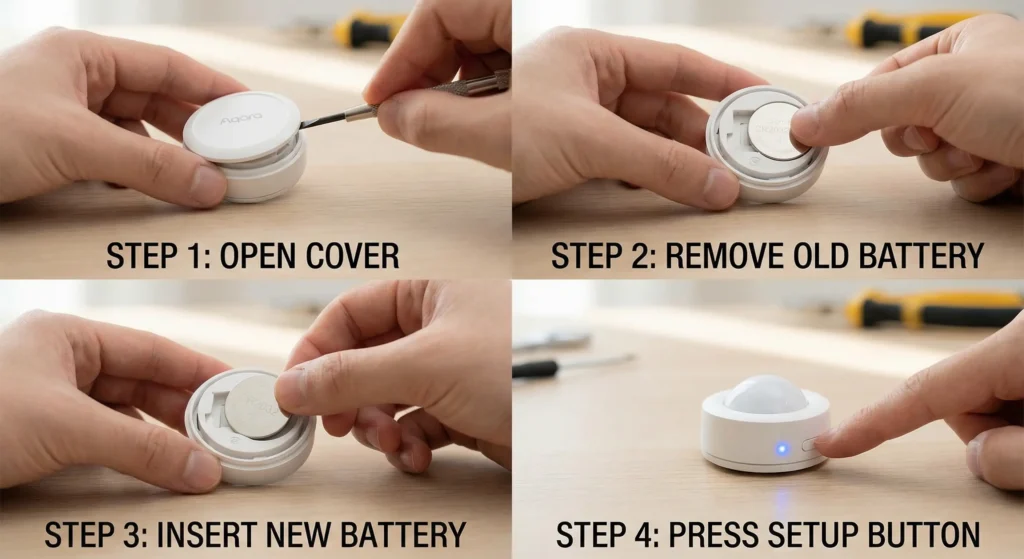
Most battery Zigbee sensors have a small button (often the reset or pairing button). Press it once briefly (do NOT hold it for a factory reset). This wakes the device from sleep and forces an immediate check-in with its parent router. On Aqara sensors, a single short press on the top button triggers a report. On IKEA sensors, briefly pressing the pairing button inside the battery compartment achieves the same result.
Step 5: Pull and Reinsert the Battery
If a single button press does not restore the sensor, remove the battery for 30 seconds, then reinsert it. This forces a complete device restart and usually results in the sensor re-joining its parent router automatically.
Step 6: Re-Pair the Device (Last Resort)
If none of the above works, you may need to remove the device from your Zigbee network and re-pair it. Be aware that this will likely change the device entity in your hub and require updating any automations that reference it.
How to Prevent Zigbee Sensor Failures Before the Next DST Change
Prevention is always better than troubleshooting at 6 AM on a Sunday. Here are proven strategies to DST-proof your Zigbee network.
Use UTC Internally for All Automations
Configure your automations to use UTC-based time references wherever possible. Since UTC does not observe Daylight Saving Time, your automation triggers remain consistent year-round. Most platforms, including Home Assistant and Node-RED, support UTC time in automation conditions.
Schedule a Coordinator Restart Around DST
Create an automation that restarts your Zigbee coordinator 30 minutes after the DST transition (typically at 2:30 AM or 3:30 AM local time). This gives the hub time to update its clock and then cleanly re-initialize the Zigbee network.
Example Home Assistant Automation (YAML):
YAMLautomation:
  - alias: "Restart Zigbee After DST"
    trigger:
      - platform: time
        at: "03:30:00"
    condition:
      - condition: template
        value_template: >
          {{ now().month in [3, 11] and now().weekday() == 6 }}
    action:
      - service: homeassistant.reload_config_entry
        target:
          entity_id: sensor.zigbee_coordinator
Update Hub Firmware Before DST
Check for and install any firmware updates for your hub at least one week before the DST change. Many manufacturers release patches that specifically address DST-related timing issues.
Reduce Reporting Intervals for Critical Sensors
For sensors that monitor critical things like nursery temperature or security doors, reduce the reporting interval to 10 or 15 minutes instead of 60 minutes. This means even if one report is missed due to timing desynchronization, the next one arrives quickly enough to prevent long outages.
Maintain Strong Mesh Routing
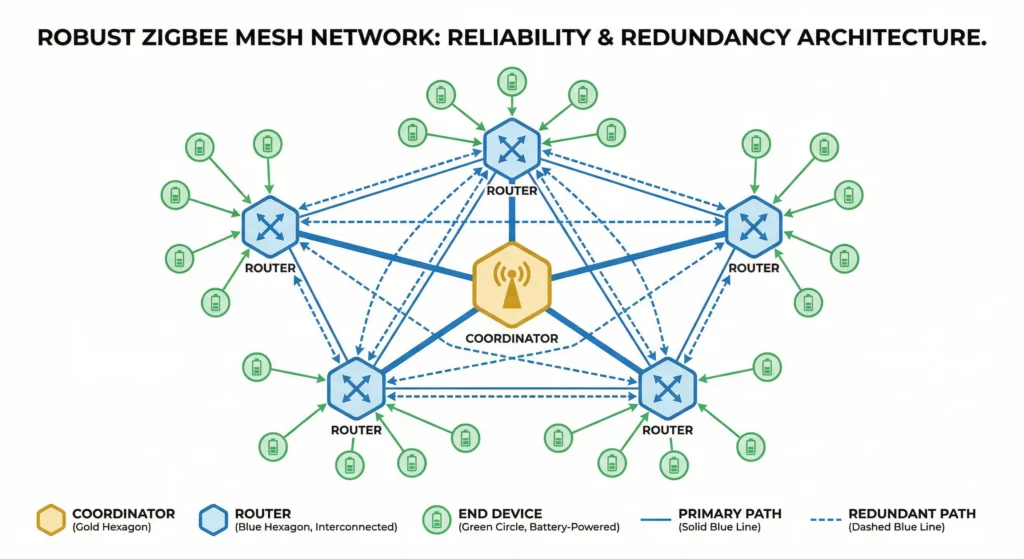
A robust Zigbee mesh with plenty of mains-powered routers (smart plugs, smart bulbs, repeaters) reduces the chance that a battery device loses its path to the coordinator. Each router maintains its own relationship with end devices, and a stronger mesh recovers faster from any disruption.
Which Zigbee Hubs Handle DST Better Than Others
Not all hubs are created equal when it comes to DST resilience. Based on community reports and my own testing, here is how popular platforms compare.
Home Assistant (ZHA Integration)
DST Handling: Good, with caveats. ZHA handles the time change at the OS level and does not restart the Zigbee coordinator automatically. Most devices recover within 1 to 2 hours. However, Aqara sensors paired through ZHA have a higher failure rate compared to Zigbee2MQTT.
Home Assistant (Zigbee2MQTT)
DST Handling: Very Good. Zigbee2MQTT operates with its own internal timing that is less affected by system clock changes. The MQTT layer provides an additional buffer, and most sensors continue reporting without interruption. The community also maintains active documentation on DST-related issues.
Hubitat Elevation
DST Handling: Moderate. Hubitat handles DST at the Java platform level. Some users report that the Zigbee radio needs a manual restart after DST. The platform has improved significantly with recent firmware updates, but older hub models (C-5 and earlier) may still experience issues.
Samsung SmartThings
DST Handling: Good. Since SmartThings is cloud-based, the DST transition is handled server-side, which reduces local timing conflicts. However, cloud dependency introduces its own latency issues, and some edge-connected Zigbee devices still lose sync.
Amazon Echo (Built-in Zigbee Hub)
DST Handling: Poor for battery sensors. The Echo’s Zigbee implementation is limited, and battery-powered sensors paired directly to an Echo frequently go offline after DST changes. Amazon does not provide tools to restart only the Zigbee radio, making troubleshooting difficult.
| Hub Platform | DST Resilience | Auto-Recovery Time | Manual Intervention Needed |
|---|---|---|---|
| Home Assistant (ZHA) | Good | 1 to 2 hours | Sometimes |
| Home Assistant (Zigbee2MQTT) | Very Good | Under 1 hour | Rarely |
| Hubitat Elevation | Moderate | 2 to 4 hours | Often |
| Samsung SmartThings | Good | 1 to 3 hours | Sometimes |
| Amazon Echo (Zigbee) | Poor | 4+ hours | Frequently |
Battery Drain: The Hidden DST Problem Nobody Talks About
There is a secondary effect of DST changes that many users overlook: accelerated battery drain.
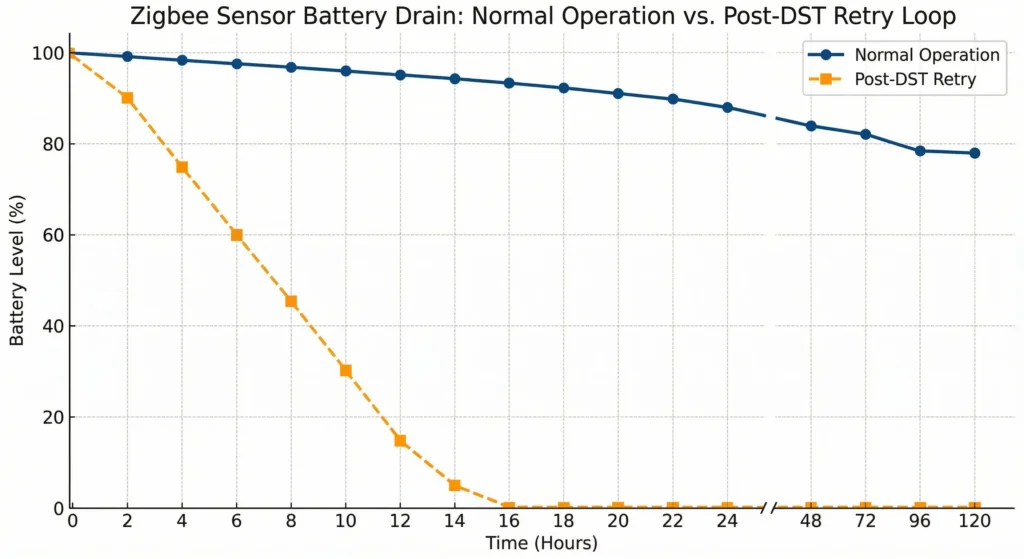
When a battery-powered Zigbee sensor fails to connect to its parent router, it does not simply give up. It enters a retry loop, waking up more frequently and transmitting at higher power levels to re-establish the connection. This retry behavior can consume 10 to 20 times more battery than normal operation.
How Much Battery Does a DST Failure Actually Cost?
Based on measurements shared by Zigbee developers and community members:
- A normal Zigbee temperature sensor check-in consumes approximately 15 to 25 milliamp-hours per day
- During a retry loop after losing its parent, consumption can spike to 200 to 400 milliamp-hours per day
- A single DST event with a 6-hour reconnection delay can consume the equivalent of 2 to 3 weeks of normal battery life
If you notice that your sensor batteries seem to die faster in the months following DST changes, this retry behavior is likely the cause.
Protecting Battery Life During DST
The best way to protect your batteries is to minimize the time sensors spend in retry mode. This means either proactively restarting your coordinator before the DST change or immediately pressing the sensor button after the change to force a clean reconnection.
Real User Experiences and Community Solutions
Experience 1: The Home Assistant Power User
A user named “TechDad_2019” on Reddit’s r/homeassistant subreddit documented his experience across six DST transitions. He found that after switching from ZHA to Zigbee2MQTT and adding four IKEA TRADFRI signal repeaters to his network, his post-DST sensor failures dropped from 8 out of 12 sensors to zero. His key takeaway was that mesh density matters more than hub software when it comes to DST resilience.
Experience 2: The Hubitat Community Fix
Several Hubitat users developed a community driver that monitors Zigbee device “last activity” timestamps and automatically sends a wake-up command to any device that has not reported within twice its expected interval. While this does not prevent the initial DST failure, it dramatically reduces recovery time from hours to minutes.
Experience 3: The Zigbee2MQTT Configuration Approach
A contributor to the Zigbee2MQTT GitHub repository shared a configuration approach where all reporting intervals are set as relative offsets rather than absolute timestamps. By configuring sensors to report “every 3600 seconds” rather than “at the top of each hour,” the DST time shift becomes irrelevant because the interval is duration-based, not clock-based.
FAQ: Zigbee Sensors and Daylight Saving Time Issues
Why do only battery-powered Zigbee sensors fail after DST, not mains-powered devices?
Mains-powered Zigbee devices (routers) stay awake continuously and maintain constant communication with the coordinator. They adapt to the time change almost instantly because they receive the updated network parameters in real time. Battery-powered end devices sleep through the transition and miss these updates.
Do Z-Wave sensors have the same DST problem?
Z-Wave uses a different communication architecture, but battery-powered Z-Wave devices can experience similar issues. However, Z-Wave’s “wakeup interval” mechanism is generally more resilient to time shifts because it uses relative timing rather than absolute clock references.
Will switching to Thread or Matter fix this problem?
Thread, the protocol underlying many newer Matter devices, handles timing differently from Zigbee. Thread devices use a more robust synchronization mechanism that is less susceptible to DST issues. However, Thread is still relatively new, and real-world DST testing data is limited. Early reports are promising.
Can I disable DST on my smart home hub?
Yes, technically. You can set your hub to use a timezone that does not observe DST (like UTC or Arizona time in the US). However, this means all your time-based automations will need manual adjustment, and displayed times throughout your system will not match your actual local time. It is a workaround, not a real solution.
How do I know if my Zigbee sensor failed because of DST or a dead battery?
Check the “last seen” or “last activity” timestamp for the sensor in your hub. If it corresponds closely to the time of the DST change (typically 2:00 AM), DST is almost certainly the cause. A dead battery would show a gradual decline in reporting frequency over days or weeks, not a sudden stop at the exact DST transition time.
Does this affect Zigbee 3.0 devices differently than older Zigbee versions?
Zigbee 3.0 includes improved network rejoin procedures that make recovery faster, but it does not fundamentally solve the DST timing issue. Zigbee 3.0 devices typically recover in 30 to 60 minutes, while older Zigbee Home Automation (ZHA) 1.2 devices may take several hours.
Should I replace all my Zigbee sensors to avoid this issue?
No. The problem is primarily at the hub and network level, not the sensor level. Investing in a stronger mesh network (more routers), using a DST-resilient hub platform, and following the prevention steps in this guide will resolve the issue for virtually all Zigbee sensors.
Final Thoughts
The failure of battery-powered Zigbee sensors after DST changes is one of those smart home problems that seems minor until it affects something critical, like your security system, your baby’s room temperature monitor, or your energy management setup.
The good news is that this is a well-understood problem with proven solutions. By maintaining a strong Zigbee mesh, using a reliable hub platform, scheduling proactive coordinator restarts around DST transitions, and understanding how your specific sensors handle timing, you can eliminate this issue entirely.
If you take only one thing from this article, let it be this: the problem is not your sensors. It is the timing gap between your hub’s clock update and your sleeping sensor’s awareness of that update. Bridge that gap, and your smart home will sail through every DST change without a single device going offline.
Clock desynchronization is just one way your network can be disrupted. If you want to ensure your entire automation system recovers smoothly after major power interruptions, take a look at our complete troubleshooting guide on Smart Home Cascading Failures After Power Outages: Causes, Fixes, and Prevention Guide.
Useful External Resources: