Table of Contents
- Introduction: The Cold Weather Zigbee Problem Nobody Talks About
- How Cold Weather Actually Affects Zigbee Devices
- The Real Reasons Behind Zigbee Instability in Winter
- Real Scenarios from EU Homeowners
- Step by Step Guide to Diagnose Cold Weather Zigbee Issues
- Practical Fixes to Stabilize Your Zigbee Network in Winter
- Best Cold Resistant Zigbee Devices for European Climates
- How to Protect Outdoor Zigbee Sensors from Freezing Temperatures
- Common Mistakes EU Homeowners Make with Zigbee in Winter
- Real User Experiences and Lessons Learned
- FAQ: Zigbee Devices and Cold Weather
- Final Thoughts
Introduction: The Cold Weather Zigbee Problem Nobody Talks About
If you have ever woken up on a freezing January morning only to find that your smart lights are not responding, your door sensor has gone offline, or your thermostat lost connection with the rest of your Zigbee mesh, you are not alone. This is a frustration that thousands of EU homeowners face every single winter, and most of them have no idea why it happens.
I have been working with smart home systems across Europe for years, and I can tell you that cold weather is one of the most underestimated enemies of Zigbee networks. The problem is not always obvious. Sometimes everything works perfectly from April to October, and then November hits, and suddenly your devices start dropping off the network like leaves from a tree.
The thing is, most smart home guides are written from a US perspective where homes are built differently, insulated differently, and heated differently. European homes, especially older ones in countries like Germany, the Netherlands, Sweden, and the UK, have unique construction characteristics that make this problem even worse.
In this article, I am going to explain exactly why your zigbee devices unstable cold weather, share real stories from EU homeowners who dealt with this issue, and give you practical, tested solutions that actually work.
How Cold Weather Actually Affects Zigbee Devices
To understand the problem, you need to understand what happens inside your Zigbee devices when temperatures drop below certain thresholds.
Battery Chemistry and Cold Temperatures
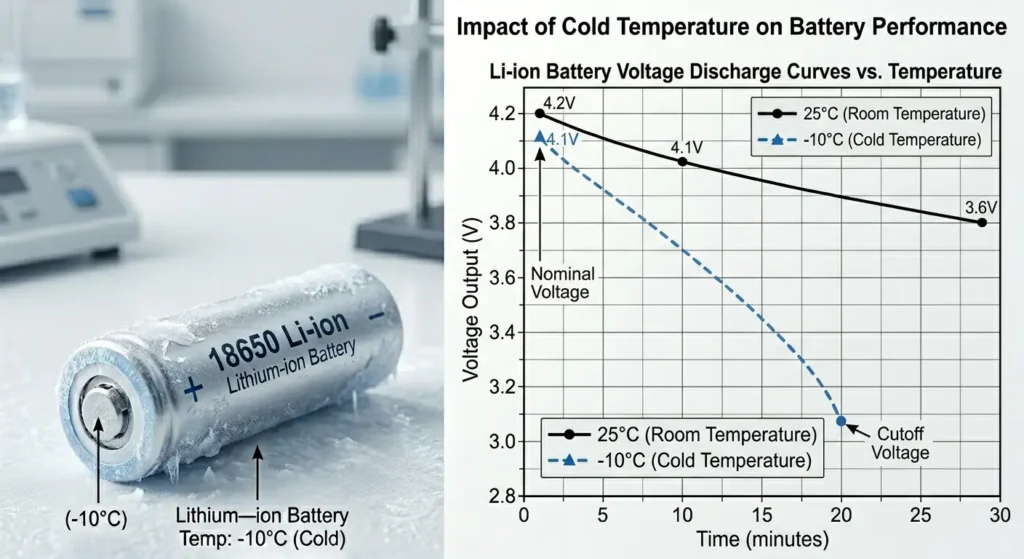
Most Zigbee sensors and devices run on small batteries, typically CR2032 coin cells, AA lithium batteries, or AAA alkaline batteries. Every type of battery has an optimal operating temperature range, and when temperatures fall below that range, the internal chemical reactions that produce electricity slow down dramatically.
Here is what happens at different temperature levels:
Above 10°C: Batteries perform normally. Full voltage output and consistent performance.
Between 0°C and 10°C: Battery voltage starts to dip. You might notice occasional delays in sensor responses.
Between minus 10°C and 0°C: Significant voltage drops. CR2032 batteries can lose up to 40% of their capacity. Devices may go offline intermittently.
Below minus 10°C: Many standard batteries simply cannot deliver enough current to power the Zigbee radio module. Devices will appear completely dead.
This is especially critical for outdoor sensors, garage door sensors, garden motion detectors, and any device placed in unheated spaces like attics, cellars, or sheds.
Radio Signal Propagation in Winter
Cold air itself does not significantly weaken Zigbee signals. However, the environmental changes that come with cold weather do. Moisture, condensation, frost buildup on antennas, and even the physical contraction of metal antenna elements can all degrade signal quality.
In EU homes, thick stone walls, double or triple glazed windows, and metal framed construction already challenge Zigbee signals. Add winter moisture to the equation, and you have a recipe for instability.
The Real Reasons Behind Zigbee Instability in Winter
Let me break down the specific factors that contribute to this problem in European homes.
1. Thick Masonry Walls and Signal Attenuation
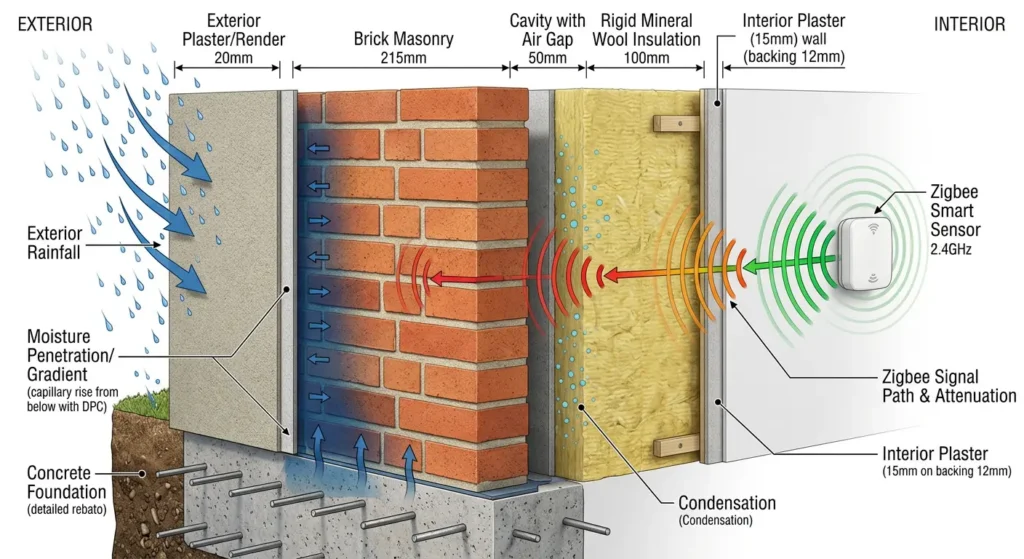
Many EU homes, particularly in countries like France, Italy, Spain, and Germany, are built with solid brick, stone, or concrete block walls. These materials already attenuate Zigbee’s 2.4 GHz signal significantly. A single solid brick wall can reduce signal strength by 6 to 10 dB.
In winter, when moisture levels inside walls increase due to condensation and rain penetration, signal attenuation gets even worse. Wet masonry can absorb 2 to 4 additional dB of signal strength, which can be the difference between a stable connection and a dropped device.
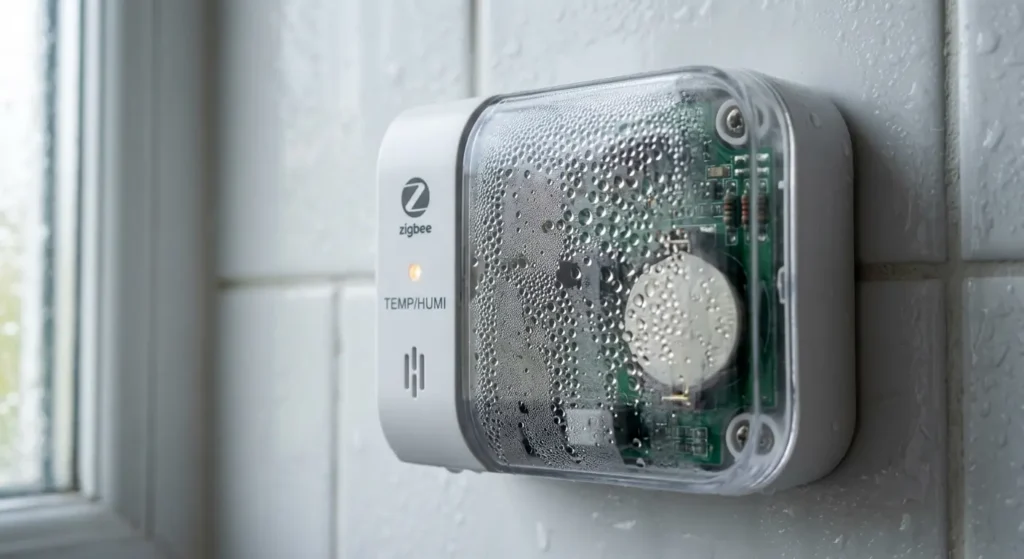
2. Condensation Inside Device Enclosures
When temperatures fluctuate between day and night, condensation can form inside device enclosures, especially for outdoor or semi outdoor devices. This moisture can cause:
- Short circuits on PCB boards
- Corrosion of battery contacts
- Degradation of antenna performance
- Intermittent connectivity issues that come and go
3. Unheated Spaces in European Homes
Many EU homeowners place Zigbee devices in spaces that are not heated during winter:
- Detached garages
- Garden sheds
- Attic spaces under tile roofs
- Cellars and basements
- Conservatories and sunrooms
- Enclosed porches
These spaces can easily reach minus 5°C to minus 15°C during harsh European winters, which is well below the operating range of many consumer Zigbee devices.
4. Increased Wi-Fi Interference During Winter Months
This one surprises many people. During winter, more people stay indoors and use their Wi-Fi networks more heavily. Streaming, gaming, and video calls all increase during cold months. Since Zigbee operates on the same 2.4 GHz band as Wi-Fi, increased Wi-Fi traffic means more interference for your Zigbee mesh.
5. Heating Systems Creating Thermal Cycling
Central heating systems in EU homes create significant temperature swings. A room might go from 15°C when the heating is off overnight to 22°C when it kicks in during the morning. Devices mounted near radiators or heating vents experience even more extreme swings. This thermal cycling stresses electronic components, solder joints, and battery connections over time.
Real Scenarios from EU Homeowners
Scenario 1: The Dutch Garage That Went Dark
Mark, a homeowner in Rotterdam, installed Aqara door and temperature sensors in his detached brick garage. Everything worked perfectly through summer and autumn. In December, when temperatures dropped below minus 3°C, both sensors stopped reporting to his Home Assistant setup. He replaced the batteries three times before realizing the cold was draining them within days. The CR2032 batteries in his Aqara sensors simply could not handle the cold.
His solution was to switch to Zigbee sensors rated for extended temperature ranges and use lithium batteries instead of standard alkaline ones.
Scenario 2: The German Attic Mesh Network Collapse
Katrin in Munich used a Zigbee router (a smart plug) in her unheated attic as a signal repeater to reach sensors on her roof. During winter, the attic temperature regularly dropped to minus 8°C. The smart plug itself did not fail, but its radio performance degraded significantly in the cold, causing the entire mesh route through the attic to collapse. All devices relying on that route lost connectivity.
She eventually moved the router to a heated hallway just below the attic hatch and added a dedicated outdoor rated Zigbee repeater for the roof sensors.
Scenario 3: The Swedish Holiday Home Mystery
Erik had a summer house near Gothenburg that he monitored remotely using Zigbee sensors connected to a hub with internet access. Every winter, his system would report random offline devices, false motion alerts, and temperature readings that jumped erratically. The issue turned out to be a combination of battery failure, condensation inside sensor housings, and the Zigbee coordinator itself struggling with the cold since it was placed near an exterior wall.
Step by Step Guide to Diagnose Cold Weather Zigbee Issues
If your Zigbee network becomes unstable during winter, follow these steps to identify the root cause.
Step 1: Map Your Device Locations by Temperature Zone
Go through every Zigbee device in your home and classify its location:
- Heated indoor spaces (living rooms, bedrooms, kitchen)
- Semi heated spaces (hallways, utility rooms, enclosed porches)
- Unheated indoor spaces (attics, cellars, garages)
- Outdoor locations (garden, exterior walls, shed)
Any device in an unheated or outdoor zone is a prime suspect for cold related issues.
Step 2: Check Battery Voltage Levels
Most Zigbee coordinators and platforms like Zigbee2MQTT, ZHA, or deCONZ report battery voltage, not just battery percentage. Look at the actual voltage readings:
- CR2032 nominal voltage: 3.0V. If you see readings below 2.5V in cold weather, temperature is likely the cause.
- AA batteries nominal: 1.5V per cell. Below 1.1V indicates cold stress.
Compare voltage readings between your indoor and outdoor or unheated space devices. A clear pattern will emerge.
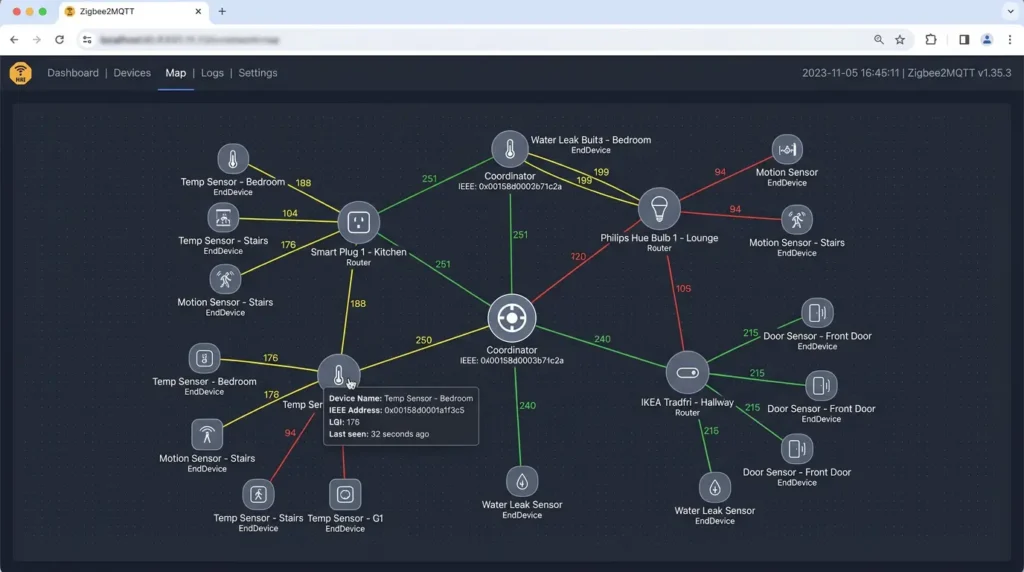
Step 3: Check Your Zigbee Network Map
Use your coordinator software to view the mesh network topology. Look for:
- Devices that route through nodes in cold areas
- Long distance links that may be weakened by winter moisture
- Single points of failure in the mesh
Tools like Zigbee2MQTT’s network map or ZHA’s visualization can show you exactly how your mesh is structured.
Step 4: Monitor Link Quality Indicator (LQI) Values
LQI values range from 0 to 255, with higher being better. Track the LQI of your devices over time:
- LQI above 150: Good link quality
- LQI between 80 and 150: Marginal, could drop in adverse conditions
- LQI below 80: Poor, likely to experience dropouts
If LQI values drop specifically during cold spells, you have confirmed a weather related issue.
Step 5: Correlate Failures with Weather Data
Keep a simple log of when devices go offline or become unresponsive. Then compare those dates with local temperature data. You can use services like Weather Underground or your country’s meteorological service. If failures cluster around cold snaps, the diagnosis is clear.
Practical Fixes to Stabilize Your Zigbee Network in Winter
Now let us get into the solutions. These are tested, practical approaches that have worked for EU homeowners.
Fix 1: Switch to Lithium Batteries for Cold Exposed Devices
Standard alkaline batteries perform terribly below 0°C. Lithium primary batteries (not rechargeable lithium ion) maintain their voltage output down to minus 20°C or even minus 40°C.
For CR2032 replacements, look for Energizer Ultimate Lithium or Panasonic CR2032 industrial grade cells. For AA powered devices, Energizer L91 Ultimate Lithium batteries are the gold standard for cold weather performance.
This single change has solved the problem for many EU homeowners with devices in garages, sheds, and attics.
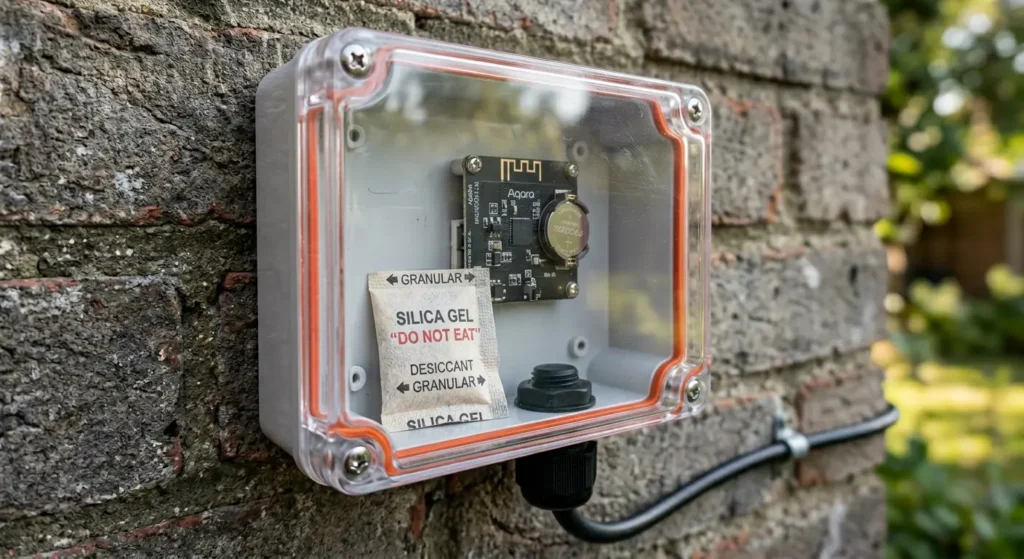
Fix 2: Add Weather Sealed Enclosures for Outdoor Devices
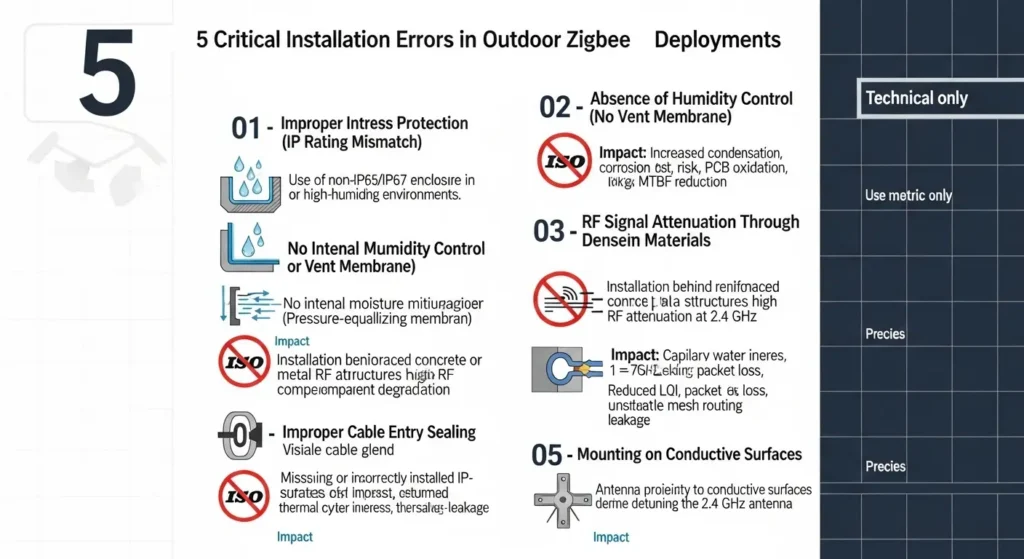
If you have Zigbee sensors mounted outdoors, invest in proper IP65 or IP67 rated enclosures. You can find ABS plastic junction boxes on Amazon or at local electronics shops that work perfectly.
Key points for enclosure setup:
- Use silica gel desiccant packets inside the enclosure to absorb moisture
- Drill a small drainage hole at the bottom (pointed downward) to prevent water pooling
- Avoid completely airtight seals, as pressure differences during temperature changes can force moisture in through seams
- Replace desiccant packets every 3 to 6 months
Fix 3: Relocate Zigbee Routers to Heated Spaces
If you are using smart plugs or other powered Zigbee devices as mesh routers, make sure they are in heated or at least insulated spaces. A router that is struggling with cold will drag down every device that routes through it.
Instead of placing a router in your cold garage, put it in the heated room closest to the garage and let the signal pass through one wall rather than having the router itself in the cold.
Fix 4: Strengthen Your Mesh with More Routers Indoors
A stronger mesh network is more resilient to winter signal degradation. Add Zigbee routers (smart plugs are the easiest option) every 10 to 15 meters throughout your heated living spaces. This creates redundant routes so that if one path degrades, devices can find alternative connections.
Recommended affordable Zigbee routers for EU homes:
- IKEA TRADFRI signal repeater (specifically designed as a range extender)
- IKEA TRADFRI smart plugs (EU socket type, act as routers)
- Sonoff ZBMINI (compact, fits behind switches)
Fix 5: Change Your Zigbee Channel to Reduce Wi-Fi Interference
Since Wi-Fi usage increases in winter, changing your Zigbee channel can reduce interference. The best Zigbee channels to avoid Wi-Fi overlap are:
- Channel 15 (if your Wi-Fi is on channels 1 and 6)
- Channel 20 (sits between Wi-Fi channels 6 and 11)
- Channel 25 (above most Wi-Fi traffic, often the best choice in EU)
- Channel 26 (highest Zigbee channel, but some devices do not support it)
Check your Wi-Fi channel first using a tool like WiFi Analyzer, then choose the Zigbee channel with the least overlap.
Important note: Changing the Zigbee channel requires re-pairing all your devices. Plan this carefully and do it before winter hits.
Fix 6: Insulate Device Mounting Locations
For devices that must stay in cold areas, you can add passive insulation:
- Mount sensors on wooden surfaces rather than directly on concrete or metal (wood is a better thermal insulator)
- Use foam mounting pads behind devices to isolate them from cold walls
- Build small insulated boxes from polystyrene foam for critical outdoor devices
This will not keep devices warm, but it will reduce thermal cycling and slow down heat loss.
Fix 7: Use Mains Powered Devices Where Possible
For critical locations that experience cold, switch from battery powered sensors to mains powered alternatives. A mains powered Zigbee device eliminates the battery cold sensitivity issue entirely and also acts as a mesh router, strengthening your network.
Best Cold Resistant Zigbee Devices for European Climates
Not all Zigbee devices are created equal when it comes to cold tolerance. Here are some that perform better in harsh conditions.
Outdoor Rated Sensors
| Device | Operating Temp Range | IP Rating | Battery Type | Best For |
|---|---|---|---|---|
| Develco Motion Sensor | minus 20°C to 60°C | IP44 | CR123A | Outdoor motion detection |
| Frient Air Quality Sensor | minus 20°C to 50°C | IP20 | USB powered | Semi outdoor air monitoring |
| Third Reality Zigbee Sensor | minus 10°C to 50°C | IP44 | CR2477 | Garage and shed doors |
| SONOFF SNZB-02D | minus 10°C to 60°C | IP20 | CR2450 | Temperature monitoring |
Smart Plugs That Work as Cold Weather Routers
| Device | Operating Temp Range | Socket Type | Notes |
|---|---|---|---|
| IKEA TRADFRI Plug | 0°C to 40°C | EU Type F | Affordable, reliable router |
| Innr SP 224 | minus 10°C to 40°C | EU Type F | Extended cold range |
| Sonoff S26R2 ZB | minus 10°C to 40°C | EU Type F | Good mesh routing |
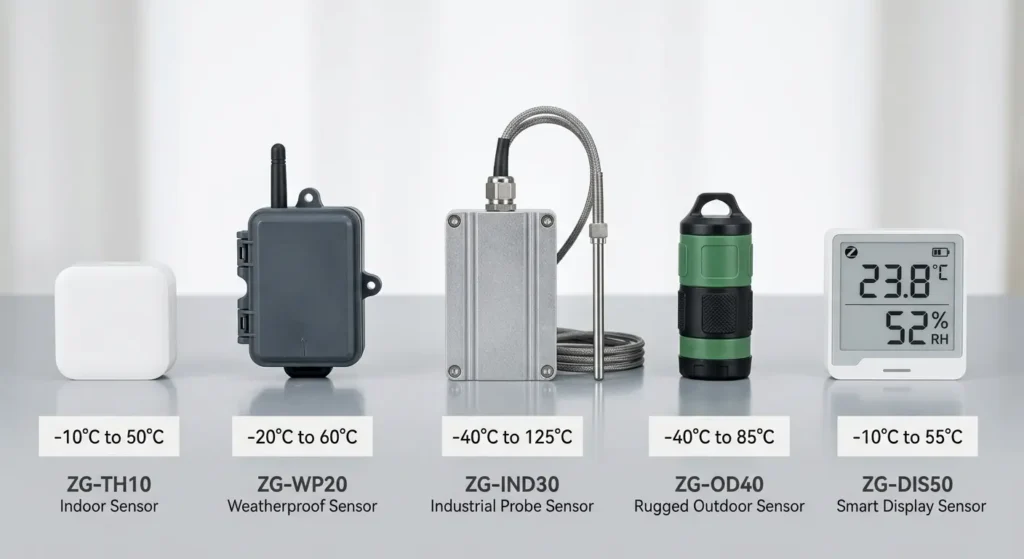
Always check the operating temperature range in the device specifications before buying. Most consumer Zigbee devices are rated for 0°C to 40°C, which means they are not designed for freezing conditions at all.
How to Protect Outdoor Zigbee Sensors from Freezing Temperatures
If you absolutely need Zigbee devices in outdoor or freezing locations, here is a protection strategy that works.
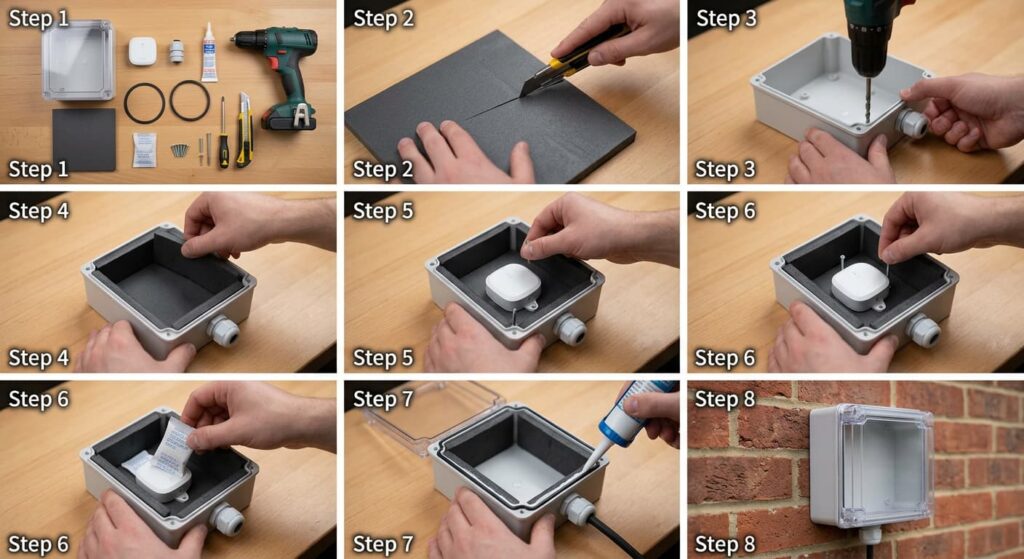
The Insulated Enclosure Method
Materials needed:
- IP65 ABS junction box (large enough for your sensor plus insulation)
- 10mm closed cell foam insulation (EVA foam or neoprene)
- Silica gel desiccant packets (5g to 10g)
- Stainless steel mounting hardware
- Clear silicone sealant
Assembly process:
First, line the inside of the junction box with closed cell foam, leaving a space in the center for your sensor. The foam provides thermal insulation and also cushions the device against vibration.
Second, mount your Zigbee sensor in the center of the insulated space. Make sure the sensor’s PIR lens (if it is a motion sensor) has a clear line of sight through an unobstructed window in the enclosure.
Third, place one or two desiccant packets beside the sensor.
Fourth, seal the enclosure and mount it in its outdoor location. Try to choose a position that is sheltered from direct rain and wind, such as under eaves or an overhang.
This method will not keep your sensor warm, but it will significantly slow temperature drops and prevent condensation, which are the two biggest killers of outdoor Zigbee devices.
Battery Warming Strategy
For extreme cold locations (below minus 15°C), some advanced users use small self regulating heating cables or heating pads powered by low voltage supplies to keep enclosures above freezing. This is more complex but effective for critical monitoring applications like security sensors on remote properties.
Common Mistakes EU Homeowners Make with Zigbee in Winter
Mistake 1: Blaming the Coordinator
When devices start dropping off in winter, many people assume their Zigbee coordinator (Conbee, Sonoff dongle, etc.) is faulty. They waste time reflashing firmware, switching coordinators, or rebuilding their entire network when the real issue is cold batteries on end devices.
Mistake 2: Replacing Batteries with the Same Type
If a battery died because of cold, replacing it with the exact same type will give you the exact same result. Switch to lithium chemistry batteries for any device in an unheated location.
Mistake 3: Placing the Coordinator Near an Exterior Wall
In EU homes with thick masonry walls, the area near exterior walls is significantly colder than the center of the house. Your coordinator should be centrally located, elevated (at least 1 meter off the ground), and away from cold exterior walls.
Mistake 4: Ignoring the Mesh Topology
Many homeowners add devices without thinking about how the mesh routes traffic. If your outdoor sensor connects through an indoor router that is near a cold window, that link might fail in winter. Understanding and managing your mesh topology is critical.
Mistake 5: Not Updating Firmware Before Winter
Device manufacturers sometimes release firmware updates that improve power management and cold weather performance. Check for updates on all your devices before the cold season starts. Platforms like Zigbee2MQTT make OTA firmware updates relatively straightforward.
Real User Experiences and Lessons Learned
Experience 1: A Home Assistant User in Finland
“I live in Tampere and my winters regularly hit minus 25°C. I have 47 Zigbee devices across my home and detached sauna building. For the first two winters, I lost connectivity to everything in the sauna building from December through February. The solution was threefold: lithium batteries in all sensors, a dedicated Zigbee router in a heated junction box on the sauna building wall, and switching from Aqara sensors to Develco sensors rated for minus 20°C. I have not lost a single device in two winters since making those changes.”
Experience 2: A Domoticz User in Belgium
“My Zigbee window sensors kept reporting as open during cold nights, which triggered false security alerts. It turned out the cold was causing enough voltage drop that the sensors would reset and send an incorrect state before going offline. I solved it by adding small rubber gaskets around the battery contacts for better connection and switching to Energizer lithium CR2032 cells.”
Experience 3: A Hubitat User in Northern England
“I had an IKEA TRADFRI bulb in my unheated conservatory that would not respond on cold mornings. Since the bulb is mains powered, the battery was not the issue. The problem was that the bulb’s internal electronics had a minimum operating temperature, and my conservatory was dropping to minus 5°C overnight. I ended up replacing it with a Hue bulb that handles cold better, and the issue went away.”
These experiences highlight an important truth: cold weather Zigbee problems rarely have a single cause. The solution usually involves addressing multiple factors simultaneously.
FAQ: Zigbee Devices and Cold Weather
What is the minimum operating temperature for most Zigbee devices?
Most consumer Zigbee devices are rated for 0°C to 40°C. Some industrial or outdoor rated devices extend down to minus 20°C or minus 40°C, but these are typically more expensive. Always check the datasheet before deploying a device in an unheated location.
Can cold weather permanently damage Zigbee devices?
Yes, it can. Repeated condensation cycles can corrode battery contacts and PCB traces. Extreme cold can crack LCD displays and damage solder joints through thermal contraction. If you bring a cold device into a warm room rapidly, condensation can form on internal circuits and cause short circuits.
Do Zigbee repeaters or routers help with cold weather issues?
Routers help by providing stronger, more redundant mesh paths, which compensates for signal degradation caused by winter moisture. However, the routers themselves must be in acceptable temperature ranges to function properly.
Is Z-Wave better than Zigbee in cold weather?
Z-Wave operates at a lower frequency (868 MHz in the EU) which penetrates walls better than Zigbee’s 2.4 GHz. This can make Z-Wave more resilient in EU homes with thick masonry walls, especially when winter moisture increases wall density. However, Z-Wave devices face the same battery and condensation challenges as Zigbee in cold weather. For more on this comparison, check the Z-Wave Alliance technical documentation.
Will moving to Zigbee 3.0 devices solve cold weather problems?
Zigbee 3.0 offers better interoperability and some power management improvements, but it does not fundamentally change the physics of battery chemistry or signal propagation. The cold weather challenges are hardware and environmental issues, not protocol issues.
How often should I replace batteries in cold exposed Zigbee devices?
For devices in unheated spaces, plan on replacing batteries 2 to 3 times more frequently than indoor devices. With lithium batteries, you might get a full winter season. With alkaline batteries, you may need to replace them monthly during the coldest period.
Can I use rechargeable batteries in Zigbee devices in cold locations?
Rechargeable NiMH batteries perform even worse than alkaline in cold weather. Their voltage is also lower (1.2V vs 1.5V), which can cause issues with some devices. For cold locations, stick with primary lithium batteries.
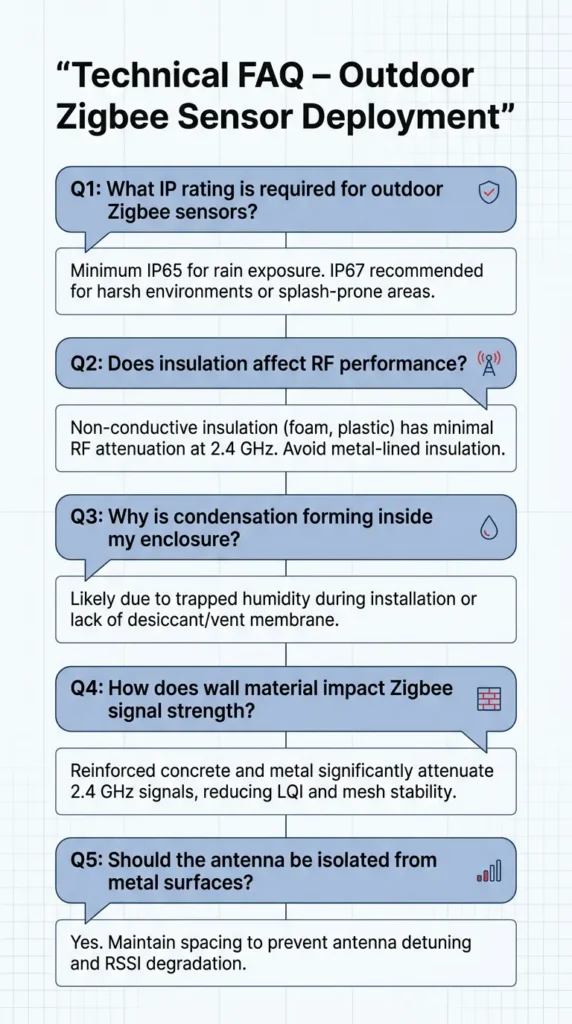
Does the Zigbee 2.4 GHz frequency get affected by snow or ice?
Snow and ice have minimal direct effect on 2.4 GHz signals. However, ice buildup on antennas or sensor housings can detune the antenna and reduce signal strength. Keeping devices sheltered from direct ice accumulation is recommended.
Final Thoughts
Cold weather Zigbee instability in EU homes is a real and widespread problem, but it is also very solvable. The key is understanding that the issue is almost never the Zigbee protocol itself. It is a combination of battery chemistry limitations, EU building construction characteristics, moisture and condensation, and environmental factors that all converge during the winter months.
Start by auditing your device locations and identifying which ones are exposed to cold. Switch those devices to lithium batteries as a first step, since this alone solves the problem for the majority of cases. Then look at your mesh topology, add routers in heated spaces, and consider weatherproof enclosures for any devices that must remain in harsh conditions.
The smart home should make your life easier, not give you extra troubleshooting work every winter. With the right preparation before the cold season, your Zigbee network can be just as reliable in January as it is in July.
For more in-depth technical discussion on Zigbee mesh networking and cold weather performance, the Zigbee Alliance official resources and the Home Assistant community forums are excellent places to continue your research.
Stay warm, and keep your smart home running smoothly.