

Table of Contents
- Introduction
- What Is the MQTT Retain Flag?
- How the Retain Flag Works Behind the Scenes
- Why Does the Retain Flag Cause Outdated Automation Triggers?
- Real World Scenarios Where This Problem Shows Up
- Step by Step Guide to Diagnose Retained Message Issues
- Practical Solutions to Prevent Outdated Triggers
- How to Clear Retained Messages on Popular MQTT Brokers
- Best Practices for Using the Retain Flag in Home Automation
- Real Experiences from the Community
- FAQ
- Final Thoughts
Introduction
Imagine this. You walk into your living room at 2 AM and the lights suddenly turn on at full brightness. Your smart thermostat kicks into cooling mode even though it is the middle of winter. Your security alarm sends you a “motion detected” alert from three days ago. You check everything, and all your devices seem fine. So what is going on?
If you have been building smart home automations using MQTT, chances are you have already run into this frustrating issue. The culprit is often a small, easily overlooked setting called the retain flag. It sounds harmless. In fact, it sounds helpful. But when misunderstood or misused, the mqtt retain flag outdated automation triggers, outdated data, leading to unexpected behaviors that are hard to debug.
I have spent years working with MQTT in home automation setups, and I can tell you this: the retain flag problem is one of the most common yet least understood issues in the MQTT ecosystem. In this article, I will break down exactly why this happens, show you real scenarios, and give you actionable steps to fix it once and for all.
What Is the MQTT Retain Flag?
Before diving into the problem, let us make sure we understand what the retain flag actually does.
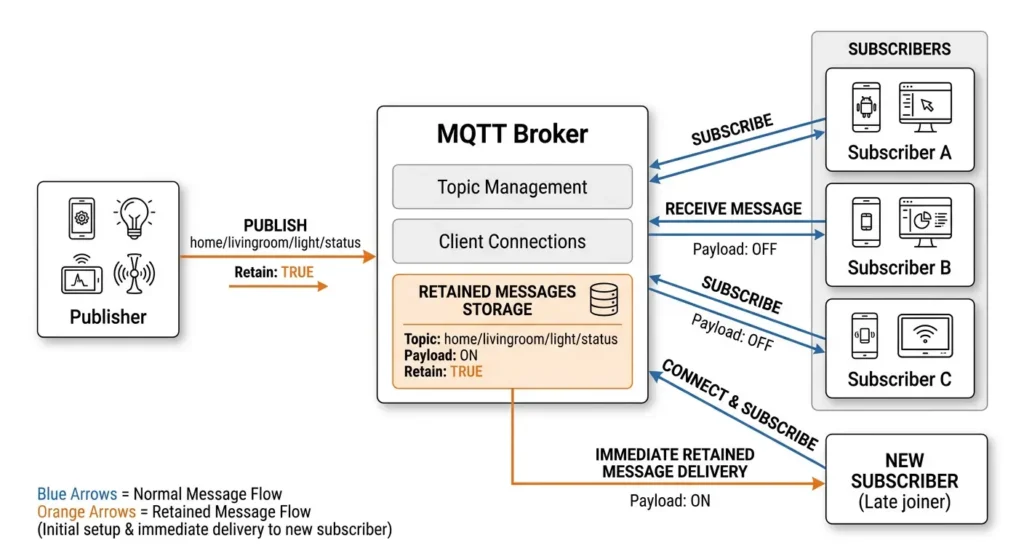
In MQTT (Message Queuing Telemetry Transport), when a client publishes a message to a topic, it can set a retain flag to either true or false. When the retain flag is set to true, the MQTT broker stores that message as the last known good message for that specific topic.
Here is why that matters: when a new subscriber connects and subscribes to that topic, it immediately receives the retained message, even if it was published hours, days, or even weeks ago. The subscriber does not have to wait for a new message to be published. It gets the stored one right away.
Why Was the Retain Flag Created?
The retain flag was designed to solve a legitimate problem. In IoT systems, devices often connect and disconnect frequently. Without retained messages, a newly connected device would have no idea about the current state of a topic until a new message arrives. The retain flag bridges that gap by providing the last known value immediately upon subscription.
For example, if a temperature sensor publishes 22°C with the retain flag on, any new subscriber will instantly know the last reported temperature without waiting for the next reading.
This sounds great in theory. But as you will see, it introduces a subtle and dangerous side effect when combined with automation triggers.
How the Retain Flag Works Behind the Scenes
To truly understand the problem, you need to see what happens at the broker level.
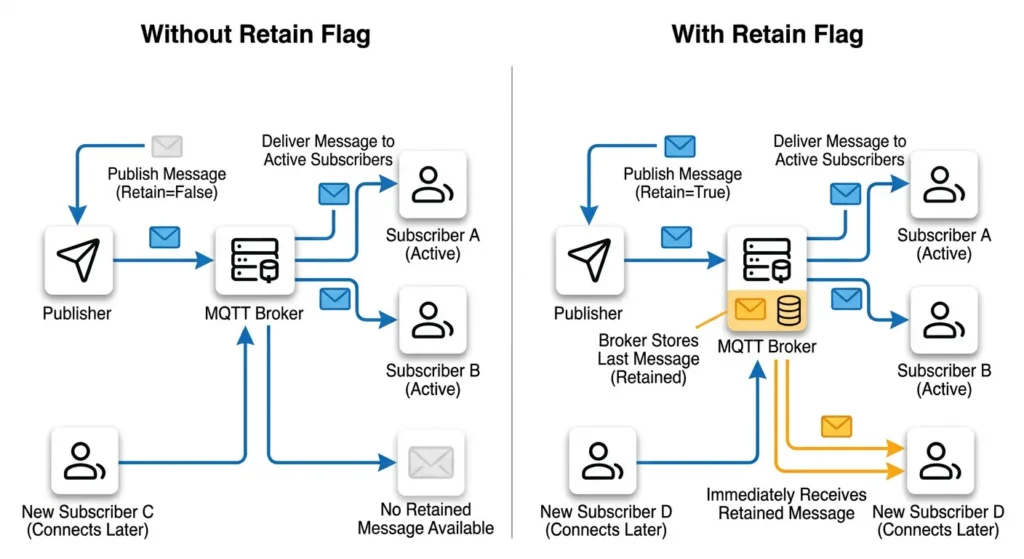
The Normal Flow Without Retain
- Sensor publishes a message to topic
home/livingroom/motion - Broker receives the message
- Broker forwards it to all currently connected subscribers
- Message is discarded after delivery
- New subscribers connecting later receive nothing until the next publish
The Flow With Retain Enabled
- Sensor publishes a message to topic
home/livingroom/motionwithretain = true - Broker receives the message
- Broker forwards it to all currently connected subscribers
- Broker stores the message as the retained message for that topic
- Any new subscriber connecting later immediately receives this stored message
- The stored message remains until replaced by a new retained message or explicitly cleared
The Critical Detail
Here is the part most people miss. The broker does not add any timestamp or “freshness” indicator to the retained message by default. When a new subscriber receives it, the message looks exactly like a fresh, just published message. There is no built in way for the subscriber to know if this message was published 5 seconds ago or 5 days ago.
Why Does the Retain Flag Cause Outdated Automation Triggers?
Now we get to the core of the problem. Let me walk you through the exact mechanism that causes outdated automation triggers.
The Trigger Replay Problem
Most home automation platforms like Home Assistant, OpenHAB, and Node-RED treat incoming MQTT messages as real time events. When a message arrives on a subscribed topic, the automation engine interprets it as something that just happened and fires the associated trigger.
Here is where things go wrong:
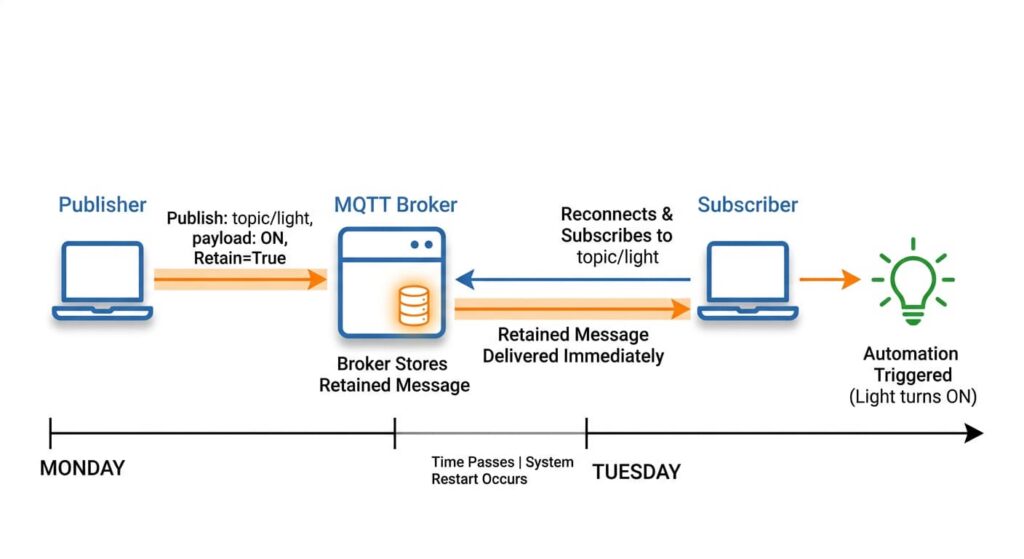
- Your motion sensor detects movement at 3:00 PM on Monday
- It publishes
{"motion": "detected"}tohome/hallway/motionwithretain = true - Your automation system receives it and turns on the hallway lights (correct behavior)
- At 3:05 PM, the motion stops, but the sensor does not publish an “off” message (or publishes it without retain)
- On Tuesday morning, your Home Assistant restarts for an update
- Upon restart, it reconnects to the MQTT broker and resubscribes to all topics
- The broker immediately sends the retained message:
{"motion": "detected"} - Home Assistant treats this as a new motion event
- The hallway lights turn on at 6:00 AM on Tuesday based on Monday’s data
This is the retain flag trap. The automation system has no way to distinguish between a genuine new event and a replayed retained message.
Why Automation Platforms Cannot Tell the Difference
There are several reasons why this is so problematic:
- MQTT protocol limitation: The protocol does not include mandatory timestamps in messages
- Broker behavior: The broker sends retained messages through the same channel as live messages
- Automation engine design: Most engines are designed to react to every incoming message as a current event
- Stateless processing: Many automation rules do not check message age or context
The Compounding Effect
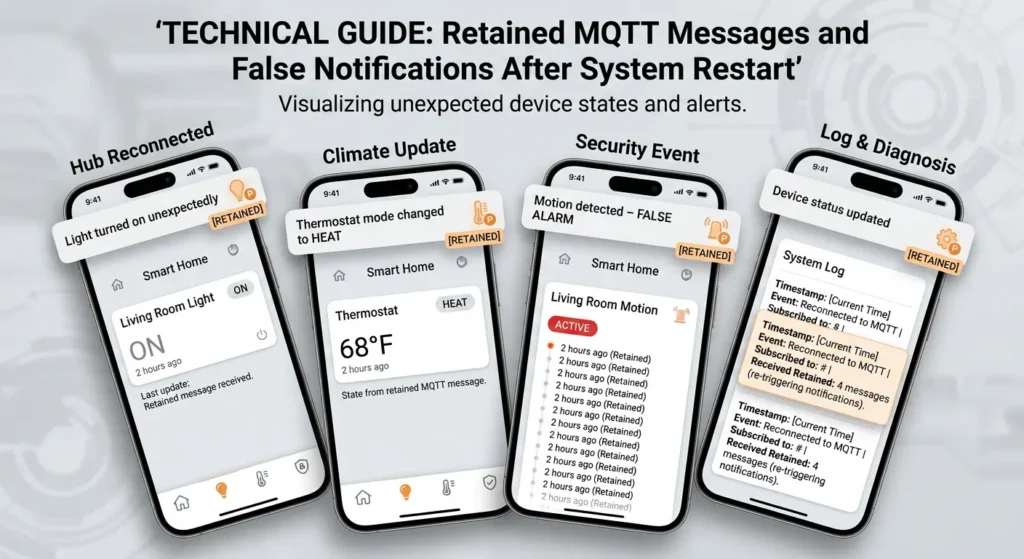
The problem gets worse when you have multiple topics with retained messages. After a system restart, every single retained message floods in simultaneously, potentially triggering dozens of automations based on outdated data. I have seen setups where a simple restart caused lights to turn on in every room, thermostats to change to old setpoints, and notification systems to send a barrage of old alerts.
Real World Scenarios Where This Problem Shows Up
Let me share some scenarios that I have either experienced personally or seen reported in the community. These will help you recognize if you are dealing with the same issue.
Scenario 1: The Phantom Motion Detection
Setup: PIR motion sensors publishing to MQTT with retain enabled, triggering lights and security cameras.
What happened: Every time Home Assistant restarted, all motion activated lights turned on and security cameras started recording. The family thought there was an intruder. In reality, it was just old retained messages from the last time motion was actually detected.
Root cause: The motion sensor published “ON” with retain but published “OFF” without retain. After restart, only the “ON” message was stored and replayed.
Scenario 2: The Thermostat Time Machine
Setup: Smart thermostat receiving setpoint commands via MQTT with retain enabled.
What happened: A user set the thermostat to 28°C during a cold snap. A week later, during milder weather, they manually set it to 21°C through the device itself (not MQTT). When the MQTT broker restarted due to a server update, the thermostat received the old retained message of 28°C and overrode the current setting. The house became uncomfortably hot before anyone noticed.
Root cause: The retained command message persisted on the broker and was re-delivered after the broker restart, overwriting the current device state.
Scenario 3: The Notification Flood
Setup: Door and window sensors publishing open/close status with retain, triggering push notifications.
What happened: After a power outage, the entire system came back online. Every door and window sensor’s last retained state was replayed. The user received 15 notifications about doors being “opened” even though they were all closed. They panicked and called the police.
Root cause: All retained messages were delivered simultaneously on reconnection, and the notification automation treated each one as a new event.
Step by Step Guide to Diagnose Retained Message Issues
If you suspect the retain flag is causing problems in your setup, follow these steps to confirm and identify the affected topics.
Step 1: Check Your MQTT Broker for Retained Messages
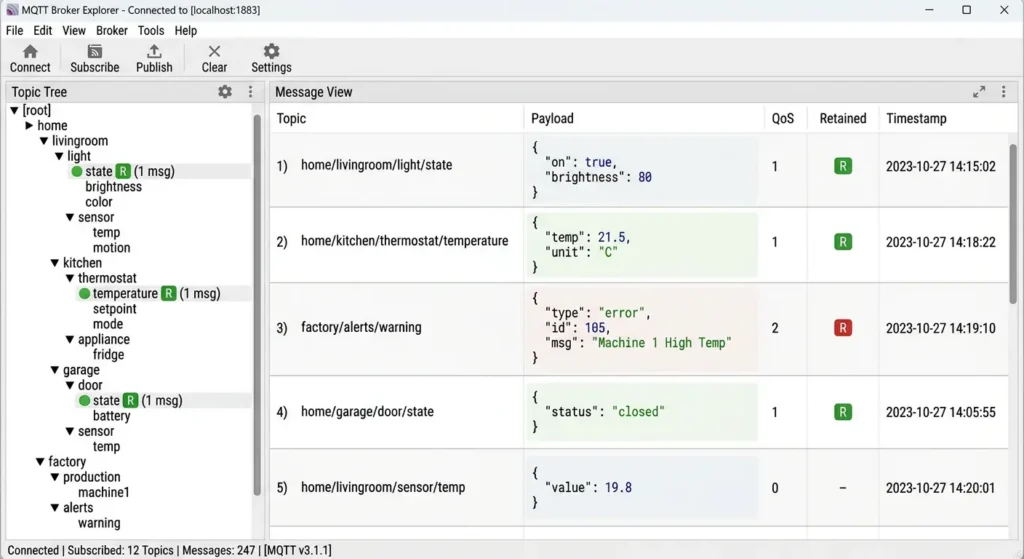
Use an MQTT client like MQTT Explorer or mosquitto_sub to view retained messages.
Using mosquitto_sub:
Bashmosquitto_sub -h localhost -t "#" -v --retained-only
This command subscribes to all topics and shows only retained messages. If you see messages on topics that trigger automations, you have found your suspects.
Step 2: Identify Which Topics Have Retain Enabled
Open MQTT Explorer (available at mqtt-explorer.com) and connect to your broker. Browse through your topics. MQTT Explorer shows a small flag icon next to topics that have retained messages. Document every topic that has a retained message and is connected to an automation trigger.
Step 3: Test the Replay Behavior
- Note the current state of your automations
- Disconnect your automation platform from the MQTT broker
- Reconnect it
- Observe which automations fire immediately upon reconnection
- Any automation that fires without a genuine sensor event is being triggered by a retained message
Step 4: Review Your Sensor and Device Configurations
Check each device that publishes to MQTT:
- Is the retain flag set to
truein the device firmware or configuration? - Does the device publish both “active” and “inactive” states with retain?
- Is there a timestamp included in the message payload?
Step 5: Audit Your Automation Rules
Review each automation rule:
- Does it blindly react to any incoming message?
- Does it check the message age or compare it with known state?
- Does it have any startup delay or filtering logic?
Practical Solutions to Prevent Outdated Triggers
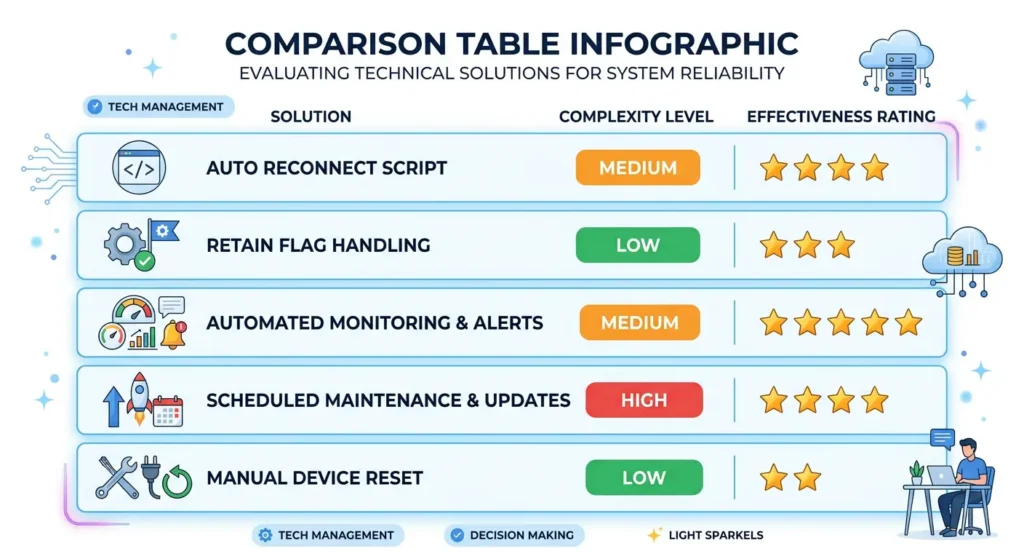
Now that you understand the problem, here are proven solutions ranked from simplest to most robust.
Solution 1: Disable Retain Where It Is Not Needed
The simplest fix is to turn off the retain flag for topics that trigger automations based on events (not states).
Event based topics (retain should be OFF):
- Motion detection
- Button presses
- Door bell rings
- Alarm triggers
State based topics (retain can be ON, with caution):
- Temperature readings
- Light on/off status
- Device availability
In Zigbee2MQTT, you can control this in the configuration:
YAMLmqtt:
  force_disable_retain: true
In Tasmota devices, use the command:
textRetainFlag 0
Solution 2: Add Timestamps to Your Messages
Include a timestamp in every MQTT message payload so your automation can check message freshness.
Example payload:
JSON{
  "motion": "detected",
  "timestamp": "2025-01-15T14:30:00Z"
}
In your automation, add a condition that checks if the timestamp is within an acceptable window (for example, the last 60 seconds). If the message is older, ignore it.
Home Assistant example using a template condition:
YAMLautomation:
  - alias: "Motion Light"
    trigger:
      - platform: mqtt
        topic: "home/hallway/motion"
    condition:
      - condition: template
        value_template: >
          {{ (now() - (trigger.payload_json.timestamp | as_datetime)).total_seconds() < 60 }}
    action:
      - service: light.turn_on
        target:
          entity_id: light.hallway
Solution 3: Use MQTT Birth and Last Will Messages
Configure your automation platform to publish a birth message when it connects. Use this as a signal to ignore all messages received within the first few seconds after connection (the “startup window”).
In Home Assistant, MQTT birth and will messages are configured in configuration.yaml:
YAMLmqtt:
  birth_message:
    topic: "homeassistant/status"
    payload: "online"
  will_message:
    topic: "homeassistant/status"
    payload: "offline"
Then add a startup delay to your automations:
YAMLautomation:
  - alias: "Motion Light with Startup Guard"
    trigger:
      - platform: mqtt
        topic: "home/hallway/motion"
    condition:
      - condition: state
        entity_id: input_boolean.system_ready
        state: "on"
    action:
      - service: light.turn_on
        target:
          entity_id: light.hallway
Create a separate automation that sets input_boolean.system_ready to “on” 30 seconds after Home Assistant starts.
Solution 4: Use MQTT 5.0 Message Expiry
If your broker supports MQTT 5.0, you can use the Message Expiry Interval property. This tells the broker to automatically delete retained messages after a specified time.
Example using the Paho MQTT Python client:
Pythonfrom paho.mqtt.properties import Properties
from paho.mqtt.packettypes import PacketTypes

properties = Properties(PacketTypes.PUBLISH)
properties.MessageExpiryInterval = 300  # Message expires after 5 minutes

client.publish("home/hallway/motion", payload="detected", qos=1, retain=True, properties=properties)
This ensures that any retained message older than 5 minutes is automatically purged by the broker.
Solution 5: Implement State Verification
Instead of blindly trusting incoming MQTT messages, have your automation verify the state with the actual device before acting.
For example, when a motion message arrives:
- Receive the MQTT message
- Query the motion sensor’s current status via a separate API or MQTT request
- Only trigger the automation if the sensor confirms active motion
- Discard the message if the sensor reports no motion
This adds a layer of verification that prevents stale messages from causing false triggers.
How to Clear Retained Messages on Popular MQTT Brokers
Sometimes you need to clean up existing retained messages. Here is how to do it on the most popular brokers.
Mosquitto
Clear a single topic:
Bashmosquitto_pub -h localhost -t "home/hallway/motion" -n -r
The -n flag sends an empty (null) message, and -r sets the retain flag. This tells the broker to delete the retained message for that topic.
Clear all retained messages (using a script):
Bashmosquitto_sub -h localhost -t "#" -v --retained-only | while read topic message; do
  mosquitto_pub -h localhost -t "$topic" -n -r
done
EMQX
Use the EMQX Dashboard or the REST API:
Bashcurl -X DELETE "http://localhost:8081/api/v5/mqtt/retainer/message/home%2Fhallway%2Fmotion" \
  -u admin:public
You can also configure automatic cleanup in the EMQX configuration:
textretainer {
  msg_expiry_interval = 5m
  max_payload_size = 1MB
}
HiveMQ
Use the HiveMQ Control Center or publish an empty retained message to the topic, similar to the Mosquitto method.
For more details on managing retained messages, refer to the HiveMQ documentation on retained messages.
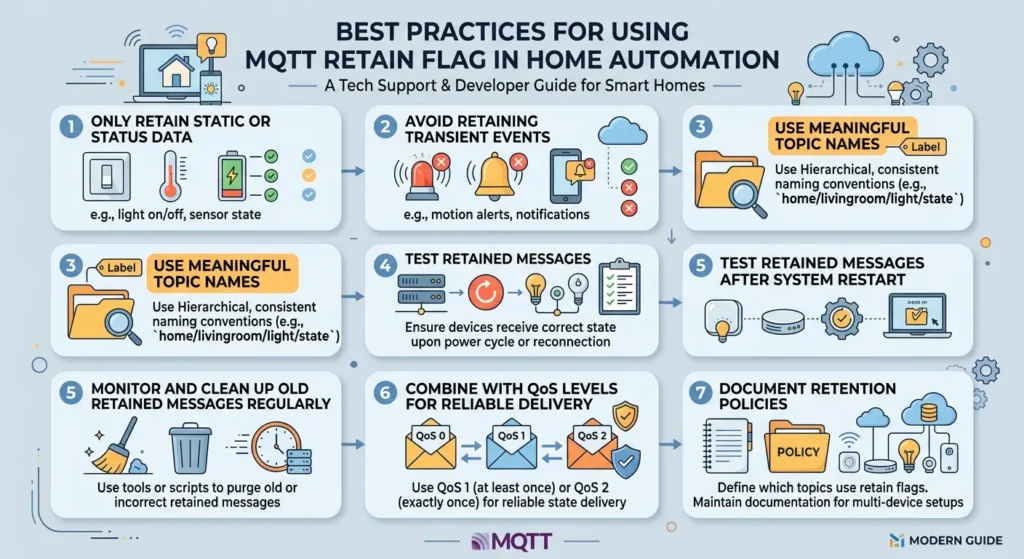
Best Practices for Using the Retain Flag in Home Automation
After years of working with MQTT in production environments, here are my recommended best practices.
Do Use Retain For:
- Device availability topics (online/offline status)
- Configuration topics that devices read on startup
- State topics where knowing the last state is critical (like light on/off)
- Sensor readings where you want immediate data on subscription (temperature, humidity)
Do Not Use Retain For:
- Event based triggers (motion detected, button pressed, doorbell rang)
- Command topics that should only execute once
- Notification triggers that should not repeat
- Alarm events that could cause false alerts
Always Pair ON and OFF with the Same Retain Setting
If you publish a motion “ON” message with retain, make absolutely sure the motion “OFF” message also has retain enabled. This way, the most recent state (whether on or off) is always the retained message. Never have mismatched retain settings for the same topic.
Use Separate Topics for State and Events
A clean architecture uses different topics for different purposes:
texthome/hallway/motion/state    → retained (current state: ON or OFF)
home/hallway/motion/event    → not retained (event: motion detected)
Your automations should subscribe to the appropriate topic based on what they need.
Document Your Retain Flag Usage
Maintain a simple spreadsheet or document that lists:
- Every MQTT topic in your system
- Whether retain is enabled
- Why retain is on or off
- Which automations subscribe to each topic
This documentation will save you hours of debugging when issues arise.
Real Experiences from the Community
These are real stories from forums and communities that highlight the retain flag problem.
Experience 1: Home Assistant Community Forum
A user on the Home Assistant Community Forum reported that every time they restarted Home Assistant, their garage door automation would trigger, attempting to open the garage. After weeks of troubleshooting, they discovered that the Zigbee2MQTT integration was publishing door sensor states with retain enabled. The old “open” command retained on the broker was being replayed on every restart. The fix was adding retain: false to the command topic in their Zigbee2MQTT configuration.
Experience 2: Reddit r/homeautomation
A Reddit user shared how their smart irrigation system watered the garden at 11 PM after a server reboot. The MQTT message “start watering” had been retained from the scheduled 6 AM cycle. When the broker restarted, the retained command was replayed, and the irrigation system obediently turned on. They solved it by switching to MQTT 5.0 with message expiry set to 10 minutes.
Experience 3: Node-RED Forum
A Node-RED user building a factory monitoring system found that alert messages were being replayed every time the Node-RED service restarted. Critical alarms from days ago would flood the dashboard, confusing operators. They resolved it by implementing a startup delay node that discarded all messages received within the first 15 seconds of Node-RED starting up.
FAQ
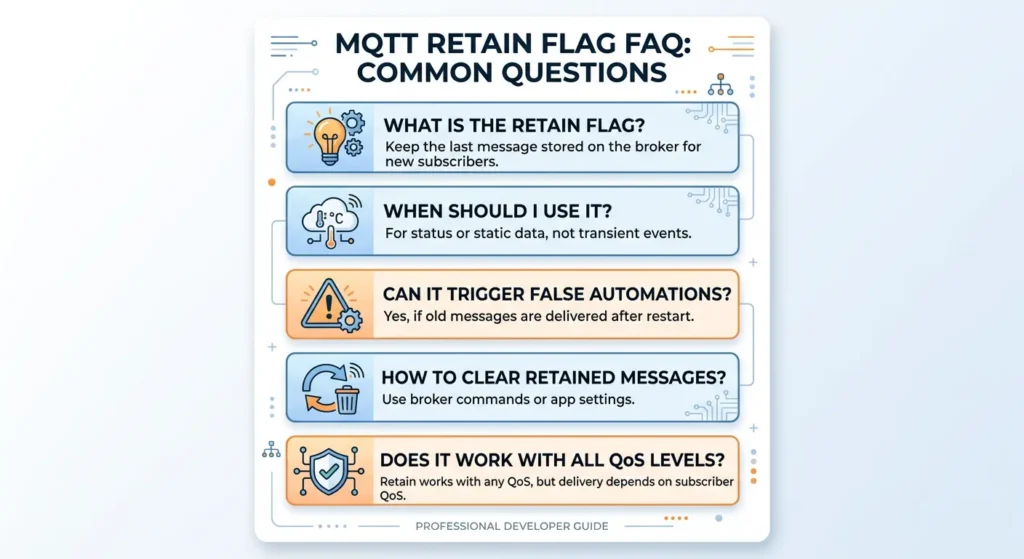
What exactly does the MQTT retain flag do?
The MQTT retain flag tells the broker to store the last message published to a specific topic. When a new client subscribes to that topic, the broker immediately delivers this stored message so the client has the most recent value without waiting for a new publish event.
Can the retain flag cause automations to trigger incorrectly?
Yes. When an automation platform reconnects to the MQTT broker (after a restart, update, or network interruption), it receives all retained messages at once. The automation engine treats these old messages as new events and fires triggers based on outdated data.
How do I know if a message is retained?
Most MQTT client libraries and tools indicate whether a received message is retained. In MQTT Explorer, retained messages are marked with a flag icon. In code, the message object usually has a retain property you can check.
Should I disable retain on all MQTT topics?
No. Retain is useful for state topics where knowing the last value matters (like temperature or device availability). You should only disable retain on event based topics that trigger automations (like motion detection or button presses).
Does MQTT 5.0 solve the retain flag problem?
MQTT 5.0 introduces the Message Expiry Interval feature, which allows retained messages to automatically expire after a set time. This significantly reduces the risk of outdated messages causing problems, but you still need to set appropriate expiry times for your use case.
How do I clear a retained message from the broker?
Publish an empty (null) message to the same topic with the retain flag set to true. The broker will delete the stored retained message for that topic.
Can I add a timestamp to prevent stale message triggers?
Yes. Including a timestamp in your MQTT message payload allows your automation engine to check how old the message is. If it exceeds a threshold (for example, 60 seconds), the automation can ignore it.
Does this affect all automation platforms equally?
Most platforms are affected, including Home Assistant, OpenHAB, Node-RED, and others. However, some platforms have built in mechanisms to handle retained messages differently. Check your platform’s documentation for specific options.
Final Thoughts
The MQTT retain flag is not a bug. It is a feature designed with good intentions. It ensures that newly subscribing clients immediately know the last published value on a topic. But in the context of home automation, where messages are treated as triggers for real world actions, this feature can become a source of frustrating, hard to debug problems.
The key takeaway is simple: be intentional about where you use retain. Use it for state information that needs to persist. Avoid it for event driven triggers that should only fire once. And always have a strategy for handling the flood of retained messages that occurs after every system restart.
If you are currently struggling with lights turning on randomly, thermostats resetting to old values, or notifications firing for events that happened days ago, go through the diagnostic steps in this article. Chances are, the retain flag is the root cause.
Take 30 minutes today to audit your MQTT topics. Identify which ones have retain enabled. Ask yourself if each one truly needs it. Clear the ones that do not. Your future self, and your family who keeps getting woken up by phantom motion alerts, will thank you.