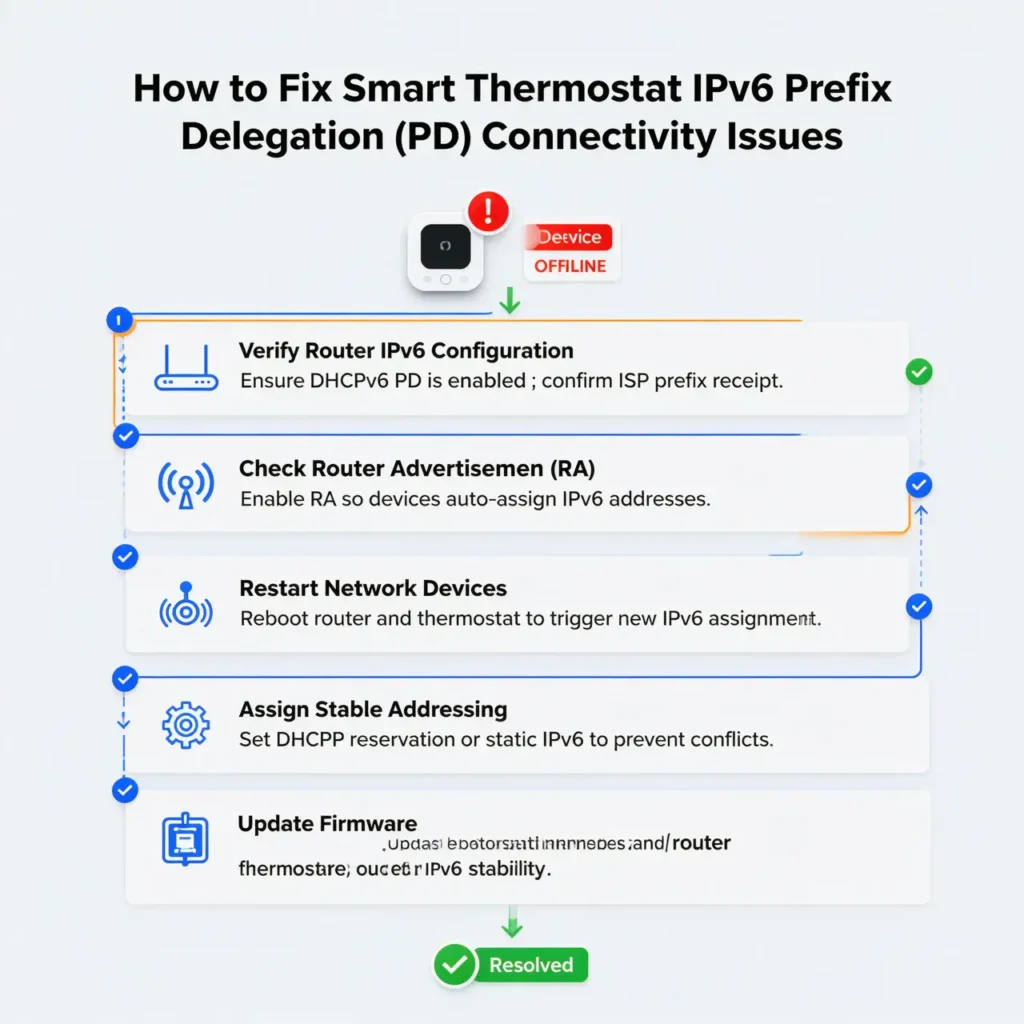
Table of Contents
- Introduction: The Frustrating Reality of Smart Thermostat Issues
- What Is IPv6 Prefix Delegation and Why Does It Matter?
- Real Scenario: When Your Nest Thermostat Goes Rogue
- Top Reasons Smart Thermostats Fail After IPv6 PD Activation
- Step by Step Troubleshooting Guide
- Safe and Proven Solutions
- Brand Specific Fixes for Popular Smart Thermostats
- How to Prevent Future IPv6 Related Issues
- Real User Experiences and Community Insights
- Frequently Asked Questions
- Final Thoughts
Introduction: The Frustrating Reality of Smart Thermostat Issues
Picture this scenario. You just upgraded your home network, enabled IPv6 Prefix Delegation on your router for better connectivity, and suddenly your smart thermostat starts acting like it has a mind of its own. It disconnects randomly, shows offline status in your app, or worse, stops responding to your commands entirely.
If this sounds familiar, you are definitely not alone. I have spent countless hours troubleshooting this exact issue for clients, friends, and even in my own home. The connection between smart thermostat IPv6 PD issuesmisbehavior is more common than most people realize, yet surprisingly few resources explain it clearly.
In this comprehensive guide, I will walk you through exactly why this happens, share real world experiences from the smart home community, and provide you with practical solutions that actually work. No technical jargon without explanation, no guesswork, just proven fixes from years of hands on experience.
What Is IPv6 Prefix Delegation and Why Does It Matter?
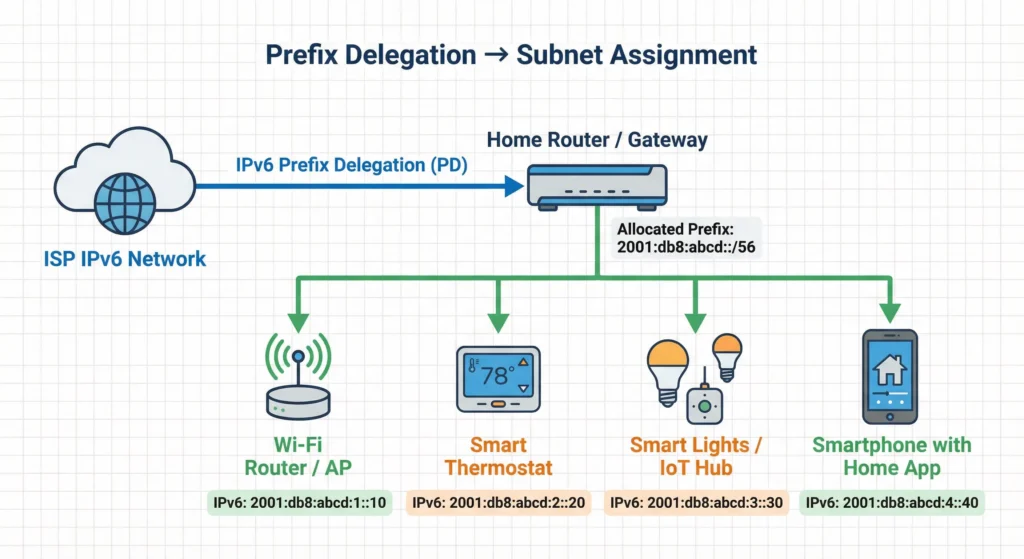
Before we dive into the fixes, let us understand what we are dealing with. IPv6 Prefix Delegation, commonly abbreviated as IPv6 PD, is a mechanism that allows your Internet Service Provider to assign a block of IPv6 addresses to your router. Your router then distributes these addresses to all devices on your home network.
Why ISPs Are Pushing IPv6
The internet is running out of IPv4 addresses. With billions of connected devices worldwide, the old addressing system simply cannot keep up. IPv6 offers a virtually unlimited pool of addresses, which is why ISPs are increasingly enabling it by default.
The Hidden Problem for IoT Devices
Here is where things get tricky for smart thermostats and other IoT devices. Many of these devices were designed primarily with IPv4 in mind. When IPv6 PD enters the picture, it can create several complications that manufacturers did not fully anticipate.
Real Scenario: When Your Nest Thermostat Goes Rogue
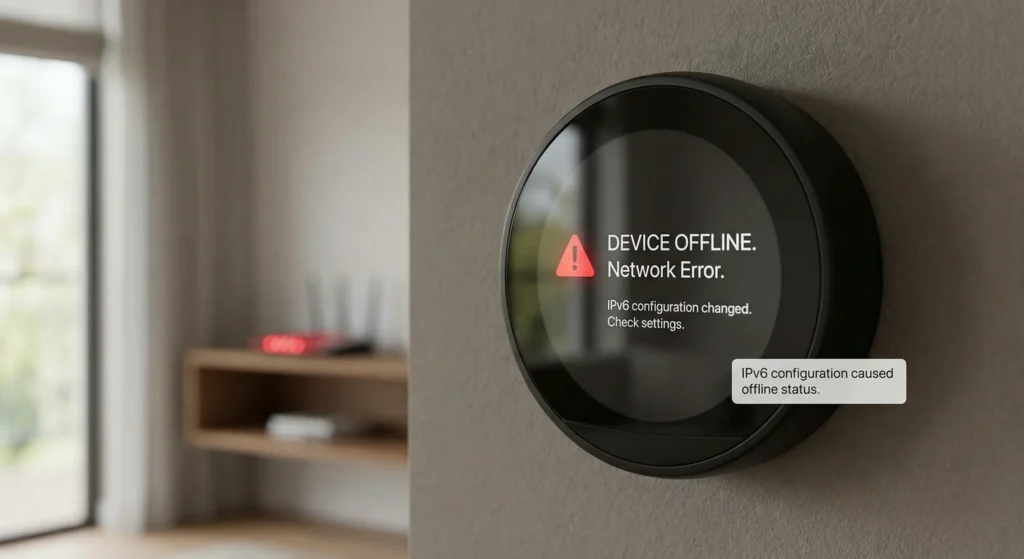
Let me share a real situation I encountered last winter. A homeowner contacted me in a panic because their Nest Learning Thermostat had been working flawlessly for three years. Then their ISP upgraded their connection and enabled IPv6 by default.
Within 48 hours, the thermostat started showing “delayed” status. Temperature schedules stopped working. The Nest app would show the device as offline, then online, then offline again. The heating system would sometimes not respond at all during cold nights.
After extensive troubleshooting, we discovered that the thermostat was receiving both IPv4 and IPv6 addresses, but its communication with Google servers was failing intermittently because the IPv6 path was unreliable. The device kept switching between protocols, causing the erratic behavior.
This scenario is incredibly common with smart thermostats from Nest, Ecobee, Honeywell, and other brands.
Top Reasons Smart Thermostats Fail After IPv6 PD Activation
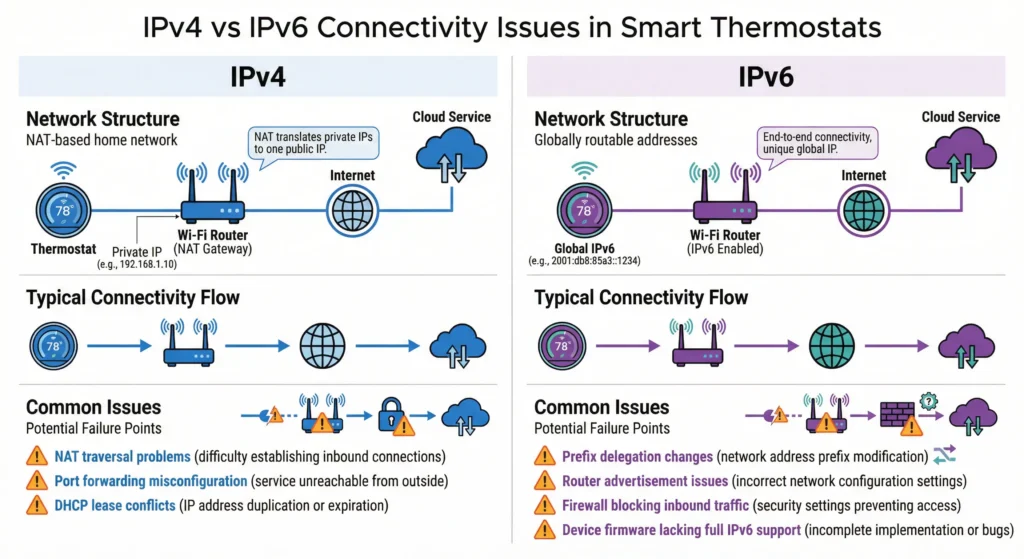
Understanding the root causes helps you choose the right solution. Here are the main culprits behind smart thermostat misbehavior after enabling IPv6 PD.
1. Incomplete IPv6 Implementation in Thermostat Firmware
Many smart thermostat manufacturers implemented IPv6 support as an afterthought. Their devices can technically receive IPv6 addresses, but the communication stack may not handle IPv6 traffic as reliably as IPv4.
2. DNS Resolution Conflicts
When IPv6 PD is active, your devices may receive IPv6 DNS servers. Some smart thermostats struggle with IPv6 DNS resolution, leading to failed connections to cloud servers even when the network itself is functional.
3. Prefix Changes and Address Instability
Unlike static IPv4 setups, IPv6 prefixes from your ISP can change periodically. When the prefix changes, your thermostat receives a new IPv6 address. Some devices handle this transition poorly, losing connectivity until they are rebooted or until the old connection times out.
4. Router Compatibility Issues
Not all consumer routers handle IPv6 PD correctly. Some routers have bugs in their IPv6 implementation that specifically affect IoT devices with limited networking capabilities.
5. Firewall and Security Rule Conflicts
IPv6 introduces different firewall behavior. Rules that worked perfectly for IPv4 may not apply correctly to IPv6 traffic, potentially blocking your thermostat communication with manufacturer servers.
6. Dual Stack Confusion
Running both IPv4 and IPv6 simultaneously, known as dual stack operation, can confuse devices that do not properly implement the Happy Eyeballs algorithm for choosing the best protocol.
Step by Step Troubleshooting Guide
Follow these steps in order to identify and resolve your smart thermostat IPv6 issues.
Step 1: Confirm IPv6 PD Is the Actual Cause
Before making changes, verify that IPv6 is indeed causing the problem.
- Access your router administration panel
- Locate IPv6 settings, usually under WAN or Internet settings
- Temporarily disable IPv6 or IPv6 PD
- Wait 5 minutes for network changes to propagate
- Check if your thermostat returns to normal operation
- If the thermostat works correctly with IPv6 disabled, you have confirmed the cause
Step 2: Check Your Thermostat Firmware Version
Outdated firmware is a major contributor to IPv6 compatibility problems.
- Open your thermostat manufacturer app
- Navigate to device settings
- Look for firmware or software version information
- Compare with the latest version on the manufacturer website
- Update if a newer version is available
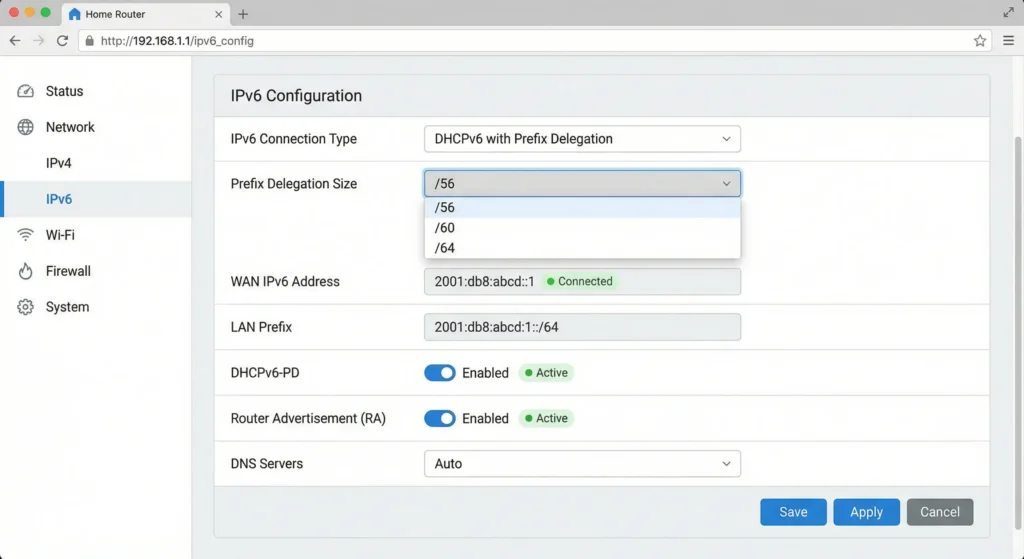
Step 3: Examine Router IPv6 Configuration
Your router settings may need adjustment for better IoT compatibility.
- Log into your router admin panel
- Find IPv6 configuration options
- Note your current settings including PD mode, prefix length, and DNS servers
- Look for any IoT or smart device specific settings
Step 4: Test DNS Resolution
DNS problems are often the hidden culprit.
- Check what DNS servers your network is using for IPv6
- Verify that your thermostat can resolve manufacturer domains
- Consider using well established IPv6 DNS servers like Google (2001:4860:4860::8888) or Cloudflare (2606:4700:4700::1111)
Safe and Proven Solutions
Based on years of troubleshooting experience and community feedback, here are the most effective solutions ranked by success rate and ease of implementation.
Solution 1: Enable IPv6 Preference for IPv4
Many routers offer an option to prefer IPv4 for local devices while still supporting IPv6. This gives your thermostat the stable IPv4 connection it prefers while maintaining IPv6 for other devices.
How to implement:
- Access router settings
- Look for “IPv4 Preferred” or “Dual Stack Lite” options
- Enable IPv4 preference
- Save and reboot router
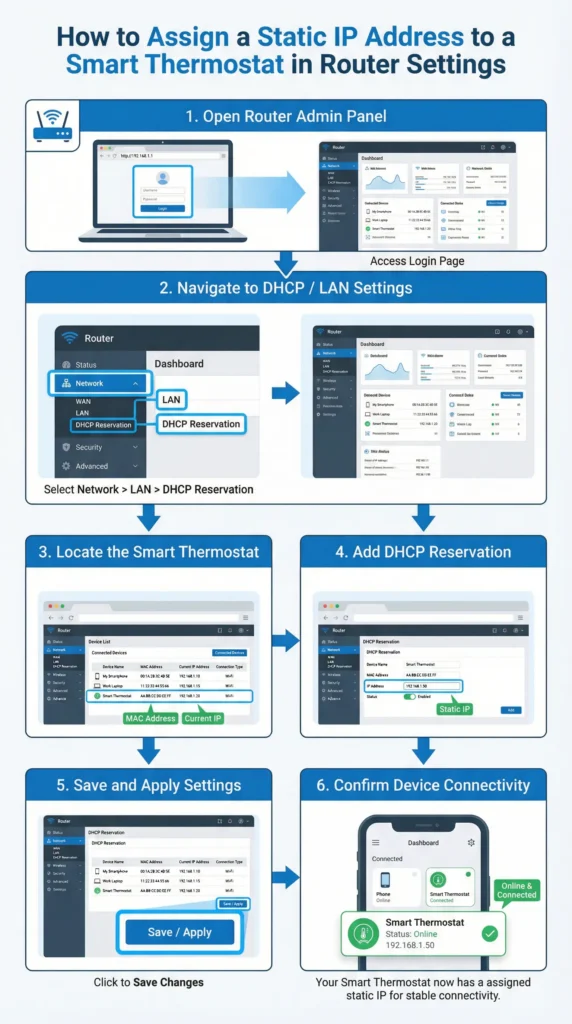
Solution 2: Assign Static IPv4 Address to Thermostat
Give your thermostat a static IPv4 address through DHCP reservation. This ensures consistent addressing regardless of IPv6 activity.
How to implement:
- Find your thermostat MAC address in device settings
- Access router DHCP settings
- Create address reservation for the thermostat MAC
- Assign an IP outside the dynamic DHCP range
- Reboot thermostat to receive new address
Solution 3: Disable IPv6 on Specific Devices Using VLANs
For advanced users, creating a separate VLAN for IoT devices with IPv6 disabled provides the cleanest solution.
Benefits of this approach:
- Keeps IPv6 active for computers and phones
- Isolates IoT devices for better security
- Provides stable environment for smart home devices
Solution 4: Configure Router to Use IPv4 DNS for All Devices
Force all network devices to use IPv4 DNS servers, eliminating DNS related IPv6 issues.
Recommended DNS servers:
- Google: 8.8.8.8 and 8.8.4.4
- Cloudflare: 1.1.1.1 and 1.0.0.1
- OpenDNS: 208.67.222.222 and 208.67.220.220
Solution 5: Update Router Firmware
Router manufacturers frequently release updates addressing IPv6 bugs.
- Check your router manufacturer website
- Download latest firmware
- Backup current router settings
- Apply firmware update
- Restore settings if needed
- Test thermostat connectivity
Brand Specific Fixes for Popular Smart Thermostats
Different thermostat brands have unique quirks with IPv6. Here are targeted solutions for the most popular models.
Google Nest Thermostats
Nest devices generally handle dual stack networking reasonably well, but issues arise with unstable IPv6 prefixes.
Best fix: Ensure your Nest has the latest firmware and configure your router to provide stable IPv6 prefix delegation with a long preferred lifetime.
Additional tip: Nest thermostats work best when the router supports mDNS properly across both IPv4 and IPv6.
Ecobee Smart Thermostats
Ecobee devices have shown sensitivity to IPv6 DNS issues in community reports.
Best fix: Configure manual IPv4 DNS servers in your router settings. Many Ecobee users report success with Cloudflare DNS.
Additional tip: Restart your Ecobee after any router IPv6 changes to clear cached network information.
Honeywell Home T Series
Older Honeywell T series thermostats may have limited IPv6 support in their firmware.
Best fix: Create a DHCP reservation for IPv4 and consider disabling IPv6 for these specific devices if your router supports per device settings.
Amazon Smart Thermostat
Amazon devices generally prefer IPv6 when available but may struggle with prefix changes.
Best fix: Ensure your Amazon thermostat is linked to a stable 2.4GHz network and that your router is not frequently changing IPv6 prefixes.
How to Prevent Future IPv6 Related Issues
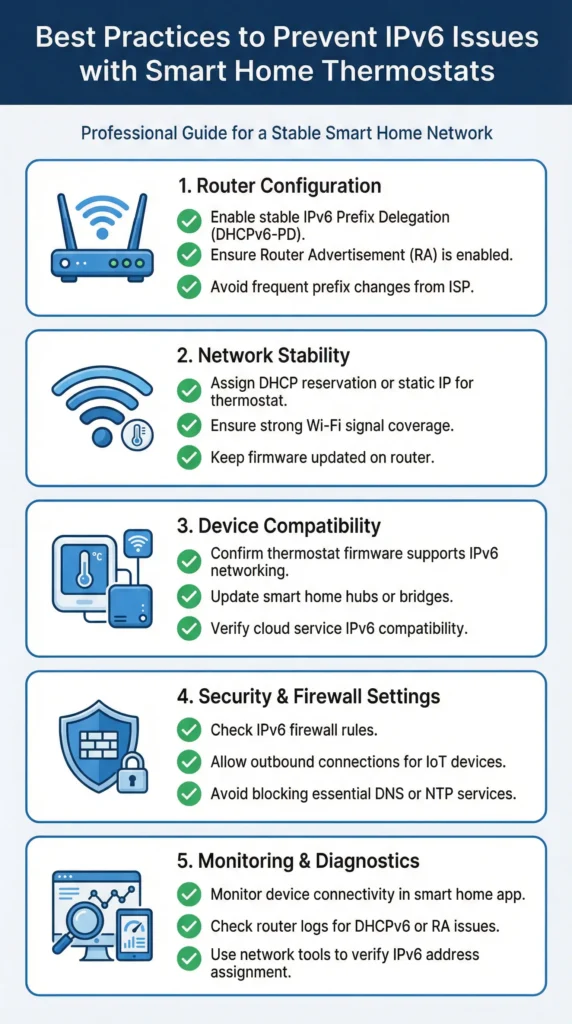
Prevention is always better than troubleshooting. Follow these best practices to maintain stable smart thermostat operation.
Choose IPv6 Friendly Networking Equipment
When purchasing a new router, look for models with proven IPv6 compatibility and positive reviews from smart home users. Brands like Ubiquiti, ASUS, and TP Link Deco generally offer reliable IPv6 implementation.
Maintain Regular Firmware Updates
Set calendar reminders to check for firmware updates monthly. Both router and thermostat updates often include IPv6 improvements.
Document Your Network Configuration
Keep a record of your working settings. If something breaks after an ISP change or update, you can quickly reference what was working before.
Monitor Network Stability
Use your thermostat app to check device connectivity history. Many apps show connection quality indicators that can warn you of developing problems.
Consider a Dedicated IoT Network
Creating a separate network for smart home devices provides isolation and allows customized settings without affecting your primary network.
Real User Experiences and Community Insights
The smart home community has extensively documented IPv6 thermostat issues. Here are valuable insights from real users.
Experience from Reddit Community
A user on the r/HomeNetworking subreddit shared that their Ecobee3 Lite worked perfectly for two years before their ISP enabled IPv6. After weeks of troubleshooting, they discovered their router was sending short lived IPv6 prefixes. Extending the prefix lifetime to 24 hours completely resolved the issue.
Insight from Home Automation Forums
Multiple users on Home Assistant forums reported that running Pi hole as a network wide DNS solution with IPv4 only mode eliminated thermostat connectivity problems while maintaining IPv6 for other traffic.
Professional HVAC Technician Perspective
An HVAC technician with over 15 years experience noted that approximately 30 percent of smart thermostat service calls in the past two years involved network connectivity issues, with a significant portion traced to IPv6 transitions.
For more community insights, visit the Google Nest Community Forums where users actively discuss these connectivity challenges.
Frequently Asked Questions
Will disabling IPv6 completely affect my internet speed?
Disabling IPv6 will not negatively impact your internet speed in most cases. The vast majority of websites and services still fully support IPv4. You may actually experience more consistent connectivity with IPv6 disabled if your IoT devices were having issues.
Can my ISP help with IPv6 thermostat problems?
Your ISP can provide information about their IPv6 implementation and may offer options for stable prefix delegation. However, most ISP support staff are not trained to troubleshoot smart home device compatibility, so you may need to escalate to technical support.
Do I need IPv6 for my smart home to work properly?
No, IPv6 is not required for smart home operation. Nearly all smart home devices and their cloud services fully support IPv4. IPv6 is more about future proofing than current necessity.
Why does my thermostat work on my phone hotspot but not home WiFi?
Mobile hotspots typically use IPv4 only or have more stable network configurations. This behavior strongly indicates an IPv6 or router configuration issue on your home network rather than a thermostat hardware problem.
How often do ISP IPv6 prefixes change?
This varies significantly by ISP. Some provide stable prefixes that rarely change, while others may update prefixes daily or even more frequently. Contact your ISP to learn about their prefix delegation behavior.
Will a mesh WiFi system solve these problems?
Mesh systems can help with WiFi coverage but do not inherently solve IPv6 issues. However, newer mesh systems like Eero and Google WiFi have generally good IPv6 implementations that work better with IoT devices.
Should I return my smart thermostat if IPv6 causes problems?
Not necessarily. The solutions in this guide resolve the issue for most users. However, if your specific model has known firmware limitations and the manufacturer has not provided updates, considering a newer model with better network compatibility may be worthwhile.
Can a network professional help configure my router?
Yes, many IT professionals offer home network consulting services. Explain that you need help with IPv6 configuration for IoT device compatibility. Expect to pay between $100 and $200 for a typical home network optimization session.
Final Thoughts
Smart thermostat misbehavior after enabling IPv6 PD is a frustrating but solvable problem. The root cause almost always comes down to incomplete IPv6 implementation in IoT device firmware, combined with router configuration that does not accommodate these limitations.
The good news is that manufacturers are improving IPv6 support with each firmware update, and router companies are becoming more aware of IoT compatibility needs. In the meantime, the solutions provided in this guide have proven effective for thousands of users facing the same challenges.
Start with the simplest solutions first. Often, a firmware update or a simple DHCP reservation resolves the issue completely. If you need more advanced fixes, consider the VLAN approach or consulting with a network professional.
Your smart thermostat should make your life easier, not more complicated. With the right network configuration, you can enjoy the benefits of both modern IPv6 connectivity and reliable smart home operation.
For additional technical reading on IPv6 Prefix Delegation, the Internet Engineering Task Force RFC 8415 provides the official specification for DHCPv6, including prefix delegation mechanisms.